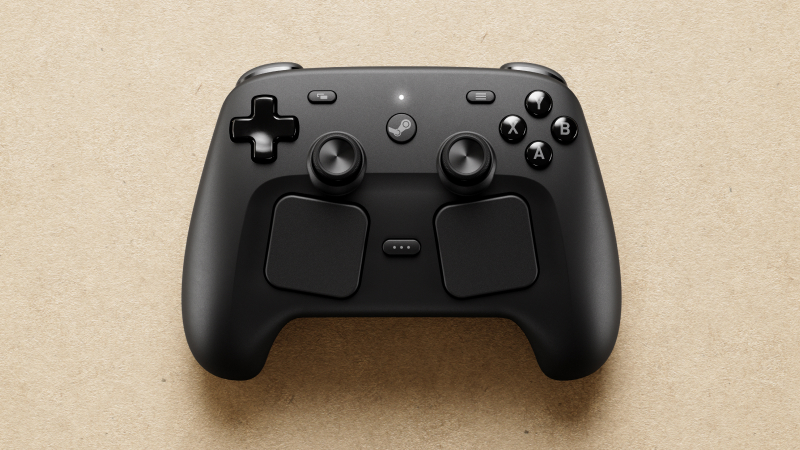
Valve has released a Steam Client update addressing critical issues with the recently launched Steam Controller, according to patch notes published Thursday. The update fixes trackpad registration problems, configuration saving failures, and compatibility issues when the controller is docked.
Key Takeaways
- Valve released a Steam Client update on 9 May fixing Steam Controller issues just five days after launch.
- The update resolves trackpad touch registration problems affecting wireless use of the left side.
- Configuration saving failures and docking compatibility issues have been addressed.
- New Grip Sensor settings are now available in Steam settings under Controller options.
- The quick turnaround demonstrates Valve’s responsiveness to user feedback.
What issues does the Steam Client update fix?
According to Valve, the update resolves three major problems affecting Steam Controller users. Configuration selections for the controller would sometimes fail to save properly, frustrating users trying to customise controls for different games. The company also fixed compatibility problems that appeared when the Steam Controller was docked to its charging puck, where some games had issues detecting the controller.
Most significantly, Valve addressed a bug affecting certain left trackpads where touches on the left side weren’t registering correctly during wireless use. Since the trackpads are one of the main features distinguishing the Steam Controller from traditional gamepads, this represented a critical functionality issue.
What new features are included?
The update adds new Grip Sensor settings accessible through Steam Settings under Controller > Details > Calibration & Advanced Settings > Grip Sensors. These settings give players more control over how the controller’s grip-based features behave during gameplay. The update also includes general Steam Client improvements, such as fixing cursor corruption during Windows streaming and adding battery notification controls.
Additional fixes address a firmware update dialogue that could reopen after successful completion and issues with streamable games appearing incorrectly in the library. A localisation bug in the Configuration browser screen has also been resolved.
Quick response to launch issues
The Steam Controller launched on 4 May, making this update particularly notable for its rapid deployment — just five days after release. This quick turnaround suggests Valve was monitoring user feedback closely and prioritising controller-specific fixes. The company had previously announced new hardware as part of a broader Steam ecosystem expansion.
For affected users, the fixes should restore full functionality to their controllers. The trackpad issue in particular was likely impacting gameplay significantly, as precise touch registration is essential for the controller’s intended functionality in games that rely on trackpad input for aiming or navigation.
Frequently Asked Questions
What issues does the new Steam Client update fix for the Steam Controller?
The update fixes configuration selections failing to save, compatibility problems when docked to the charging puck, and left trackpad touch registration issues during wireless use.
What new features are included in the Steam Client update for the Steam Controller?
The update adds new Grip Sensor settings accessible through Steam Settings under Controller > Details > Calibration & Advanced Settings > Grip Sensors.
How quickly did Valve fix Steam Controller issues?
Valve released the fix just five days after the Steam Controller launched on 4 May, demonstrating rapid response to user feedback.
Does the update fix other Steam Client issues?
Yes, it also fixes cursor corruption during Windows streaming, battery notification settings, and streamable game display issues.
How do I access the new Grip Sensor settings?
Navigate to Steam Settings > Controller > Details > Calibration & Advanced Settings > Grip Sensors to find the new grip sensor configuration options.