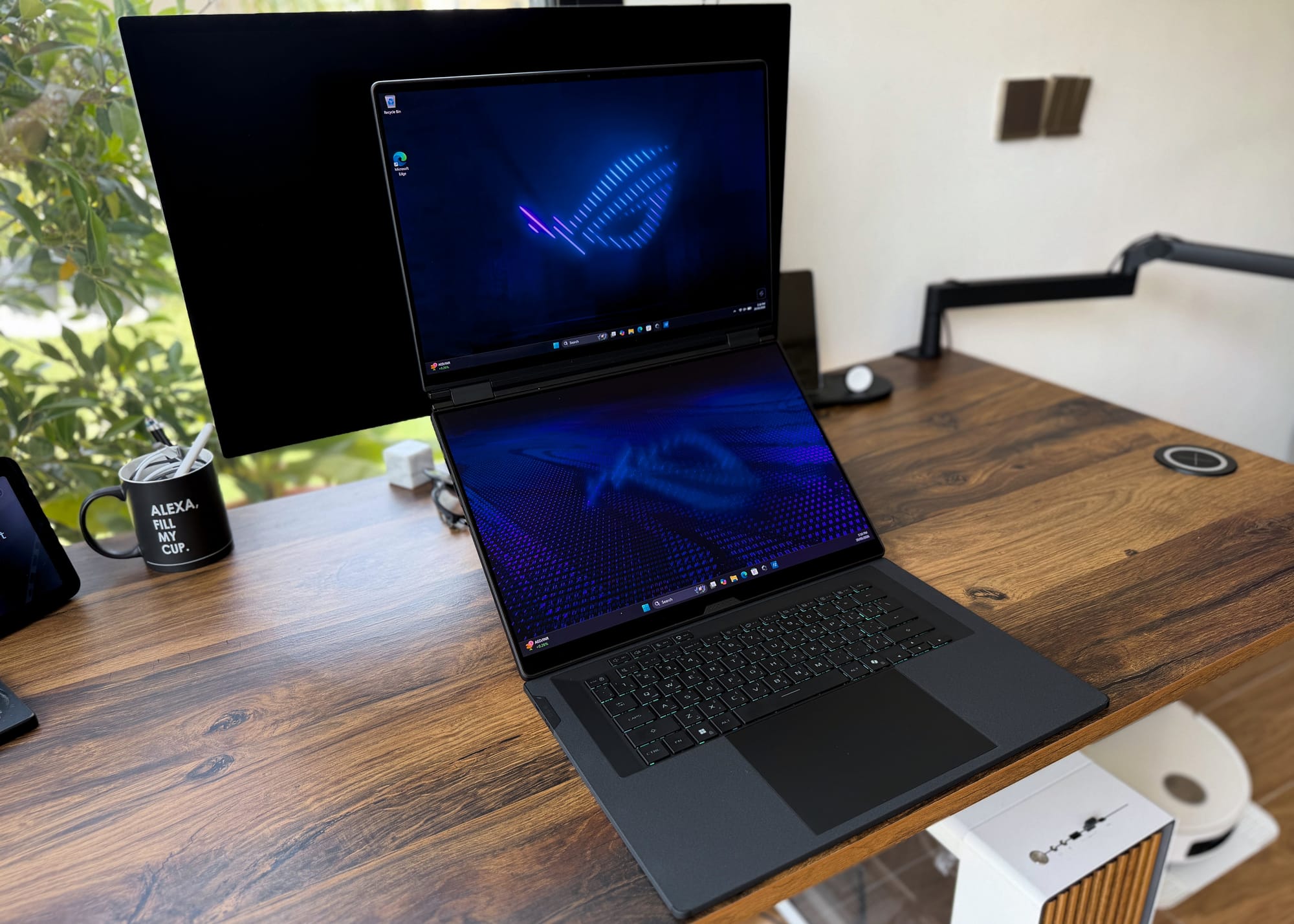
The Asus ROG Zephyrus Duo 2026 is a beautifully built dual-screen gaming laptop with two 16-inch 3K OLED panels, but its RTX 5090 Laptop GPU runs at an effective ~125W, so rival 5090 laptops costing around AED 8,000 less outperform it. At AED 33,999 it only makes sense if you specifically need a portable dual-screen setup and accept the performance trade-off.
We reviewed the ZenBook Duo earlier this month — Asus’s latest dual-screen laptop aimed at creators and professionals who want the flexibility of two monitors without carting a second display everywhere they go. It made a solid case — you can read our full review here. The Zephyrus Duo arrives with the same foundational premise — but this time tuned for gaming, with ROG branding, Intel’s latest Core Ultra processor, an RTX 5090, a sizable amount of RAM, and an eye-watering AED 33,999 price tag to match.
The entire package, including the performance, is expectedly top-tier (with some caveats), however that price changes everything. I would wager Asus doesn’t expect to sell a whole lot of these — it’s a niche product, not mass-market, and for what it offers and for those who can comfortably afford it, this is as complete a package as one can make.
Specifications
| Specification | Details |
|---|---|
| General | |
| Model | ASUS ROG Zephyrus Duo (2026) |
| Operating System | Windows 11 Home |
| Colour | Stellar Gray |
| Price (as reviewed) | AED 33,999 |
| Processor | |
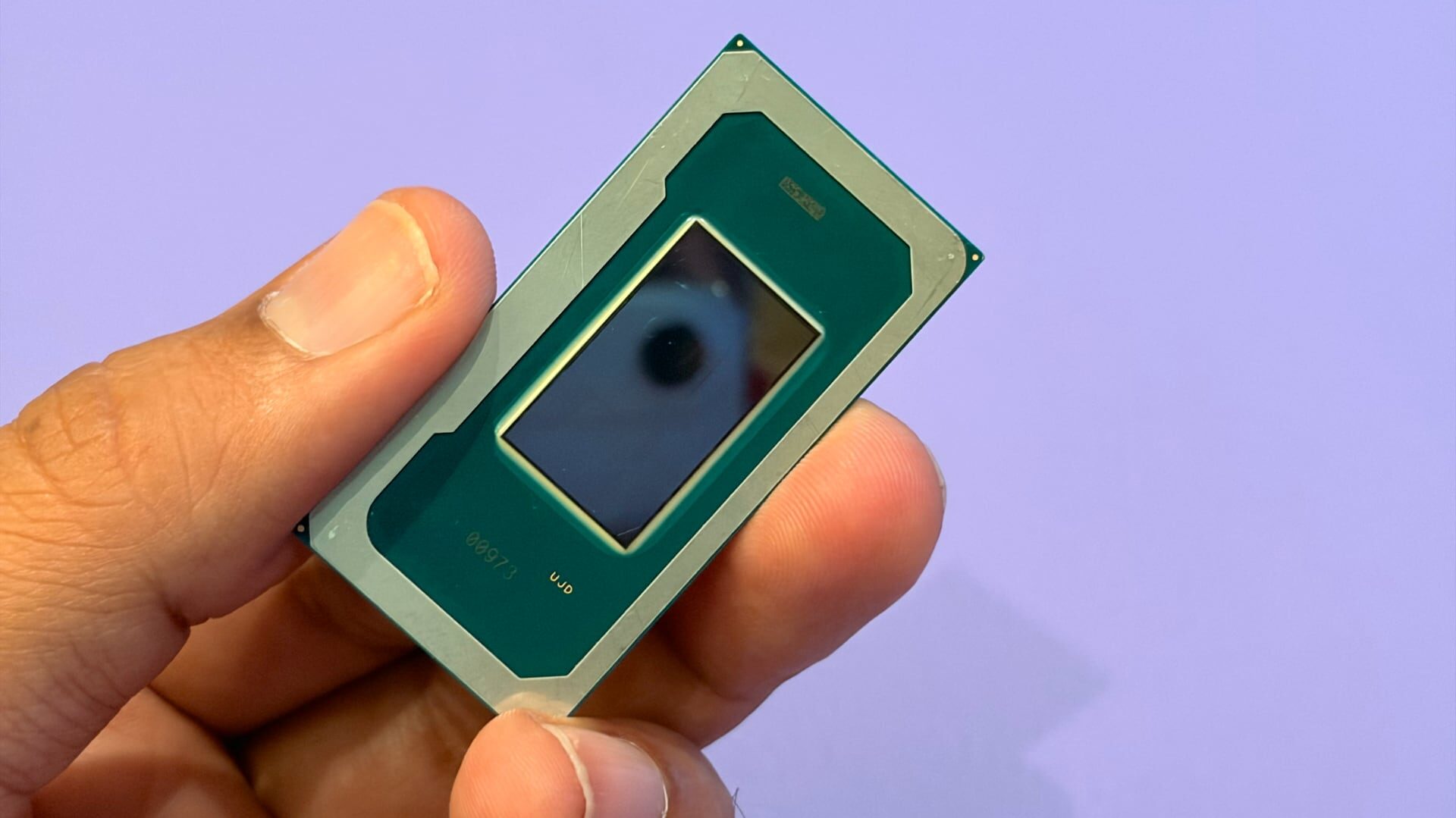
| CPU | Intel Core Ultra 9 386H (Panther Lake) |
| Cores / Threads | 16 Cores / 16 Threads |
| Boost Clock | Up to 4.9GHz |
| Graphics | |
| GPU | NVIDIA GeForce RTX 5090 Laptop GPU |
| GPU Architecture | NVIDIA Blackwell (GB203) |
| CUDA Cores | 10,496 |
| VRAM | 24GB GDDR7 |
| Memory Bus | 256-bit |
| Memory Bandwidth | 896 GB/s |
| Max GPU TGP | 150W (Dynamic Boost) |
| Memory | |
| RAM | 64GB LPDDR5X (on-board) |
| Storage | |
| Primary Storage | 2TB PCIe 5.0 NVMe SSD |
| Expansion | 1x additional M.2 slot |
| Display | |
| Panel Type | Dual 16-inch ROG Nebula HDR OLED |
| Resolution | 3K (2880 x 1800) per panel |
| Aspect Ratio | 16:10 |
| Refresh Rate | 120Hz |
| Response Time | 0.2ms |
| Peak Brightness | 1,100 nits (HDR) |
| Colour Coverage | 100% DCI-P3 |
| Colour Accuracy | Factory calibrated ΔE < 1 |
| HDR Standard | VESA DisplayHDR True Black 1000, Dolby Vision |
| Adaptive Sync | G-SYNC (upper panel only) |
| Touch | Yes (both panels) |
| Keyboard | |
| Type | Detachable wireless keyboard |
| Connectivity | Bluetooth / Magnetic pogo pin dock |
| Key Travel | 1.7mm |
| Thickness | 5.1mm |
| Backlighting | Single-zone RGB (Aura Sync) |
| Keyboard Charging | USB-C / Auto-charges when docked |
| Audio | |
| Speakers | 6 speakers (4x 2W woofers + 2x 2W tweeters) |
| Total Speaker Output | 12W |
| Audio Technology | Dolby Atmos |
| Audio Jack | 3.5mm combo (headphone/microphone) |
| Camera | |
| Webcam | 1080p with IR (Windows Hello) |
| Connectivity | |
| Wi-Fi | Wi-Fi 7 |
| Bluetooth | Bluetooth 6.0 |
| Ports | |
| USB-C | 2x Thunderbolt 4 (DisplayPort / Power Delivery) |
| USB-A | 2x USB-A 3.2 Gen 2 |
| HDMI | HDMI 2.1 |
| Card Reader | Full-size SD (UHS-II) |
| Power Input | DC barrel jack |
| Battery | |
| Battery Capacity | 90Wh |
| Adapter | 250W (50% charge in ~30 minutes) |
| USB-C Charging | Up to 100W Power Delivery |
| Cooling | |
| Cooling System | ROG Intelligent Cooling — custom vapor chamber (45% motherboard coverage), Graphite Nano-Insulated Film, dual heatsinks, three exhaust vents, dust filters |
| Exhaust Angle | 207° |
| Physical | |
| Dimensions | 355 x 246 x 19.9–24.9mm |
| Weight | 2.82kg |
| Chassis Material | CNC-milled aluminium |
Design and Features
The Zephyrus Duo’s chassis is CNC-milled aluminium throughout (and not Asus’ fancy new ceraluminium, which is a shame because I really like that material), finished in Stellar Gray. There is nothing visually aggressive about this machine. No bold colour accents, no dramatic angles carved into the lid, no branding competing for attention. It’s almost too boring and modest — I mean, something that costs this much needs to knock your socks off, or at least that’s what you would expect. This doesn’t, but I guess the dual-screen and performance do the heavy lifting here.

The only things that break the monotony are a glossy, mirror-like slash running across the lid and a subdued ROG logo at the bottom.

That restraint carries through to the keyboard deck as well. Where most gaming laptops treat the interior as an opportunity for sharp cuts and aggressive styling, the Zephyrus Duo keeps things clean and flat. The keycaps are slightly stylised (they do remind me of Razer Blades), but with the RGB lighting on, the overall look is tidy rather than overwrought.
The wrist rest is covered in a soft rubbery coating that feels good against the skin during longer sessions. There’s a catch, though: it reacts poorly to moisture. Water — whether from condensation off a cold glass or just sweaty palms on a warm day — leaves a visible stain. Worth being mindful of.
The aluminium finish, for its part, is a fingerprint magnet. It collects them without much effort on your part. If you like keeping your hardware clean, a microfibre cloth needs to be brought out and kept within arm’s reach.
At 2.8kg, the Zephyrus Duo is heavy — quite heavy. If you are planning to commute with this daily or carry it across a campus, your arms will file a formal complaint before the week is out. On a desk, where this machine clearly belongs, the weight is not an issue. It measures 35.5 x 24.6cm with a thickness that varies between roughly 2 and 2.5cm depending on the hinge position — sizable, but not unreasonable for a 16″ machine carrying two screens inside it. Cut it some slack — it’s not fat, just big boned.

The hinge is one of the better ones. It opens cleanly with a single finger, holds its position at any angle without play or wobble, and the mechanism feels deliberate rather than springy.

The kickstand that props the device up in dual-screen mode is equally solid. It holds its angle firmly under typing load, offers a good range of tilt adjustments, and doesn’t shift during use.

Port selection is genuinely good, though the layout has practical implications if you want to use all the available ports. The left side carries two USB-A 3.2 Gen 2 ports, a Thunderbolt 4 port, the DC power input, and the audio jack. The right side handles the second Thunderbolt 4 port, HDMI 2.1, and a full-size SD card reader.

For most desk setups — keyboard and mouse on the left — cables run cleanly out of the way. If you need to plug in additional peripherals like an external SSD or a USB hub on the right, the cable will run across your mousing area, which can be irritating during gaming sessions.
Display and Speakers
Both panels are 16″ OLEDs with a 3K (2880×1800) resolution, 120hz refresh rate, 0.2ms response time, and a peak brightness of 1100 nits in HDR. Both carry VESA DisplayHDR True Black 1000 certification, support Dolby Vision, and come factory calibrated to a delta of less than 1 with 100% DCI-P3 coverage. The spec sheet reads well, and the panels back it up. Colours are sharp and vibrant, blacks are properly deep, and there is nothing to complain about in terms of accuracy or image clarity across either display.

HDR content holds up as expected. Movies and games that support it look good — punchy highlights, solid shadow detail, nothing overblown or weird in the image. Overall, the panels do what OLED does well, and they do it consistently on both screens. They are great if you want a consistent experience for critical work, such as image editing.
G-SYNC is supported, but only on the upper panel. For modern single-player games where the RTX 5090 is working to maintain frames at native 3K resolution, that matters more than the refresh rate. However, for competitive multiplayer — CSGO, COD, Valorant, Fortnite — the 120Hz ceiling might fall a little short of expectation. As such, you will need to connect this to an external display to get higher refresh rates.

The panels are glossy, and in a brightly lit room with light sources behind you, the reflections are distracting enough to affect usability. Angling the machine away from those sources, or working in moderate lighting, takes care of it. It’s manageable, but worth thinking about if your usual setup has a window directly behind the screen.

The hinge gap between the two panels is also wider than the ZenBook Duo’s — enough that any content dragged across both displays will lose a chunk of itself in the gap. Trying to use these as one large combined screen doesn’t work. The right way to use this machine is to treat each display as its own independent monitor.

You can use the dual screens in five different ways: like a regular laptop with a single screen; two displays stacked on top of each with the help of the kickstand; a notebook-style with the two screens side-by-side; in Tent Mode with the main screen doing a complete 180-degrees; and completely flat, if you want to share a screen with someone — useful for presenting your work to clients or even playing supported games.

The orientation of the screens is managed by Windows, but Asus also includes an app called ScreenXpert that provides some core features. Start dragging any window, and a small overlay lets you snap it to the other display or split it across both. Brightness can be adjusted independently per screen or synced across both from the same panel. Switching display modes, toggling the second screen off to conserve battery, managing the keyboard’s Bluetooth battery level, screen recording shortcuts — all of it accessible without going anywhere near Windows settings.

Both displays are touch-enabled, which comes in handy given the below-average trackpad. You can quickly snap windows to the other screen or drag items together in one smooth motion. The unit doesn’t come with a pen or a stylus, so I am not sure if it’s supported, and I didn’t have the ZenBook Duo’s stylus with me at the time of writing to test it out either.
As for the speakers, there are six in total — four 2W woofers and two 2W tweeters — with Dolby Atmos support. The sound primarily comes from the bottom of the chassis, through the grilles near the kickstand area, with additional slits visible along the sides of the machine, though it’s not entirely clear from listening alone whether the side units are doing meaningful work. Asus claims a 122% increase in volume over the previous Zephyrus Duo, and the output here is loud enough for casual music or YouTube without headphones.
Beyond that, it gets more modest. There’s some bass — enough to give the sound a bit of body — but the low end doesn’t leave much of an impression, and the spatial imaging is fairly flat. Audio comes across as clear and present rather than particularly dimensional or rich. For background listening, watching a video, keeping something running while you game, these speakers do the job without issue.
Keyboard and Trackpad
The keyboard here is detachable and wireless — 5.1mm thin, with 1.7mm of key travel, connecting via Bluetooth and magnetic pogo pins when docked. It charges automatically when docked in Laptop Mode and has a USB-C port on the side for topping up during wireless use. A single-zone RGB backlight covers the full deck and syncs with other Aura-compatible peripherals through Armoury Crate.

For a keyboard this thin, it types better than expected. The key travel feels meaningful, with a poppy, satisfying sound profile and a clean snap and rebound that keeps typing from feeling flat or dead. Nothing mushy, no key wobble anywhere on the board, and quiet enough for shared spaces without the tactility suffering for it. The keycaps use Asus’s Excimer coating, giving them a smooth texture that holds up well to extended use.
The single-zone RGB is fine for most. It looks clean, it’s easy to set up, and the lack of per-key customisation is an expected trade-off given the form factor and connectivity. Anyone deep into RGB lighting setups may find it limiting, but I don’t really care for it and didn’t think too much about it.
No wireless input lag was detectable during gaming sessions, which matters on a keyboard that spends a fair amount of time detached. Asus doesn’t publish a specific battery figure for the keyboard unit, but I’d estimate around 7-8 hours before it needs a top-up. Somewhat low for a Bluetooth keyboard, but it should last you a full day.

The small arrow keys are a minor but persistent irritation — too cramped for anyone who leans on them regularly during gaming or document work. The more significant issue, though, is one that surfaced during extended typing: occasional missed key registrations when repeating the same character in quick succession. Typing a word like “additionally” or “successfully” quickly, one of the repeated letters occasionally doesn’t register, leaving a typo mid-sentence. It doesn’t happen constantly, but it happens often enough to catch.
The same problem appeared during the Asus ROG Falchion Ace 75 HE review, which raises questions about whether this is a pattern in recent Asus keyboard hardware rather than a one-off unit issue (or maybe I am just having terrible luck with Asus keyboards?). It doesn’t affect gaming, but it’s something to keep in mind.
The trackpad is the weakest part of this package. It’s physically large — the deck and wrist rest area are wide enough that your palms never naturally drift near it, so palm rejection is a non-issue in practice — but responsiveness is a consistent problem. Casual browsing is manageable. Anything more demanding than that, and it becomes slow, imprecise, and frustrating to use accurately. There’s no haptic feedback either; it only registers a click reliably in the bottom two-thirds of the surface. Gestures work fine, which is one mark in its favour.
Benchmarks and Performance
On paper, the Zephyrus Duo is one of the most powerful laptops money can buy: Intel Core Ultra 9 386H, 64GB of LPDDR5X RAM, 2TB of NVMe storage, and an NVIDIA GeForce RTX 5090 Laptop GPU. However, the last component requires more context, and that context significantly changes this machine’s value proposition.
| Benchmark | Score |
|---|---|
| Geekbench 6 CPU — Single Core | 2,883 |
| Geekbench 6 CPU — Multi Core | 17,029 |
| Geekbench GPU | 213,206 |
| Geekbench AI | 8,378 |
Starting with the CPU. The Core Ultra 9 386H is a Panther Lake chip with 16 cores and 16 threads, boosting up to 4.9 GHz. In Geekbench 6, it scored 2883 in single-core and 17,029 in multi-core. Those are solid numbers — comfortably ahead of previous-gen Intel laptop chips — though it’s worth noting this processor is not the HX-series variant found in direct competitors like the Asus ROG Strix Scar 18 or the MSI Titan 18 HX AI, both of which use the more powerful Core Ultra 9 275HX. The Geekbench GPU score came in at 213,206, with a Geekbench AI result of 8,378 — reasonable performance for AI-accelerated workloads. Day-to-day performance was smooth, with very little throttling when the laptop was running off battery.
The RTX 5090 Situation
The GPU situation warrants a proper explanation before the benchmark numbers make sense. The desktop RTX 5090 and the RTX 5090 Laptop GPU share a name and almost nothing else. The desktop version runs on the GB202 chip with 21,760 CUDA cores, 680 Tensor Cores, 170 RT cores, 32GB of GDDR7 across a 512-bit memory bus delivering 1,792 GB/s of bandwidth, and a 575W TDP. The laptop GPU runs on the GB203 chip — the same die used in the desktop RTX 5080. It has 10,496 CUDA cores, 328 Tensor Cores, 82 RT cores, and 24GB of GDDR7 memory across a 256-bit bus, delivering 896 GB/s of bandwidth.
That’s roughly half of almost everything, putting it more in line with the RTX 5080. However, the laptop GPU is further limited by the amount of power it can draw — of course, desktop cards have more space and capacity to fire away without throttling, but laptops need to be capped at a certain point for safety reasons among other things. The problem with the Zephyrus Duo is that the RTX 5090 on it is running at an effective ~125W in combined loads — below the 150W it is rated for, and well short of the 175W that rival 5090 laptops run at.
All benchmarks below were run at Turbo fan profile with Ultimate GPU performance mode enabled, where the GPU operates at a maximum effective TGP of approx. 125W in combined gaming loads — significantly below the 175W that other RTX 5090 laptops like the Scar 18, MSI Titan 18 HX AI, Gigabyte Aorus Master 16, and Acer Predator Helios 18 AI run at, all of which are priced at AED 25,999 to AED 26,999 — roughly AED 8,000 less than the Zephyrus Duo.
| Benchmark | Score |
|---|---|
| 3DMark | |
| Speed Way | 5,643 |
| Port Royal | 13,801 |
| Time Spy Extreme | 9,701 |
| Fire Strike Extreme | 24,262 |
| DirectX Raytracing Feature Test | 71.73 fps |
| Forza Horizon 6 | |
| Extreme — NVIDIA DLAA | 71 fps |
| Extreme + RT | 40 fps |
| Extreme + RT + DLSS Balanced + MFG 2x | 114 fps |
| Ultra + RT | 56 fps |
| Marvel Rivals | |
| Ultra — DLSS Native | 53 fps |
| Ultra + DLSS Balanced | 84 fps |
| Ultra + DLSS Balanced + MFG 2x | 74 fps |
| Cyberpunk 2077 | |
| Ultra — Native | 61 fps |
| Ultra + DLSS Balanced | 82 fps |
| Ultra RT + Native | 29 fps |
| Ultra RT + DLSS Balanced | 54 fps |
| Ultra RT + DLSS Performance + MFG 2x | 108 fps |
| Path Tracing — Native | 17 fps |
| Path Tracing + DLSS Performance + MFG 2x | 88 fps |
Let’s start with Zephyrus Duo’s own benchmarks (tested at the native resolution of 2880×1800). Forza Horizon 6 at Extreme settings with DLAA delivered 71 fps, dropping to 40 fps once ray tracing entered the picture, and climbing to 114 fps with RT enabled alongside DLSS Balanced and 2x MFG.
In Cyberpunk 2077, 61fps at Ultra Native is serviceable for most single-player use, but RT Ultra Native at 29fps and Path Tracing at 17fps at native make clear that this GPU, at its effective power budget, cannot brute-force those workloads. Enabling DLSS Balanced pushes Cyberpunk’s Ultra numbers to 82 fps and RT Ultra to 54 fps — playable, but only with AI assistance. With DLSS Performance and MFG 2x stacked, Path Tracing becomes usable at 88fps, which is impressive in its own right, though it’s worth being clear about what those frame numbers actually represent.
Marvel Rivals at Ultra with DLSS Native came in at 53 fps, rising to 84 fps with DLSS Balanced, and 74 fps with DLSS Balanced + MFG 2x. For a more direct comparison, here is the Scar 18 running the same GPU at 175W TGP (tested at 2560×1600 vs the Duo’s 2880×1800, though 3DMark scores are resolution-independent):
| Benchmark | ASUS ROG Zephyrus Duo 2026 | ASUS ROG Strix SCAR 18 (G835LX) |
|---|---|---|
| 3DMark | ||
| Speed Way | 5,643 | 6,392 |
| Port Royal | 13,801 | 15,680 |
| Time Spy Extreme | 9,701 | 12,036 |
| DirectX Raytracing Feature Test | 71.73 fps | 81.50 fps |
| Cyberpunk 2077 | ||
| Ultra — Native | 61 fps | 95 fps |
| Ultra RT — Native | 29 fps | 44.58 fps |
| Ultra RT + DLSS Performance + MFG 2x | 108 fps | 154 fps |
| Path Tracing — Native | 17 fps | 23 fps |
| Path Tracing + DLSS Performance + MFG 2x | 88 fps | 117 fps |
The synthetic benchmark gap is already telling, but the gaming numbers are more severe. A 34fps deficit in Cyberpunk 2077 at native Ultra settings is not something we expected to be writing about a flagship laptop in 2026. The resolution difference between the two tests would account for some of the gap in the gaming results, but even after adjusting for that, the underlying performance difference due to the power constraint remains substantial.
The honest takeaway from all of this is that users of this laptop will need to rely heavily on DLSS and MFG for demanding modern titles at native resolution. Current-gen games at the panel’s native 2880×1800 resolution are broadly manageable, and the GPU is more than capable of light workloads. But in next-gen titles where rasterisation alone already strains the hardware, and at 4K, where power constraints bite even harder, this GPU will have to work significantly harder.
Battery Life and Heat
The Zephyrus Duo ships with a 90Wh battery and a 250W adapter that charges it to 50% in around 30 minutes. If you would rather leave the large adapter at home, USB-C PD up to 100W is supported — slower, but workable for lighter use.
For a machine with dual 16″ OLED displays and an RTX 5090 rumbling inside, the battery life is better than expected. Running on the silent fan profile with the Optimised GPU Performance mode, general use — browsing, documents, video calls, and a mix of single- and dual-screen use — pulls between 6 and 8 hours. That drops once the CPU and GPU are put to work, as you would expect, but for a day of office or travel use, this machine can comfortably last the distance without needing the adapter. Turning off the keyboard’s RGB, dropping the panel refresh rate to 60Hz, and keeping to Laptop Mode with only the primary screen active are the most effective ways to stretch that further.

As for the cooling, the Zephyrus Duo uses a custom vapor chamber that covers 45% of the motherboard surface, moving heat away from the CPU and GPU rapidly. A Graphite Nano-Insulated Film sits between the motherboard and the lower OLED panel, acting as a thermal barrier to stop heat from bleeding directly into the display.
Air is drawn in through dust-filtered intakes, passes through a pair of heatsinks, and exits through three exhaust vents across a wide 207-degree angle — designed to keep heat away from surface-mounted components on the board rather than concentrating the exhaust in one direction.
In real life, the heat does seep through the keyboard deck, warming it enough to make your palms noticeably sweaty during gaming sessions. It stops short of being hot enough to force you to take your hands off, but the persistent warmth becomes uncomfortable over time. The machine also runs warm even under lighter loads—browsing, light productivity work—so the sweaty-palm issue isn’t exclusive to gaming.
The fans are audible too, but they are not the loudest ones I have heard from a gaming laptop. However, they will compete with the laptop’s own speakers during heavier sessions. For headphone users, it’s less of a concern, unless you are rocking open-backs.
The Verdict
AED 33,999 is the number this review keeps coming back to, and the Zephyrus Duo never quite escapes it.
It’s a good laptop, no doubt. The concept works — the dual-screen setup is not just a novelty. Having two full 16″ OLED panels in a single chassis changes how you use a laptop in ways that become harder to give up once you have settled into the workflow. The build quality is solid throughout, ScreenXpert manages the dual-screen experience cleanly, and the battery life in general use from a machine this powerful is pretty alright.

The performance, though, is where things get a little rocky. The RTX 5090 Laptop GPU running at an effective 125W TGP means you are paying the highest price in the category for GPU performance that cheaper machines with the same chip deliver more completely. The Asus ROG Strix Scar 18 and MSI Titan 18 HX AI — both running the same GPU at 175W — cost around AED 8,000 less and outperform this machine by significant margins. A desktop build with a proper RTX 5090, two monitors, and faster performance would cost less than AED 33,999, with money left over.
DLSS and MFG soften the blow in supported titles, and for current-gen gaming at native 2880×1800, the experience is broadly fine. But leaning on AI-generated frames to make a flagship GPU’s performance acceptable is not what anyone spending this much should be settling for.
The Zephyrus Duo makes sense for a narrow audience — someone who specifically needs a portable dual-screen gaming setup, travels frequently enough that a desktop isn’t viable, and goes in fully aware of what the wattage cap means for raw performance. For everyone else, the compromises are too significant and the alternatives too obvious.
Buy it if: you specifically need a portable dual-screen gaming setup, you travel too often for a desktop to be practical, and you go in fully aware of what the wattage cap means for raw performance.
Don’t buy it if: you want the most gaming performance for your money — rival RTX 5090 laptops run the same GPU faster for around AED 8,000 less, and a desktop build with two monitors would cost less still.