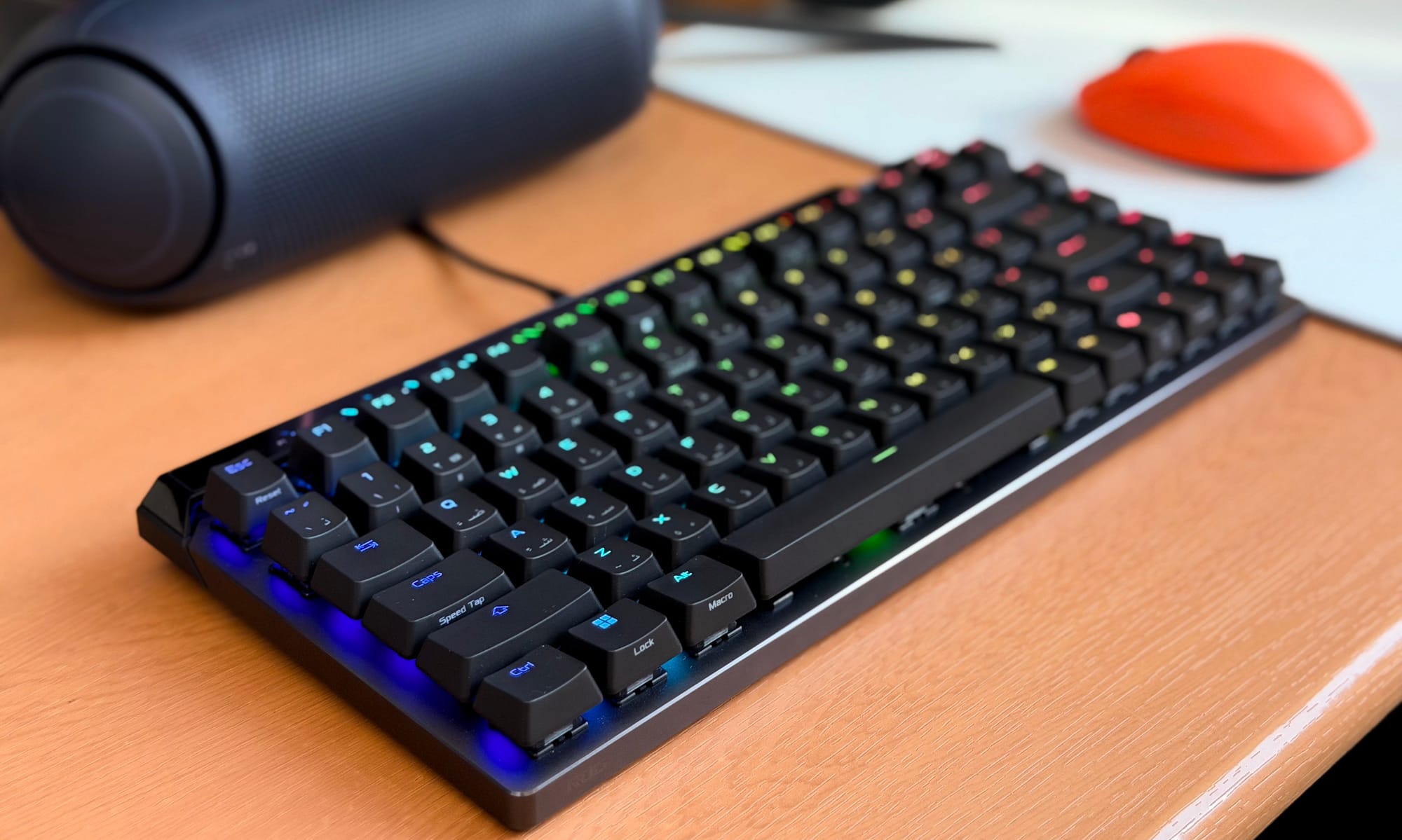
Quick Answer: The ASUS ROG Falchion Ace 75 HE (AED 765/USD 200) is a brilliantly built 75% Hall Effect gaming keyboard with fantastic sound and clever onboard controls. A typing bug that drops rapid repeated keystrokes holds it back from a full recommendation.
The Falchion Ace 75 HE is Asus ROG’s latest Hall Effect keyboard, and it sits in an interesting spot in their lineup. It’s a step up in layout from the 65% Falchion Ace HFX, and a more conventional, single-piece alternative to the split-layout Falcata – same core technology, without the gimmick of being sliced in half.
The 75% form factor is the sweet spot for a lot of people: you keep the dedicated F-row and arrow cluster without the footprint of a full-sized board, and Asus has loaded this one with the full competitive feature set – ROG HFX V2 magnetic Hall Effect switches, 8000Hz polling, rapid trigger, per-key adjustable actuation, a touch panel, and six layers of sound dampening.
At AED 765 (US$200), it goes up against some strong competition, such as the wireless Keychron K2 HE, which offers similar Hall-Effect fundamentals at a lower price with the added freedom of no cable, while custom-feel boards in this range offer a more refined typing experience. Asus is betting that the combination of build quality, onboard controls, and their latest switch generation makes the premium worth it, and, spoiler alert, I think they do.
ASUS ROG Falchion Ace 75 HE Design and Build Quality
The Falchion Ace 75 HE is a good-looking keyboard. The black version we received has a clean, purposeful appearance – sharp lines, a solid aluminium top plate, and decked to the gills with RGB, but it’s all very tastefully done in my books. It feels sturdy in the hands and quite light, and that’s partly down to the construction: aluminium on top, plastic on the bottom. For AED 765, a full aluminium chassis would have been ideal, and the plastic underside is a minor disappointment given the price.
But there is also the fact that since this is a keyboard aimed at competitive gamers, Asus might have assumed that you would want to carry it around for tournaments (hence why it comes in a nice hard shell case), and you certainly wouldn’t want to carry around a 2-3kg keyboard. At the very least, it doesn’t feel flimsy, and the keyboard doesn’t budge on the desk – the rubber feet do their job well.

What does impress is how thoughtfully Asus has used the space above the F-row. Running along the top edge is a thin LED light bar that does double duty. On one level, it adds to the RGB spread of the keycaps. On another, more useful level, it serves as a real-time visual indicator of your actuation and rapid-trigger sensitivity. As you turn the scroll wheel on the right edge of the board to adjust either setting, the lightbar fills up or empties to show you exactly where you have landed. The adjustments happen in 0.10mm increments, and every 0.50mm mark comes with a subtle notch on the lightbar, so you always know you have 0.5, 1.0, 1.5mm and so on. It’s a small thing that makes a real difference, especially for people who like dialling in settings mid-session without touching the software.

The rapid trigger toggle is equally well considered. It’s a physical flip switch on the side of the board, and it does exactly what it sounds like – it flicks the rapid trigger on or off in an instant. No key combinations, no opening an app, no disrupting whatever you are in the middle of doing. It removes a lot of the friction of owning such a keyboard.

The touch panel that runs across the top of the board handles media and system controls, and it works well for what it is. By default, it handles volume – swipe left or right to adjust, which is responsive and doesn’t miss. A button next to the panel lets you cycle it through other modes: media scrubbing and play/pause, keyboard brightness, and a customizable mode where you can assign keyboard or mouse functions to the left swipe, right swipe, and double tap.
It covers the basics confidently, and in day-to-day use, it’s genuinely more convenient – or at the very least a somewhat different experience – than a standard boring old scroll wheel setup. The one area where it falls short is in what you can actually assign to it – you are limited to keyboard and mouse inputs, and there’s no option to launch apps or trigger system actions beyond that. I hope this can be added in via a software update, but I don’t think Asus is particularly interested in doing so.

Another thing worth flagging is the lack of a wrist rest in the box. For AED 765, a magnetic wrist rest would have been a welcome inclusion and wouldn’t be unreasonable to expect at this price. It’s not a dealbreaker, but it’s a noticeable omission.
HFX V2 Switches, Keycaps, and Sound Profile
The doubleshot PBT keycaps feel smooth under the fingers but never slippery – there is a subtle grippy texture to them that helps avoid slippage of any kind. There’s no flex or wobble either, which you would hope for at this price but don’t always get.

The legends are clean and legible, and the Arabic localisation is a thoughtful inclusion – letters and numbers get both scripts, while the F-row and function keys like Enter, Spacebar, and Capslock are English-only/icons, which makes sense given there’s nothing to translate there. The RGB shines through the English legends well, but the Arabic characters are notably smaller, so less light passes through them. That’s unlikely to be a problem for most people, but if you rely on the Arabic legends and work in low light, it’s worth keeping in mind.

The Fn layer covers the usual ground and then some. Volume sits on F9 through F11, media controls – play/pause, stop, rewind, forward – are mapped to F5 through F8, and the arrow keys handle backlight mode and brightness. The number keys 1 through 15 correspond to the five onboard profiles you can create, with 6 reverting to the default. Alt triggers Macros, and F12 is something like a Boss Mode that instantly minimises all open windows (works on Windows only).

The HFX V2 switches are the headline act, and they deliver. Specs-wise, you are looking at a 32 gf actuation force, 49 gf total force, and 3.5mm of total travel, with a POM stem that comes pre-lubed from the factory. In practise, they feel like a very well-executed linear – smooth throughout the travel, quick rebound, and with just enough character that they don’t feel flat or lifeless the way some magnetic switches can. The actuation is light enough that 1mm works well for gaming without triggering accidental keypresses, while bumping it up to around 2 to 2.5mm gives you a more grounded feel for longer typing sessions. There’s no wobble to speak of, and the smoothness is consistent across every key.

The stabilisers deserve a specific mention because this is where mainstream gaming keyboards have historically let themselves down. Not here – Asus has done well. The spacebar, enter, and backspace are all rattle-free and smooth straight out of the box – properly lubed, no ticking, no wire ping. It’s the kind of thing that should be standard but often isn’t, and it’s good to see ROG paying attention to it.
The sound profile is genuinely one of the more enjoyable things about this keyboard. It lands somewhere between thocky and thumpy – there’s a deep, satisfying thud to each keystroke with a clacky edge that keeps it from feeling too muted.
Typing long documents on it is a pleasure. A lot of that comes down to the six-layer damping setup Asus has put together inside the case: silicone strips at the base, PORON foam damping layers, and silicone pads stacked between the PCB and the switch plate. The result is that there’s no case ping, no hollow resonance, and no thin metallic sound that plagues many aluminium gaming keyboards. For a board designed primarily around competitive gaming, the sound profile is better than expected, and it’s comfortably one of the best you will find from a mainstream brand.
Gear Link Software: A Welcome Replacement for Armoury Crate
Asus has ditched Armoury Crate for the Falchion Ace 75 HE in favour of Gear Link, a browser-based configuration tool, and as someone who has had a long and unpleasant relationship with Armoury Crate, this is a very welcome change. Gear Link connects to the keyboard reliably every time, loads in a second or two – which is just how web apps work – and once it’s up, it’s snappy and responsive throughout. Everything is laid out clearly, and there’s no hunting around for settings that should be obvious.


The options available are comprehensive. Key assignment covers Dynamic Keystroke, Mod Tap, Toggle Trigger, keyboard and mouse functions, Macros, Multimedia shortcuts, and Quick Access, and the Fn combo layer can be fully remapped as well. The Analog Trigger section lets you set a global actuation point anywhere between 0.1mm and 3.5mm, with adjustable top and bottom dead zones, and you can go further and set individual actuation points per key if you want to fine-tune your WASD separately from the rest of the board.
Rapid Trigger sits in its own section with a sensitivity slider and the option to set independent press and release sensitivity values. SpeedTap handles SOCD key bindings – you can set up to five key binding combinations per key.
Lighting has 10 effects to choose from, including Reactive, Raindrop, Starry Night, Rainbow, and more, all with adjustable speed, brightness, and direction. There’s also a per-key switch calibration tool that walks you through a three-step process, and the Performance tab is simply a polling rate slider that goes all the way up to 8000Hz. Firmware updates are handled through the app as well, and they go through without any fuss.
It’s not the most visually polished experience – a native desktop app would look sharper and feel more considered – but Gear Link does the job well, and that’s what matters.
Gaming Performance and the Typing Bug Problem
For gaming, the Falchion Ace 75 HE was tested on Marvel Rivals and Battlefield 6, with actuation set to 1mm and Rapid Trigger and Speed Tap enabled. At those settings, the keyboard feels fast and immediate, with inputs registering exactly when and how you would expect. Rapid Trigger makes a real difference in games where precise movement and positioning matter – subtle strafing adjustments and quick direction changes feel more responsive with it on than off, and you can feel why competitive players gravitate toward this feature.
To get the most out of it, you would really need to be playing at a level where those fractions of a second are being actively exploited, but it works exactly as advertised regardless of skill level. Speed Tap is similarly useful – being able to make micro-adjustments while strafing without fully lifting your finger off the key is a practical advantage, not just a spec sheet talking point. No latency issues of any kind were encountered across either title.

There is, however, one problem that needs to be addressed directly, and it’s a significant one. When typing quickly and pressing the same key in rapid succession – doubled letters like two L’s in “well”, the two E’s in “feel”, or even quickly double-tapping the spacebar or backspace – the keyboard drops the second input roughly 60% of the time. It consistently produces “wel” instead of “well”, misses repeated letters mid-word, and skips keystrokes that were clearly pressed.
This persists across every actuation point tested, with Rapid Trigger on and off, a full per-key calibration followed by a factory reset, and different USB-C cables and ports, and nothing resolved it. In gaming, this hasn’t caused any noticeable issues, but for anyone who types on this keyboard daily – documents, emails, chat – it means constantly going back to correct missed letters. Whether this is isolated to the review unit or something more widespread is difficult to say, but it’s a problem that’s hard to overlook on a keyboard at this price.
Should You Buy the Asus ROG Falchion Ace 75 HE?
The Falchion Ace 75 HE is, in almost every respect, a keyboard that earns its price. The build is solid, the sound profile is fantastic, the HFX V2 switches are smooth and well-characterised, and the stabilisers are tuned properly straight out of the box – something that still can’t be taken for granted at this price.
The onboard control system is where Asus has put the most thought in, and it shows: the lightbar doubling as an actuation indicator, the RT flip switch, the touch panel – none of it feels like features added for the sake of a spec sheet. Gear Link completes the picture as a clean, functional replacement for the damned Armoury Crate that gets out of your way so you can get on with it.
The AED 765 price is steep, and there are capable Hall Effect keyboards available for less. But the premium here is for the feature set and how well it’s been put together – if those onboard conveniences matter to you, the price is defensible. If they don’t, cheaper options will cover the core performance just as well.
What holds the Falchion Ace 75 HE back from a stronger recommendation is the typing bug. Rapid double inputs – doubled letters, quick backspace presses, repeated spacebar taps – drop the second keystroke with enough regularity to be genuinely disruptive. It persisted through calibration and a factory reset, across every actuation setting tested. It may well be an isolated unit issue, and Asus may address it through a firmware update, but on the review unit, it’s a real and consistent problem that’s difficult to set aside on a keyboard at this price.
ASUS ROG Falchion Ace 75 HE FAQ
Is the ASUS ROG Falchion Ace 75 HE worth AED 765 in the UAE? For competitive gamers who value the onboard controls, the lightbar actuation indicator, and the physical Rapid Trigger flip switch, the AED 765 price is defensible. If you only want the core Hall Effect performance, cheaper boards like the Keychron K2 HE deliver that for less.
Does the ASUS ROG Falchion Ace 75 HE have a typing issue? On our review unit, yes. The keyboard drops the second of any rapidly repeated keystroke roughly 60% of the time — doubled letters in words like “well” or “feel”, quick backspace presses, repeated spacebar taps. The issue persisted across all actuation settings, calibrations, factory resets, and USB-C cables. Whether this is unit-specific or widespread is unclear.
Is the ASUS ROG Falchion Ace 75 HE wireless? No, it’s a wired-only keyboard with USB-C connectivity and 8000Hz polling. If wireless is a priority, the Keychron K2 HE is a closer match.
What’s the difference between the Falchion Ace 75 HE and the Falchion Ace HFX? The 75 HE is a 75% layout with a dedicated F-row and arrow cluster, ROG HFX V2 switches, an LED lightbar, touch panel, and physical Rapid Trigger toggle. The Falchion Ace HFX is a more compact 65% layout without the F-row.
Does the ASUS ROG Falchion Ace 75 HE support Arabic keycaps? Yes — the keycaps include Arabic localisation on letters and numbers, with English and Arabic legends both lit by RGB. Arabic characters are smaller than English, so they reflect less light in low-light conditions.