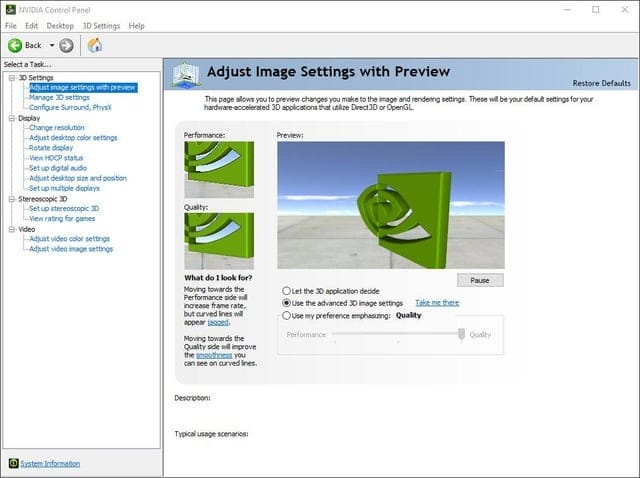
Nvidia has officially retired its GeForce Control Panel after 20 years, as reported by The Verge. All major features from the legacy application have been successfully ported to the unified Nvidia App, marking the end of an era for PC gamers who relied on the familiar interface for graphics settings and driver management.
Key Takeaways
- Nvidia officially retired the GeForce Control Panel after 20 years of service.
- All Control Panel features have been migrated to the unified Nvidia App.
- The Nvidia App combines GeForce Experience and Control Panel functionality.
- Users can still access display settings, 3D settings, and driver management through the new app.
- The transition affects all Nvidia GPU users globally, including those in the UAE.
What features moved to the Nvidia App?
According to Nvidia, all core functionalities from the GeForce Control Panel have been integrated into the Nvidia App. This includes display settings, 3D settings, driver updates, and system information previously accessible through the standalone Control Panel. The unified app also incorporates features from GeForce Experience, such as game optimization, driver downloads, and gameplay recording tools.
The Nvidia App features a modern interface designed to streamline the user experience. Instead of managing two separate applications, users now have a single hub for all graphics-related settings and updates. This consolidation eliminates the need to switch between different interfaces when configuring display settings or updating drivers for modern Nvidia graphics cards.
Why is Nvidia retiring the Control Panel?
Nvidia’s decision to retire the Control Panel stems from its goal to provide a more unified and modern user experience. The 20-year-old interface had become outdated compared to contemporary software design standards. By consolidating functionality into the Nvidia App, the company can deliver faster updates and maintain a single codebase instead of supporting multiple legacy applications.
The retirement also aligns with Nvidia’s broader strategy to modernise its software ecosystem. The unified approach reduces complexity for users and allows Nvidia to focus development resources on a single, feature-rich application rather than maintaining separate legacy tools.
What this means for gamers
For PC gamers, this transition primarily involves adapting to a new interface for familiar functions. The Nvidia App provides the same core capabilities as the Control Panel, including adjusting graphics settings, managing multiple displays, and configuring 3D settings for optimal gaming performance. Users who relied on specific Control Panel features for game optimisation will find equivalent functionality in the new app.
The change affects all Nvidia GPU users globally, including gamers in the UAE who use GeForce graphics cards for gaming and content creation. While the interface has changed, the underlying functionality remains intact, ensuring that users can still fine-tune their graphics settings and manage drivers effectively.
Legacy of the GeForce Control Panel
The GeForce Control Panel served as Nvidia’s primary graphics management interface for two decades, becoming an essential tool for enthusiasts and casual users alike. Launched alongside early GeForce drivers, it provided granular control over graphics settings, display configurations, and 3D rendering options that helped define the PC gaming experience.
Throughout its lifespan, the Control Panel evolved to support new technologies like G-Sync, multiple monitor setups, and advanced anti-aliasing options. Its retirement marks the end of one of the longest-running graphics management interfaces in PC history, replaced by a more modern solution designed for today’s gaming landscape.
Frequently Asked Questions
What is replacing the Nvidia Control Panel?
The Nvidia App is replacing the GeForce Control Panel, consolidating its features along with those from GeForce Experience into a single, modern application with an updated interface.
What features moved to the Nvidia App?
All major features including display settings, 3D settings, driver management, and game optimization have been ported to the Nvidia App, ensuring no functionality loss for users.
Why is Nvidia retiring the Control Panel?
Nvidia is retiring the 20-year-old Control Panel to provide a more modern, unified experience through the Nvidia App, eliminating the need for multiple graphics management applications.
Can I still access my graphics settings?
Yes, all graphics settings previously available in the Control Panel are now accessible through the Nvidia App, including display configuration, 3D settings, and driver updates.
Does this affect Nvidia GPU users in the UAE?
Yes, the transition affects all Nvidia GPU users globally, including those in the UAE, who will need to use the Nvidia App for graphics management and driver updates.