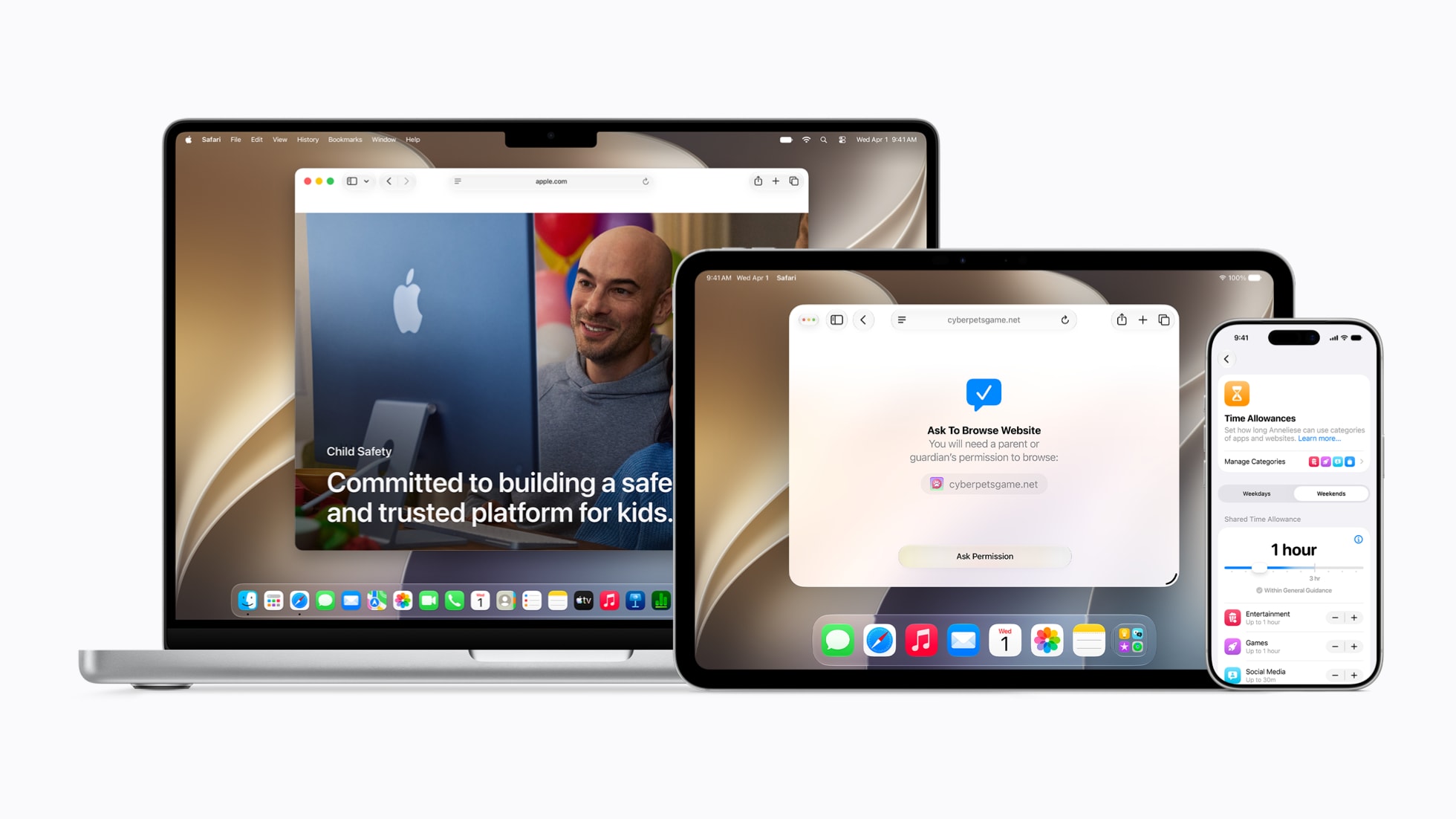
Apple’s iOS 27, iPadOS 27 and macOS 27 add new parental controls that let parents approve websites and contacts, set app-category time allowances and schedule access across the family’s devices.

What iOS 27 parental controls add
The changes sit behind Apple’s Child Account system, which is required for children under 13 and available for children up to 18, although the minimum age for creating an account can vary by country or region. Parents can begin with essential apps, a recommended set or a hand-picked selection, then add more over time through Ask to Buy.
Apple’s new Ask to Browse feature extends that approval model to Safari. A child can request access to a blocked website, with the parent approving or rejecting the request in Messages. Parents can also require approval before a child connects with a new contact through Phone, FaceTime or Messages.
The update applies to iPhone, iPad and Mac, so the same iOS 27 parental controls can follow a child between devices. Apple says the controls become available after installing the Screen Time update in iOS 27, iPadOS 27 and macOS 27.
Screen Time gets categories and schedules
Time Allowances let parents set shared or individual daily limits across categories such as Entertainment, Games and Social Media. Parents can create their own categories, move apps between them and assign an allowance when approving a new app. Websites associated with an app can follow the same allowance.

Daily Schedules control which apps are available at different times and on different days. A child might have one set of apps before school, another during school hours and a wider selection after school. Parents can also pause access, switch schedules or grant extra time without removing the wider restrictions.
Apple has redesigned Screen Time to show weekly usage summaries and the most-used apps at a glance. Communication Safety is also expanding to warn about or block detected gore and violent content in shared images and videos, alongside its existing nudity protections.
The new controls are available in Apple’s September 2026 software updates. Apple’s official announcement outlines the feature set, while 9to5Mac’s breakdown covers the changes in the released updates. For more on the wider rollout, see our guides to iOS 27’s release and supported iPhones and installing the iOS 27 beta in the UAE.
What is Ask to Browse in iOS 27?
Ask to Browse lets a child request permission to access a blocked website in Safari. The parent can approve or reject the request in Messages.
What are Time Allowances?
Time Allowances let parents set daily usage limits for categories such as Entertainment, Games and Social Media, with shared or individual limits.
Which devices support the new parental controls?
Apple says the features are available across iPhone, iPad and Mac after installing the Screen Time updates in iOS 27, iPadOS 27 and macOS 27.