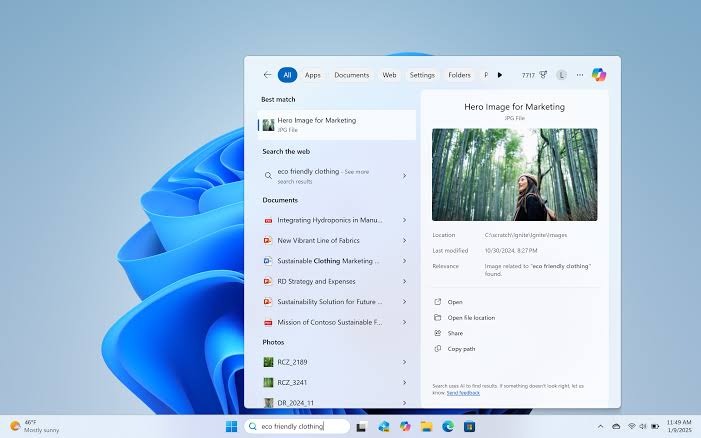
Microsoft is rebuilding Windows 11 Search to put your own files, apps and settings first, rather than treating the taskbar box as a shortcut to Bing. The change addresses one of the most persistent complaints about the operating system: type the name of a document you know is sitting on your drive, and Windows would too often surface web results before it surfaced the thing you actually wanted.
Why was Windows 11 search so bad?
The core problem was that Windows 11 Search prioritised web suggestions over local content, even when a strong local match existed. Microsoft has now changed the ranking logic so that files and installed apps are more likely to appear ahead of Bing-powered suggestions. In the Insider Preview build 26300.8493 release notes, Microsoft states that files and apps more reliably appear ahead of web suggestions when your content is a stronger match. TechRadar reports the same shift, noting the taskbar search box will no longer surface web results as a priority in some cases.
WinCentral describes the reworked ranker as making search feel more contextual and accurate, with strong local matches rising above web suggestions. It is a small conceptual change with a large practical payoff, because the search box finally behaves the way most people always assumed it should.
What are the search improvements in Windows 11?
Beyond the ranking overhaul, Microsoft is making local search both faster to trigger and better at finding awkwardly named files. The May 2026 optional update KB5089573 introduced the ability for Windows Search to find and prioritise files with as few as two characters typed, so results appear sooner instead of Windows reaching for the web when it cannot find an instant match.
The other headline addition is Search by Substring, currently in Insider builds 26300.8553 and 26220.8544. It fixes the long-running annoyance that search only matched from the start of a file name. Microsoft’s example is that files with compound names such as MeetingNotesApril or ProjectStatusReport become discoverable by typing ‘april’ or ‘status’. Microsoft ties these changes back to its March 20 “Our commitment to Windows quality” blog, which promised search that surfaces apps, files and settings clearly so users get to the right result quickly.
Can you remove web results from Windows 11 search?
Microsoft is testing a local-only search mode that removes Bing web results entirely, and it confirmed the feature on 18 June 2026. According to Windows Latest, which tested the debloated no-Bing search, the option is currently hidden behind feature flags in the experimental build 26300.8697, tagged as Windows 11 version 26H2. With it enabled, new “Show suggested search results” options appear under Settings > Privacy & security > Search, and the panel becomes noticeably cleaner and faster because the system no longer waits for a web round-trip.
This is a natural extension of the appetite for stripping web clutter out of search. Enthusiasts have already been finding ways to disable Bing in Windows 11 Search to reclaim performance; Microsoft is now building that behaviour in as a supported toggle rather than a registry hack.
When can you get the new Windows 11 search features?
Availability depends on whether your PC runs the stable Windows 11 channel or is enrolled in the Windows Insider Program. Two-character search arrived through the May 2026 optional update KB5089573 for regular PCs, which means it must be installed manually via Windows Update rather than waiting for the next automatic cumulative rollout. Search by Substring and the reworked local-first ranking are still Insider-only, in the Experimental and Beta channels, though Windows Latest expects them to reach all PCs in the coming months.
The full removal of web results is the most experimental piece of the lot, sitting behind feature flags in an unreleased 26H2 build and requiring ViveTool to switch on. That is firmly enthusiast and IT-department territory for now. Everyday users on retail laptops and desktops will feel the benefit first through the faster local matching and better ranking, which is the part that matters most day to day. After years of a search box that seemed to trust the internet more than the machine it was running on, Microsoft is finally getting the priorities in the right order.