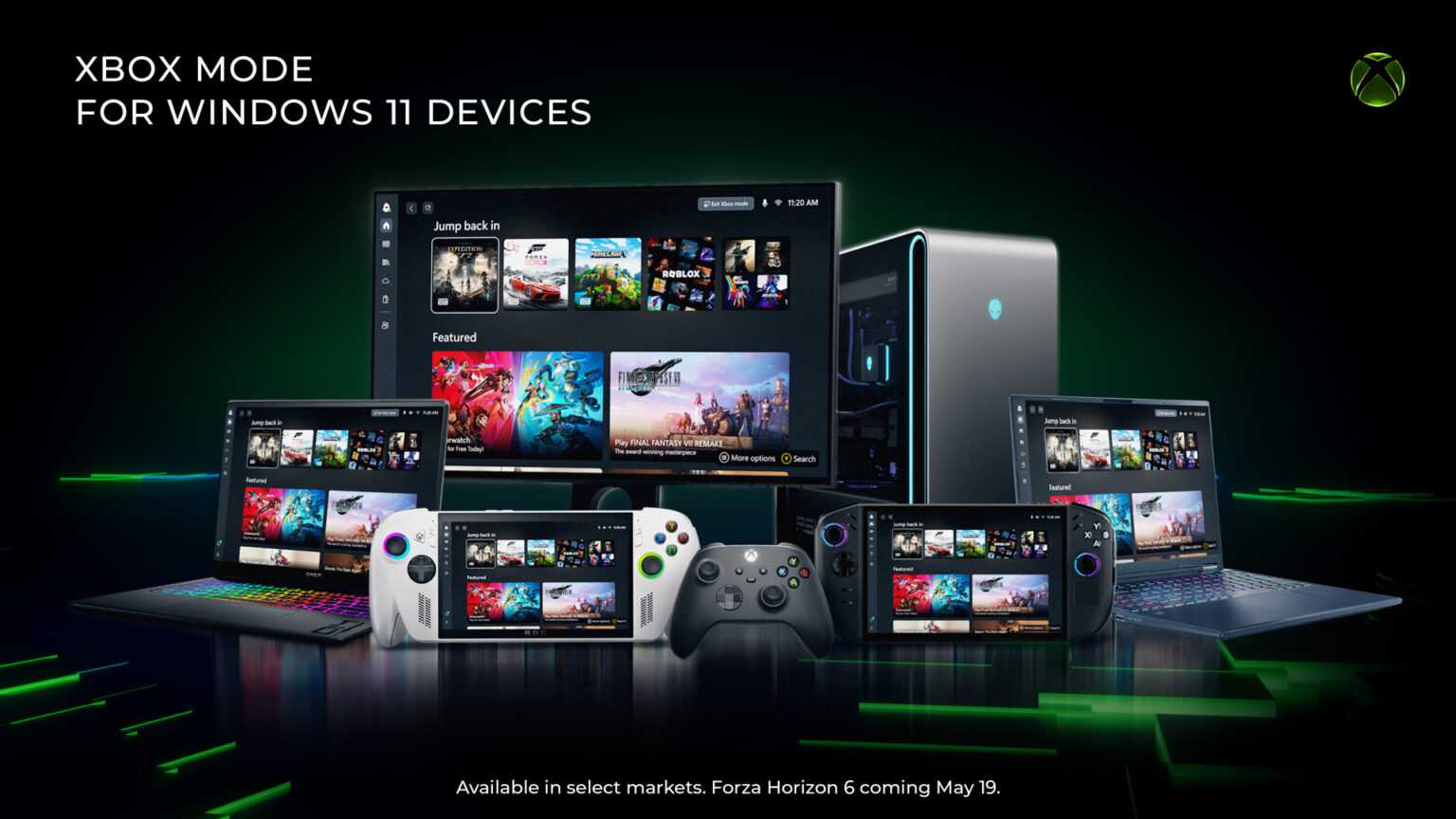
Microsoft has started rolling out Xbox Mode to Windows 11 PCs today, bringing a console-inspired gaming experience to laptops, desktops, and tablets. According to Xbox Wire’s announcement, the controller-optimized interface makes it easier for players to access their game libraries with a full-screen experience designed specifically for gaming.
Key Takeaways
- Xbox Mode began rolling out to Windows 11 PCs on 30 April 2026 in select markets.
- The feature provides a controller-optimized, full-screen gaming interface inspired by Xbox consoles.
- Players can access Game Pass titles and games from other PC storefronts through the unified interface.
- Users need to enable ‘Get the latest updates as soon as they are available’ in Windows Update settings.
- The rollout will expand to more players over the coming weeks.
What is Xbox Mode and why does it matter?
Xbox Mode transforms your Windows 11 PC into something that feels more like an Xbox console. The interface puts your game library front and centre, minimising background distractions and creating a streamlined experience for controller users.
This matters particularly for UAE gamers who prefer playing with controllers or use Windows handheld devices. Instead of navigating traditional Windows menus, you get a clean, game-focused interface that makes jumping between titles seamless.
The feature evolved from feedback Microsoft received about their previous ‘full screen experience’ on Windows handhelds. Based on what we’ve seen from similar implementations, this should significantly improve the living room gaming experience for PC players.
How does Xbox Mode work on your PC?
Xbox Mode creates a dedicated gaming environment whilst maintaining Windows 11’s flexibility underneath. You can browse and launch games using a controller-optimised interface that aggregates titles from Xbox Game Pass and other PC storefronts in one place.
The key benefit is seamless switching between Xbox Mode and the standard Windows 11 desktop. When you want to game, you enter the console-like environment. When you need to do other tasks, you switch back to regular Windows without restarting or losing your place.
The interface displays your recently played titles prominently and organises your entire game library for easy controller navigation. This eliminates the need to use keyboard and mouse for basic gaming tasks.
How to get Xbox Mode on your Windows 11 PC
Xbox Mode is rolling out gradually to ensure stability across different hardware configurations. To get access as soon as it becomes available for your device, you need to enable the latest Windows updates.
Here’s how to prepare your PC:
- Open Settings on your Windows 11 PC
- Select Windows Update
- Turn on ‘Get the latest updates as soon as they are available’
- Check for updates regularly over the next few weeks
Microsoft hasn’t specified which markets are included in the initial rollout, though the feature will expand to more players over the coming weeks. UAE users should expect to receive the update as part of the broader international rollout.
What games work with Xbox Mode?
Xbox Mode works with your entire PC game library, not just Xbox titles. You can access games from Steam, Epic Games Store, and other PC platforms alongside your Xbox Game Pass subscription titles.
The aggregated library view means you won’t need to open multiple launchers to find your games. Everything appears in one interface, whether you purchased games individually or access them through subscription services.
This is particularly useful for UAE gamers who often use multiple storefronts to find the best regional pricing or availability. Instead of managing several different launchers, Xbox Mode provides a unified starting point for all your PC gaming.
Should you use Xbox Mode?
Xbox Mode makes sense if you primarily game with a controller and want a more console-like experience on PC. It’s particularly valuable for living room setups where you’re gaming on a TV rather than at a desk.
Our take is that this feature bridges the gap between PC and console gaming effectively. You maintain access to PC gaming’s advantages – better graphics options, mod support, multiple storefronts – whilst getting the simplicity of console navigation.
The gradual rollout suggests Microsoft is being careful about implementation, which is encouraging for stability. For UAE users who’ve been waiting for a better controller-centric PC gaming experience, this could be exactly what you need.
However, keyboard and mouse players who prefer desktop-style interfaces might find little benefit. Xbox Mode is clearly designed for the controller gaming audience.
Frequently Asked Questions
What is Xbox Mode on Windows 11?
Xbox Mode is a controller-optimized, full-screen gaming interface for Windows 11 PCs. It provides a console-inspired experience that aggregates games from Xbox Game Pass and other PC storefronts in one streamlined interface.
How do I get Xbox Mode on my Windows 11 PC?
Enable ‘Get the latest updates as soon as they are available’ in Windows Update settings. Xbox Mode is rolling out gradually to select markets, with broader availability expected over the coming weeks.
What are the key features of Xbox Mode?
Key features include controller-optimized navigation, aggregated game library access across multiple PC storefronts, seamless switching between Xbox Mode and Windows desktop, and a streamlined interface that minimises distractions.
Does Xbox Mode work with non-Xbox games?
Yes, Xbox Mode works with games from Steam, Epic Games Store, and other PC platforms, not just Xbox Game Pass titles. It creates a unified interface for your entire PC game library.
Can I still use regular Windows features with Xbox Mode?
Absolutely. You can switch between Xbox Mode and the standard Windows 11 desktop whenever needed. Xbox Mode doesn’t replace Windows functionality – it adds a gaming-focused interface option.