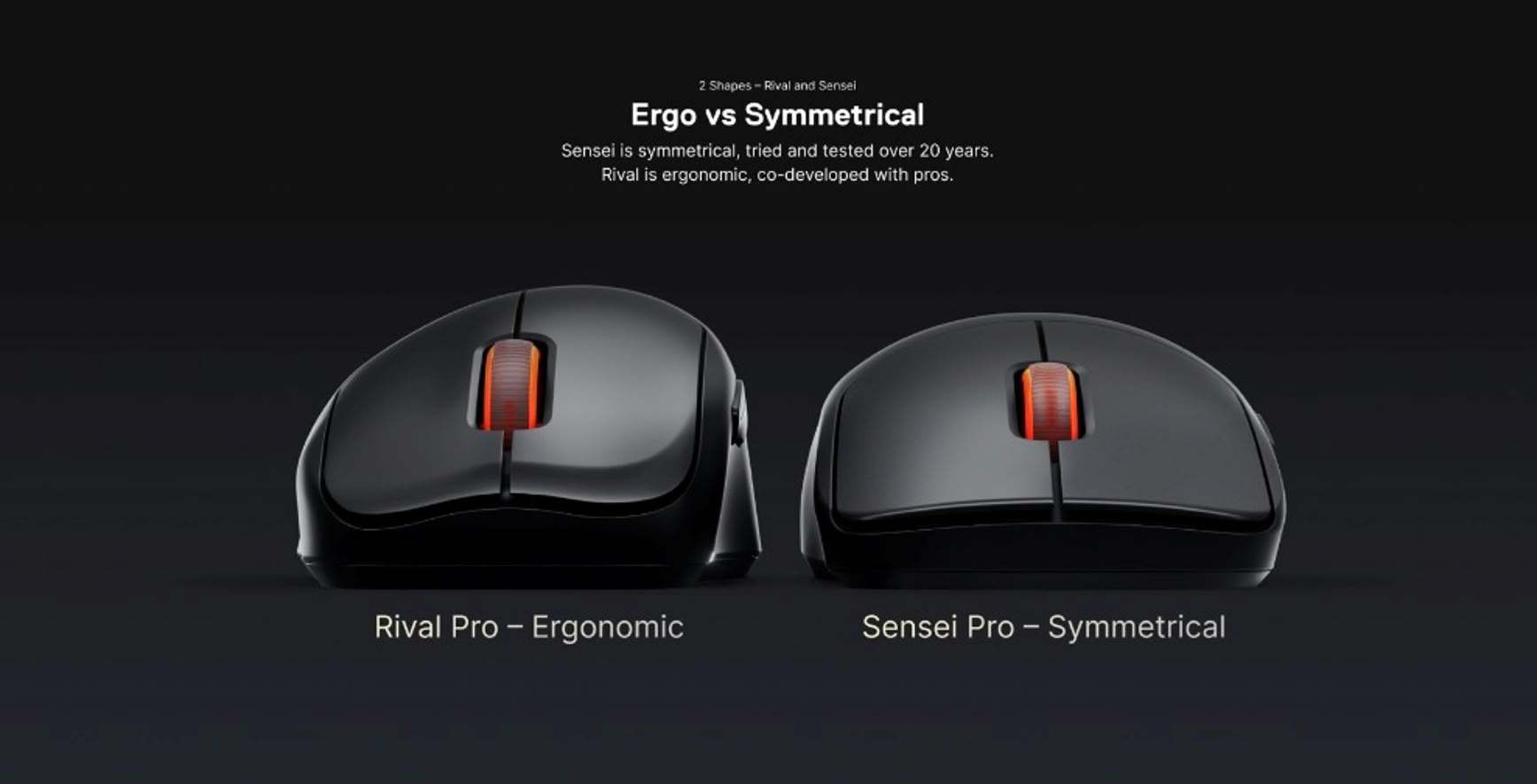
SteelSeries Rival Pro and Sensei Pro wireless gaming mice launch on October 13 for $179.99 each, with pre-orders open now. The ergonomic Rival and symmetrical Sensei each come in a full-size and Mini version, and all four use ultra-wideband wireless and hot-swappable batteries.

The full-size models weigh 53g in black and 54g in white; the Minis are 49g and 50g respectively. The mice also share a TrueMove 42K optical sensor, optical switches rated for 100 million clicks and an 8,000Hz maximum polling rate. Their central difference is shape: the Rival Pro is contoured for right-handed use, while the Sensei Pro has a symmetrical design.
SteelSeries Rival Pro and Sensei Pro: four models, one price
| Model | Shape | Weight | Price |
|---|---|---|---|
| Rival Pro | Ergonomic, full-size | 53g black / 54g white | $179.99 |
| Rival Pro Mini | Ergonomic, compact | 49g black / 50g white | $179.99 |
| Sensei Pro | Symmetrical, full-size | 53g black / 54g white | $179.99 |
| Sensei Pro Mini | Symmetrical, compact | 49g black / 50g white | $179.99 |
The four-model line-up gives players a choice of shape and size, but not a cheaper entry point: the Mini versions cost the same as the full-size mice. SteelSeries says the new Pro models build on the Sensei and Rival families, which date back to 2011 and 2013. The company is bringing both designs back with a lighter shell and a different wireless system.
For a price comparison, HyperX’s 47g Pulsefire Haste 3 Pro launched at $129.99, while tbreak’s Corsair Sabre V2 Pro CF review covered a 55g mouse listed at $199. Those products use different designs and battery setups, but they show where SteelSeries has placed the new models: above a lighter, less expensive option and below a carbon-fibre model with a higher launch price.
UWB replaces the usual 2.4GHz link
Instead of connecting to its base station over the more common 2.4GHz band, the Rival Pro and Sensei Pro use ultra-wideband across 6.4GHz to 9.056GHz. SteelSeries says that gives the link around 20 times the bandwidth and makes it less vulnerable to congestion from nearby wireless devices. The base station is part of the system, handling the connection and charging the spare battery.
In its launch announcement carried by TechPowerUp, SteelSeries says the UWB connection is designed to keep 8,000Hz reporting consistent. That is the company’s claim rather than an independent latency comparison. The 8,000Hz rate means the mouse can report its position up to eight times as often as a 1,000Hz mouse, although the difference will depend on the game, PC and player.
Two batteries make 8K polling less convenient
Each mouse comes with two circular batteries that can be swapped between the mouse and charging base. SteelSeries rates each battery for up to 16 hours at 8,000Hz or 60 hours at 1,000Hz; with two batteries in rotation, the company lists up to 32 hours and 120 hours respectively. The trade-off is clear: keeping the highest polling rate means swapping more often.
The Verge’s hands-on report says its reviewer changed batteries at least six times during several weeks of testing. The second battery can charge while the first is in use, so the system avoids waiting for a mouse to recharge over a cable. Players who do not need 8,000Hz can lower the rate and stretch the time between swaps.
The SteelSeries GG software adds SuperSync, which lets users set separate polling rates for clicks and sensor movement. A player could, for example, use 8,000Hz click reporting and 4,000Hz sensor reporting. SteelSeries says the split can reduce CPU load and help in games that have problems with high polling rates. Smart DPI can also change sensitivity when moving from a game to its menus, then restore the preferred setting on returning to play.
GG is also available as a feature-limited web app in Chrome and Edge, so basic settings and firmware updates do not require installing the full desktop program. That is a small but practical change for players who only need to adjust a mouse or update it on another computer.
Pre-orders opened on September 29 through SteelSeries and retailers, with retail availability scheduled for October 13. The announcement lists the price in US dollars and does not provide a UAE price or local launch date, so $179.99 should not be read as a confirmed AED price.
Who is most likely to benefit from 8,000Hz polling?
Competitive players using games and hardware that can take advantage of faster reporting are the clearest audience. The rate is optional: running at 1,000Hz extends each battery’s stated runtime from 16 to 60 hours, so most buyers should compare the responsiveness they want with how often they are willing to swap batteries.
Does UWB guarantee lower input lag than a 2.4GHz mouse?
No independent latency comparison is included in the launch coverage. SteelSeries says its 6.4GHz–9.056GHz connection has more bandwidth and is less exposed to congestion, but those claims do not guarantee a noticeable improvement in every room or game.
Which shape should left-handed players look at?
The Sensei Pro has a symmetrical shape, while the Rival Pro is designed around a right-handed ergonomic contour. Players who need a mouse that can suit either hand should start with the Sensei shape and check how its side controls feel in their grip.
Is the Mini a lower-cost version of either mouse?
No. The Rival Pro Mini and Sensei Pro Mini cost the same $179.99 as the full-size models. Choose a Mini for its smaller shell and lower weight, not as a way to spend less.