The MacBook Air 15″ M5 (AED 5,499) is a strong upgrade for anyone on an M3 or older — roughly 13% faster CPU, 25–30% better GPU, and nearly double the SSD speeds over the M4. With the AED 2,599 MacBook Neo now handling casual users, the Air finally fits a clearer role, though 60Hz and two-port limits still sting at this price.
The MacBook Air M5 is, by almost every external measure, identical to the MacBook Air M4. Same design, same ports, same display. If you lined them up side by side, you would be hard-pressed to find any difference. What Apple has done instead – as they do every year – is work on the inside: a new M5 chip, a bump to WiFi 7 and Bluetooth 6, and a larger (speedier!) base storage of 512GB that replaces the 256GB that shipped with the M4. So don’t go expecting a redesign, and to be honest, Apple has no reason to drastically touch what has been a class-leading chassis anyway.
What has changed this year is the context around it. The 15″ MacBook Air M5 starts at AED 5,499 – AED 500 more than where the M4 launched – while the 13″ starts at AED 4,599. And sitting below both of them now is the MacBook Neo at AED 2,599. The Air used to be Apple’s entry point into the Mac lineup, and for casual users – people who just want a laptop for browsing, streaming, and documents – that price was always a tough ask when a capable Windows laptop cost half as much. The Neo fills that gap well. It’s not as powerful as the Air and doesn’t match it on build quality or features, but it gives casual users a proper MacBook at a price that actually makes sense for what they need.
So the need for an Air has changed; it’s now for people who want to do more with it, and in that sense, the new M5 delivers the goods.
Design and Ports: Still Class-Leading, Still Two Ports Short
The MacBook Air 15″ hasn’t changed its physical form by a whole lot since Apple introduced the larger size with the M2 generation, and that’s fine – it was already excellent. If it ain’t broke, and all that, right? The aluminium chassis is rigid without being heavy, the hinge is solid and stays positioned where you want it to, and at 11.5mm thin and 1.51kg, it’s comfortable to carry around and place, although if you are strapped for desk space, the 13″ might be more appropriate (I will always prefer the large screen estate, it just feels better).

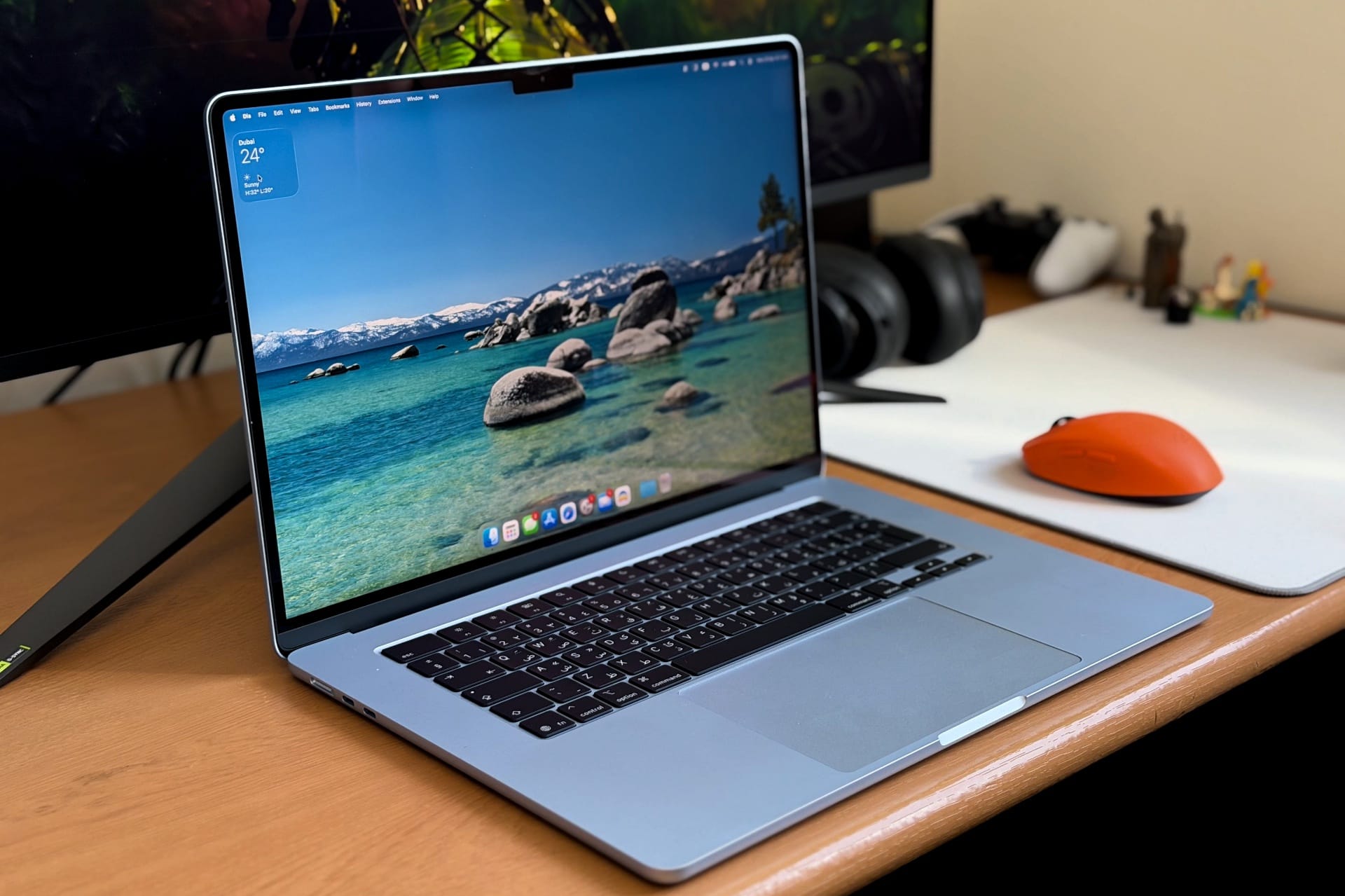
We received the Sky Blue colourway, which is more subdued than the name might suggest. It’s a soft, almost muted blue – like a clear sky with the saturation dialled way back. Indoors, it reads clearly as blue, and it looks quite good. In strong direct light, it does lose a bit of its colour and appears not much different from silver (as you can see from the pictures), but I do like the finish.

It’s classy and understated, and while I still maintain that the MacBook Air has never looked better than its classic silver colour, the Sky Blue easily comes as a strong second for me. It’s also one of the colourways that doesn’t attract fingerprints and smudges the way the Midnight version does (I owned one, it’s an overhyped colour – there, I said it). The peace of mind that comes from not having to worry about a laptop looking like it has been through hell and back at the end of the day feels great.

The keyboard and trackpad remain unchanged, which is no bad thing. The scissor-switch keyboard has a comfortable amount of travel, the keys are well-spaced, and typing on it for long stretches never becomes tiring. The trackpad is large, responsive, and still one of the best you will find on any laptop.

The port situation is where the design starts to show its age. On the left, you get two Thunderbolt 4 USB-C ports and a MagSafe 3 charging connector. On the right, a 3.5mm headphone jack. Two USB-C ports are workable on a thin laptop, but it gets tight quickly – connect an external display, plug in a storage drive, and you are already out of room before you have added anything else. A third port would make a real difference, and at this price, it wouldn’t feel like too much to ask.
Display and Features: A Great Panel Held Back by 60Hz
The 15.3″ Liquid Retina display runs at 2880 x 1864 pixels at 224PPI (actual render resolution is 1920 x 1243). Colours are accurate and rich out of the box, peak brightness sits around 500 nits for SDR content, and the IPS panel handles contrast well enough for most everyday use. Watching movies, editing photos, working through a browser with a dozen tabs open – it handles all of it well enough.

The 60Hz refresh rate, though, is harder to overlook in 2026. The display itself isn’t the problem – it’s a good panel. The issue is that 120Hz has become the baseline almost everywhere else at this price point – even budget Windows laptops. Apple keeps ProMotion locked to the Pro lineup as a deliberate product differentiator, which is a reasonable business decision, and I am not saying the 60Hz panel is not smooth. If you have never used a 120Hz+ panel, you might not notice anything. But once you do, the difference is significant enough that not having it at this price point is hard to justify.
Beyond that, the M5 generation brings some meaningful connectivity upgrades. WiFi 7 replaces the M4’s WiFi 6E, and Bluetooth bumps to version 6. You will need a WiFi 7 router to take advantage of the former, which most people don’t have yet, but it’s good to have for longevity. The SSD also moves to PCIe 4.0 speeds – sequential reads around 6,700MB/s – which is a substantial jump over the M4 and on par with the MacBook Pro.

The 12MP Center Stage webcam is solid for video calls, tracking you naturally as you move. The four-speaker array continues to be one of the better audio setups you will find in a laptop at this size – there is a decent low-end presence, there’s good musicality and voices render clearly, and there is a good amount of soundstage that you can use it to watch movies without too many complaints. Microphones are clean and handle background noise well.
Apple Intelligence is available throughout macOS, covering Writing Tools across system apps, Priority Notifications in Mail, and various on-device AI features powered by the M5’s Neural Engine. Whether it’s useful is for you to decide, but it works when needed.
Performance and Battery Life: Substantial GPU Gains, All-Day Endurance
The MacBook Air 15″ M5 is built around Apple’s M5 chip, featuring a 10-core CPU – four performance cores and six efficiency cores – paired with a 10-core GPU, 16GB of unified memory, and a PCIe 4.0 SSD. There is no fan, of course. The M5 handles all of its thermal management passively, which is still, to me, an impressive feat of engineering considering how monstrously fast these chips are.
In day-to-day use, the M5 Air feels exactly as fast you would want a laptop at this price to feel. Apps open immediately, switching between tasks is instant, and it handles a heavy mix of browser tabs, streaming, photo editing, and video work simultaneously without any hesitation. Whether it feels noticeably faster than the M4 in practice is harder to say – the honest answer is not really, because the M4 was already fast enough that the gap only shows up in benchmarks and sustained workloads.
| Benchmark | MacBook Air M5 | MacBook Pro M4 | % Gain |
|---|---|---|---|
| CPU | |||
| Cinebench 2026 Single Thread | 733 | 646 | +13.5% |
| Cinebench 2026 Multi Thread | 3,285 | 3,829 | -16.6% |
| Geekbench 6 Single Core | 4,155 | 3,713 | +11.9% |
| Geekbench 6 Multi Core | 16,928 | 15,453 | +9.5% |
| GPU | |||
| Cinebench 2026 GPU | 19,369 | 15,735 | +23.1% |
| Geekbench 6 GPU (Metal) | 76,126 | 58,642 | +29.8% |
| 3DMark Steel Nomad Light | 5,019 | 4,201 | +19.5% |
| 3DMark Wild Life Extreme | 10,795 | 9,618 | +12.2% |
| 3DMark Solar Bay Extreme | 4,198 | 3,020 | +39.0% |
| AI | |||
| UL Procyon AI Image Generation | 176 | 172 | +2.3% |
| UL Procyon AI Computer Vision | 1,425 | 1,271 | +12.1% |
| Storage | |||
| Blackmagic Disk Speed — Write | 6,497.6 MB/s | 3,421 MB/s | +89.9% |
| Blackmagic Disk Speed — Read | 5,982.9 MB/s | 3,048 MB/s | +96.3% |
For this review, we ran the MacBook Air M5 against the MacBook Pro M4 across a range of benchmarks. Single-core CPU performance is where the M5 opens things up comfortably – Cinebench 2026 single-thread puts it at 733 against the M4’s 646, a 13.5% advantage, and Geekbench 6 single-core follows at 4,155 versus 3,713, roughly 12% faster.
Multi-core is the one area the M5 loses ground, scoring 3,285 on Cinebench 2026 multi-thread against the M4’s 3,829 – a 16% deficit that’s likely a byproduct of the fanless design reaching its thermal ceiling under sustained maximum load. Geekbench multi-core tells a different story, though, with the M5 scoring 16,928 against 15,453, a 9.5% lead, suggesting that under shorter bursts, the Air pulls ahead before the heat becomes a factor.
GPU performance is a similar story, where the M5 pulls ahead in every test. Cinebench 2026 GPU scores 19,369 versus 15,735 – a 23% jump – and Geekbench 6 GPU (Metal) comes in at 76,126 against 58,642, a 30% advantage. The 3DMark results follow the same pattern across Steel Nomad Light, Wild Life Extreme, and Solar Bay Extreme.
Storage is similarly one-sided: the M5’s PCIe 4.0 SSD posts 6,497.6 MB/s write and 5,982.9 MB/s read, against 3,421 MB/s and 3,048 MB/s on the M4 – nearly double across the board. The AI benchmarks are the closest of the lot, with UL Procyon Image Generation at 176 vs 172 and AI Computer Vision at 1,425 vs 1,271, incremental gains that reflect the Neural Engine improvements without overstating them.
Taken together, the M5 is a meaningful step up from the M4 in most areas – on average, around 13% faster in CPU performance and a substantial 25-30% ahead on GPU – while the one area it trails is narrow enough that most users will never push into it.
As for battery life, it holds up well in real-world use. Apple rates the M5 Air for up to 18 hours, and on a single charge of mixed use – browsing with plenty of tabs open, watching shows, YouTube, chatting, and some light photo editing running across the day, I got around 11-12 hours comfortably. That’s with the display at a reasonable brightness and everything running simultaneously, so lighter usage will stretch it further. Given how much I use the laptop daily, this endurance is an easy 2-2.5 days of battery life for me.
The Verdict: Buy It If You’re Past M3, Skip If You’re on M3 or M4
If you are coming from anything older than an M3, the MacBook Air M5 is an easy recommendation. The performance gains will be substantial; the build quality is just as good; battery life continues to improve and remains excellent; and the M5’s GPU advantage is significant enough to matter for anyone doing creative work or light gaming. The 60Hz display and two-port setup are frustrating at this price, and Apple has no real excuse for either of them in 2026. I am really hoping the next Air improves in this regard.
If you are already on an M3 or M4 Air, sit this one out. The day-to-day experience is going to feel largely identical, and unless you specifically want the GPU uplift or the much faster SSD speeds – which are nearly double and useful if you move large files regularly – there isn’t a compelling reason to spend the money.
For students and casual users, the MacBook Neo at AED 2,599 is worth a closer look before committing to the Air’s AED 4,599 or 5,499 starting price. It’s not as powerful, and it doesn’t match the Air on build quality or features, but it’s a proper MacBook that handles everyday workloads without complaint, and the price difference is hard to ignore.
Buy the MacBook Air 15″ M5 if
- You’re coming from an M2, M1, or any Intel Mac — the performance jump will be substantial
- You do creative work, light gaming, or anything GPU-leaning — the 25–30% GPU uplift over the M4 is the M5’s real headline
- You want the larger 15″ screen for multitasking, photo work, or watching content while you work
- You move large files often and will actually feel the near-doubled SSD speeds
Don’t buy the MacBook Air 15″ M5 if
- You already have an M3 or an M4 Air — the day-to-day experience is too similar to justify the spend
- You mostly browse, stream, and write documents — the AED 2,599 MacBook Neo covers all of that for less than half the price
- You need a 120Hz/ProMotion display — that’s still Pro-line exclusive
- Two USB-C ports won’t be enough for your setup — an external display plus a drive already maxes you out
Buying the Air for university? Our MacBook Air setup guide for UAE students walks you through the first-hour setup. Still deciding? Our MacBook Air M5 vs MacBook Neo comparison breaks the choice down by major.
For years, the MacBook Air played an odd role as the “casual user”: it had enough power for even heavy workloads, yet it was too expensive for anyone who wanted a sleek little laptop for browsing the web or homework. With the MacBook Neo now handling the casual end of the market, the Air has shifted into a different role: a genuinely capable machine for people who actually push their laptops, at a price that finally makes sense for what it delivers.
MacBook Air 15″ M5: Frequently Asked Questions
1. How much does the MacBook Air 15″ M5 cost in the UAE?
The MacBook Air 15″ M5 starts at AED 5,499, which is AED 500 more than the M4 was at launch. The 13″ model starts at AED 4,599, and base storage is now 512GB across both.
2. Is the MacBook Air M5 worth upgrading from the M4?
For most M4 owners, no. Day-to-day performance feels nearly identical, and the gains only show up in benchmarks and sustained workloads. The upgrade only makes sense if you specifically want the M5’s faster GPU (25–30% better) or its nearly doubled SSD speeds.
3. Should I buy the MacBook Air M5 or the MacBook Neo?
For browsing, streaming, and document work, the AED 2,599 MacBook Neo is the smarter choice. Pick the MacBook Air M5 only if you push your laptop harder with creative work, heavy multitasking, or want long-term headroom — it’s a more capable machine, but it costs almost double.
4. How much faster is the M5 chip than the M4?
In our benchmarks, the M5 is around 13% faster on CPU single-core tests, 25–30% faster on GPU workloads, and posts nearly double the SSD read and write speeds. Sustained multi-core performance actually trails the M4 slightly because of the fanless design’s thermal ceiling.
5. Does the MacBook Air M5 have a 120Hz ProMotion display?
No. The MacBook Air M5 still uses a 60Hz refresh rate, the same panel as the M4. Apple keeps ProMotion exclusive to the MacBook Pro line as a deliberate product differentiator.
6. How long does the MacBook Air M5 battery last?
Apple rates the MacBook Air M5 for up to 18 hours. In our mixed-use testing — browsing with multiple tabs, streaming, and light photo editing — we got a comfortable 11–12 hours of continuous use, which stretches to 2–2.5 days for moderate workloads.