My first, and only experience with a planar magnetic headset was the HyperX Cloud Orbit S, back when it launched with head-tracking and Waves Nx audio. I liked them quite a bit for their exceptional sound quality, but their harsh clamping force meant I never quite used them. So when Asus announced their own planar magnetic gaming headset, it got me curious enough to give it a try, hoping that I would finally get to experience proper planar magnetic drivers – always fascinated with that piece of tech – in a better package. Well…about that.
The Kithara is a collaboration between Asus’s ROG division and HiFiMan, a New York-based audiophile headphone brand with a long history of making high-end planar magnetic headphones. The idea was to bring that driver expertise into the gaming space – ROG’s acoustic engineers tuned the 100mm planar drivers specifically for gaming, paired them with an open-back design and a full-band MEMs boom microphone- bundled in a cable setup that covers everything from a standard 3.5mm connection to a 4.4mm balanced output for hi-fi equipment. And yes, it is pricey at over AED 1,200, but shockingly cheap compared to audiophile headphones with the same features. This is actually quite budget-friendly, ha!
The Kithara does things with sound that most gaming headsets simply can’t. The open-back design and planar drivers give it a wide, clean soundstage that works well for both competitive gaming and listening through well-produced game soundtracks. But the headband sliders are far too loose, comfort becomes an issue well before the hour mark, and getting the most out of these drivers really does call for a dedicated DAC/Amp. So, if you want a “gaming” headset that you simply want to plug and play, these might not exactly cut it.
In simple terms, the ROG Kithara is not a headset for everyone. It is a wired, open-back planar magnetic headset for PC gamers who care more about sound quality than convenience. If you want wireless, noise isolation, heavy bass, or easy console use, this is probably not the one. If you have a good PC audio setup and want one of the cleanest-sounding gaming headsets around, it absolutely deserves your attention.
Design and Comfort: Premium Look, Awkward Fit
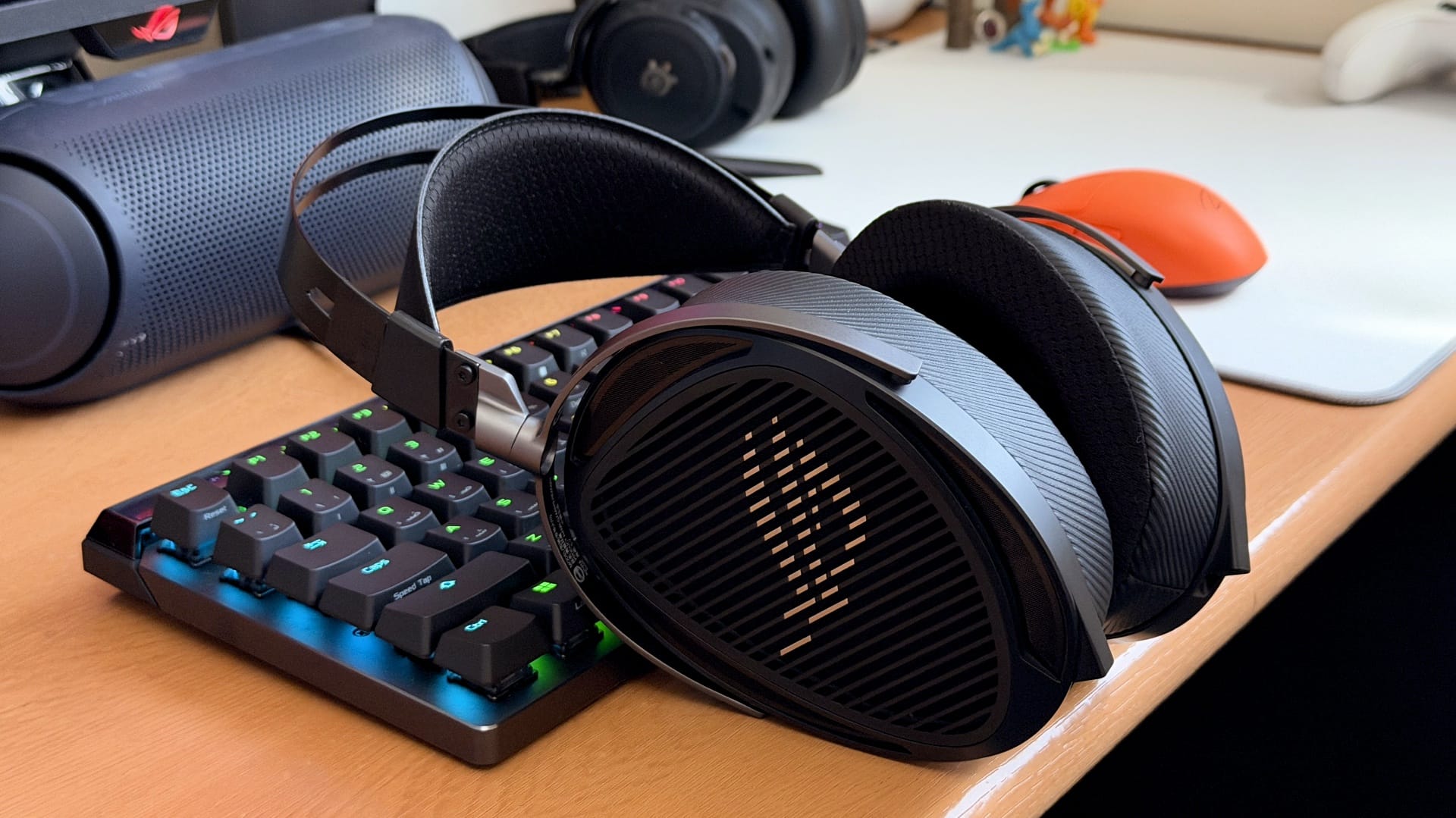
If you have never encountered a HiFiMan headphone before, the Kithara will look a bit odd. But those familiar with HiFiMan’s lineup will immediately see the Edition XS and Ananda in its DNA, but with ROG’s fingerprints on it. These feature large oval earcups with open lattice grilles, a suspended headband, and separate cables running to each driver.

And I quite like the way it looks. The ROG logo is tastefully laser-etched onto the side grilles rather than aggressively stamped on, the carbon fibre-patterned finish on the earcup housing is clean, and the metal hinges are well machined with no wobble. It doesn’t scream gaming at you, and that’s the right call for something positioning itself as a crossover audiophile product.

The earcups are large, though – some people will struggle to wrap their hands around them when lifting the headset off a stand. The 100mm planar drivers demand that footprint, and there’s no way around it. Two sets of earpads come in the box: leatherette with mesh fabric, which seals better and slightly tightens the sound, and velour, which is softer on the skin, more breathable, and adds a touch of warmth to the acoustic character. Both are circumaural and shaped to distribute pressure evenly around the ear.

The stainless steel upper arc of the headband is comically oversized. Unless you have an unusually tall head and run the sliders near their maximum extension, you will have a noticeable gap between the top of your skull and the steel arch sitting above it. It looks goofy, but hey, who cares? The suspended leather strap below it does most of the actual weight distribution work, and that part performs well – at 420g, the Kithara feels lighter on the head than it looks, which really surprised me when I first put it on.

What doesn’t work as well, at least on my unit, is the headband adjustment sliders. They are so loose they’re a problem. Picking the headset up shifts them. Tilting your head shifts them. I think even just looking at them makes them lose their position. And as you wear them, the sliders will slowly creep down while making an unpleasant cranking sound, and the earcups will descend toward your ears, increasing pressure. As a result, you will always be adjusting the headband and will find yourself very carefully picking up the headset so as not to make them cranky.
This is a known issue, and it’s batch-specific. Units manufactured in November 2025 have it – mine included. Units made in 2026 apparently don’t. If you are buying one now, check the manufacturing date before laying down the cash for it.
However, there is a fix for this: tighten the slider screws with a T7 Torx screwdriver. I eventually went ahead and did it. The left slider was already at its maximum tension, so it couldn’t be tightened further, but the right screw was noticeably loose and responded well. After tightening, the right slider is considerably more stable – the headset keeps its position after removing and re-wearing it and doesn’t click down nearly as easily as it did before. It’s an improvement, even if a partial one. That said, having to reach for a screwdriver to make an AED 1,238 headset wearable is not something one should be required to do.

With the sliders sorted, the comfort is better, but still not without issues. The clamp force is very light, which I understand – a heavy headset gripping your head firmly would be miserable over a long session. But the trade-off is that the Kithara never quite settles on your head. You are always aware it’s there. It doesn’t disappear the way a well-fitted headset does.
Around the 30min mark, the earpads soften and compress, and the headset starts to droop slightly. You start feeling pressure and itchiness at the tops and sides of your ears, which increase over time. The large earcups also make contact with your jawline – not painfully, but it feels strange at first. You do get used to it after a few sessions, but it will catch your attention early on.
Cables and Accessories: Better Than Most Gaming Headsets
Two separate 1.8-metre cables come in the box, and the package is more thoughtfully put together than even most audiophile headphones.

The gaming cable has a braided cloth sheath and splits into two 3.5mm plugs at the headset end – one per driver – which physically separates the audio and microphone signal paths and eliminates any crosstalk between them. At the source end, it branches into separate 3.5mm headphone and microphone jacks, with an inline remote module in the middle handling volume via a scroll wheel and mic mute via a toggle switch. Also included is a USB-C-to-dual 3.5mm adapter with an onboard DAC that supports up to 24-bit/96kHz output – useful for laptops, desktops, and consoles that dropped dedicated headphone jack support.
The second is the hi-fi cable, which has an entirely different construction. Rather than the cloth-sheathed gaming cable, this one is a tightly twisted braid – multiple strands wound together into a single cord that feels noticeably more premium in the hand. It’s malleable and light, doesn’t tug on the headset, and doesn’t tangle as easily. It connects to each driver with three swappable terminations: a standard 3.5mm single-ended, a 6.3mm single-ended for desktop amps, and a 4.4mm Pentaconn balanced plug for DAC/amp combos that support balanced output. Swapping between them takes seconds and requires no tools.
At 1.8 metres, both cables are fine if your PC sits on a desk within arm’s reach and your cable route is simple. But the moment you are routing under the desk and back up, threading through a monitor stand, or running to a desktop DAC sitting off to the side, you will find yourself at the end of the cable sooner than you would like. Anyone with a more involved setup, or who simply likes a bit of slack to move around, will want to budget separately for a longer cable.
Does the Asus ROG Kithara Need a DAC/Amp?
The short answer is: it depends on what you are connecting to.
On paper, the Kithara’s 16-ohm impedance is low enough that most modern devices should drive it without breaking a sweat. But planar magnetic drivers are a different conversation – the Kithara’s sensitivity sits at 94dB SPL, and while that sounds reasonable, planars have a reputation for needing real current to perform at their best, not just voltage. Low impedance doesn’t always mean it’s easy to drive.
My MacBook Pro M4 handled them without any issues. Apple’s 3.5mm output has always punched above its weight – its EU version of the 3.5mm to USB-C dongle is well known in audio circles for a reason – and it gave the Kithara enough headroom to sound the way it should, at comfortable listening volumes with no strain.
On my PC, which runs the ROG Maximus Z790 Hero’s SupremeFX audio solution – a Realtek ALC4082 codec paired with an ESS ES9218 Quad DAC – the headset also performed well. But this is a high-end motherboard with a genuinely capable onboard solution, and even then, I had to go into Realtek Audio Console and switch the amplification from Performance to Extreme to get the Kithara the current it needed to open up properly. Whether a mid-range or budget motherboard with a weaker audio section can drive these adequately, I honestly can’t say – and that’s worth keeping in mind if your PC isn’t running flagship-tier audio hardware.
Consoles are where things fall apart. I tried the Kithara on my PS5 Pro both through the DualSense’s 3.5mm jack and via the included USB-C DAC plugged directly into the console. Neither source gave the headset what it needed. Across Astro Bot, Pragmata and Resident Evil 9, the sound was flat, muffled, and almost entirely devoid of bass – like hearing the headset operate at a fraction of its capabilities. If you want to use the Kithara on console, you will need a proper PS5-compatible DAC/amp in the chain. There’s no way around it.
I also tested both cables with a couple of mobile devices – the iPhone 17 Pro and the Samsung S26 Ultra, both using the included USB-C DAC. Audio quality was good on both, but the iPhone ran noticeably quieter than the Samsung at the same system volume. Apple may simply not be pushing enough power through the USB-C port for audio purposes here, though I can’t say that with certainty.
Asus ROG Kithara Specs
| Feature | Asus ROG Kithara |
|---|---|
| Driver type | 100mm planar magnetic |
| Design | Open-back, wired |
| Impedance | 16 ohms |
| Sensitivity | 94dB SPL |
| Frequency response | 8Hz–55kHz |
| Total harmonic distortion | <0.03% at 1kHz |
| Microphone | Detachable full-band MEMS boom mic |
| Mic frequency response | 20Hz–20kHz |
| Weight | 420g |
| Cables | Gaming cable, hi-fi cable with 3.5mm, 6.3mm and 4.4mm terminations |
| Adapter | USB-C to dual 3.5mm DAC adapter |
| Price in UAE | AED 1,238 |
Audio Quality: Why the Planar Drivers Matter
The Kithara uses 100mm planar magnetic drivers, 16-ohm impedance, 94dB sensitivity, an 8Hz to 55kHz frequency response, and a total harmonic distortion below 0.03% at 1kHz. That THD figure is exceptionally low even by audiophile standards, and it comes down to how planar drivers work: instead of a cone pushed from a single voice point like a conventional dynamic driver, a planar driver moves a thin, flat membrane uniformly across its entire surface. Less distortion, faster transient response, cleaner sound.

Before anything else, this is an open-back headset. There is zero sound isolation. You will hear everything around you, and everyone around you will hear everything you are listening to in perfect clarity. Fans, conversations, traffic – all of it comes through. If your PC runs loud under load, you will hear that too. This isn’t a criticism of the Kithara; it’s just what “open-back” means.
Inside the box is a Sound Signature Certificate – a card showing the measured frequency response curve of your specific unit. Each Kithara is apparently tested and calibrated individually at the factory, so every certificate is slightly different. My unit’s curve is mostly flat across the sub-bass and lower and upper midrange, with a slight dip in the middle of the midrange band. There’s a rise in the 2-3kHz region – the upper midrange presence area, which is where vocal clarity and intelligibility live – before it rolls off from around 5kHz and levels out. That tells you a lot about how this headset is tuned before you even put it on.
Now, open-back headsets have a reputation for weak bass. This is true for the Kithara, but I wouldn’t call its bass weak by any measure. It won’t give you the thick, physical thump of a well-tuned closed-back headset, but there’s plenty of bass – it’s just controlled, ridiculously smooth and balanced rather than boosted. It hits when it needs to without bleeding into other frequencies or sounding overcooked. What it actually creates is a solid foundation that makes everything built on top of it sound full and grounded. I was surprised by how much bass comes out of these, and more so by how cleanly it’s managed.
The midrange is where the Kithara is at its best. Vocals, instruments, environmental effects – everything that lives in the core of the frequency spectrum comes through with real presence and clarity. Mids are forward and confident, sitting prominently in the mix. Vocals specifically are something on these headsets – every shift in pitch, every breath, every bit of harmonic detail in a voice is rendered with a richness and precision that’s hard to describe without sounding over the top. It’s pretty damn good.

Treble is smooth rather than sharp. There’s detail and air up top, but the edge is taken off, which is exactly what that 5kHz roll-off on the certificate is doing. I have never been able to get on with the DT990 Pro or the DT770 Pro because of how sharp they get up top, and the Kithara gave me none of that. Even at higher volumes, the highs stayed enjoyable. If you prefer a brighter, more extended top end, you might want more, but for most people, this tuning is the sensible call.
Soundstage is honest rather than exceptional. It’s not the wide, almost out-of-head presentation of something like the HD800S, but it’s meaningfully more spacious than a closed-back headset, with instruments and sound effects sitting at clearer distances from each other. In music, the open-back design creates a noticeable sense of air and separation that a closed headset can’t match.
Gaming Performance: Imaging, Soundstage and Positional Audio
In games, interestingly, the difference shrinks. I ran the Kithara alongside my daily driver, the Arctis Nova Elite, across multiple sessions, and the gap in soundstage width was real but smaller than expected. The Arctis Nova Elite is a seriously capable headset, and the skill gap between the two is quite narrow. If you are coming from a mid-range headset, you will hear more differences.
Where the Kithara does pull ahead is in depth and imaging. The planar drivers’ fast transient response means individual sounds stay clean and distinct rather than blurring in each other, and in games like Marvel Rivals and Battlefield 6, tracking gunfire and movement – left, right, above, below, near, far – came through with good accuracy. The slight edge over the Arctis Nova Elite wasn’t in width but in how convincingly it could place sounds at a distance. It’s a small difference, but in games with strong audio design, it’s noticeable.
The Kithara is at its best on PC, where its planar drivers deliver clean imaging and strong positional detail. In games like Marvel Rivals and Battlefield 6, movement, gunfire, and distance cues are easy to track, with better depth than most closed-back gaming headsets offer.
On PS5 Pro, however, the headset struggled through both the DualSense 3.5mm jack and the included USB-C DAC. Without a proper console-compatible DAC/amp, the sound becomes flat, muffled and light on bass.
Microphone Quality: Good Enough, Not Studio Grade
The Kithara ships with a detachable MEMS boom microphone – a full-band mic covering 20Hz to 20kHz with a signal-to-noise ratio of 74dB. MEMS microphone technology is what you typically find in smartphones, and the design priority here is clean, consistent voice capture rather than broadcast-grade audio. The dual 3.5mm cable setup keeps the microphone signal physically separate from the audio output, eliminating crosstalk between the two.

The microphone is serviceable for most use cases, though if you were expecting exceptional voice quality from a headset at this price point – especially a wired one – I have some not-so-good news. It’s not bad by any means, and for online gaming, Discord calls, and work meetings, it more than does the job. People on the other end won’t have much to complain about.
What you will notice is that the mic captures your voice clearly, but with a thin quality and noticeable compression. Beyond online chats and meetings, it isn’t really suited for streaming or any kind of professional recording work. There’s also no background noise cancellation, so depending on your setup, keyboard noise, fan hum, and nearby chatter can creep in.
Here’s a sample of the microphone, recorded using the included USB-C adapter on a Windows 11 machine with no post-processing applied.
Should You Buy the Asus ROG Kithara?
The ROG Kithara is one of the most interesting gaming headsets to come out in a while, not because it does everything well, but because it commits so completely to doing one thing exceptionally. The sound quality is in a different league from most gaming headsets at this price – controlled bass, gorgeous midrange, smooth treble, clean imaging, and a level of detail that rewards good source material and well-designed game audio. The cable package is thoughtful, the build quality on the earcups and frame is solid, and the per-unit Sound Signature Certification is a nice touch that signals Asus and HiFiMan took the collaboration seriously.
But there are real problems here that can’t be ignored. The headband slider issue on November 2025 units – mine included – is a genuine flaw that affects everyday wearability, and while Asus has apparently addressed it in 2026 production runs, there’s no guarantee you won’t pull an affected unit off the shelf.
The comfort, even with the sliders tightened, asks for patience. And the Kithara genuinely needs a decent source to perform – PC users with capable onboard audio or a dedicated DAC will be fine, but console gamers without an external DAC/Amp in the chain will be left with a flat, muffled version of what this headset can actually do, which at AED 1,238 is another expensive to add on top.
If you are a PC gamer who values audio quality above wireless convenience, already has or is willing to invest in a decent DAC, and can live with the open-back trade-offs, the Kithara is worth every dirham. If you game on a console without additional audio hardware or need any sound isolation, look elsewhere. The Audeze Maxwell 2, at AED 1,628, is the natural alternative to consider if you want planar magnetic drivers with wireless capability and broader platform support – though you will be paying more for the privilege.
Asus ROG Kithara FAQ
Is the Asus ROG Kithara good for gaming?
Yes, the Asus ROG Kithara is excellent for gaming on PC if you care about sound quality, imaging and positional detail. Its open-back planar magnetic drivers help separate sounds clearly, making it useful for games with strong audio design.
Does the Asus ROG Kithara need a DAC or amp?
The Asus ROG Kithara can work from some laptops and high-end PC motherboards, but it sounds best with a capable DAC/amp. Console players, especially on PS5, should use an external DAC/amp for proper performance.
Is the Asus ROG Kithara good for PS5?
Not on its own. In testing, the Asus ROG Kithara sounded flat and muffled when connected directly to the PS5 Pro through the DualSense controller or the included USB-C DAC. A PS5-compatible DAC/amp is strongly recommended.
Is the Asus ROG Kithara open-back?
Yes, the Asus ROG Kithara is an open-back headset. That gives it a more spacious sound, but it also means there is no sound isolation. You will hear your surroundings, and people nearby will hear your audio.
Is the Asus ROG Kithara comfortable?
Comfort is mixed. The headset feels lighter than its 420g weight suggests, but the loose headband sliders on some units and pressure around the ears can become annoying during longer sessions.
Is the Asus ROG Kithara good for streaming?
The audio quality is excellent, but the microphone is only serviceable. It is fine for Discord, gaming chat and meetings, but streamers should use a dedicated microphone.
What is the best alternative to the Asus ROG Kithara?
The Audeze Maxwell 2 is the natural alternative if you want planar magnetic drivers with wireless support and better platform flexibility, though it costs more.