Quick Answer: The Corsair Void v2 Max Wireless (AED 489) offers impressive battery life and useful dual 2.4GHz + Bluetooth connectivity, but its muddy audio, recessed mids, and poor passive isolation make it hard to recommend over better-tuned competition at this price. Skip it if gaming audio quality matters to you.
The Corsair Void series has been around long enough to have earned a reputation. It has gone through several iterations over the years, and the Void V2 Wireless – released earlier in 2025 – was already a well-regarded mid-range gaming headset. The MAX version that we have here is not a ground-up redesign; it’s more of…side upgrade. The core headset remains identical, but Corsair adds two things: simultaneous 2.4Ghz and Bluetooth audio, and Sonarworks SoundID support through its iCUE software.
If you already own the standard Void v2 and are perfectly happy with it, there’s no pressing reason to upgrade unless those two features are specifically things you want. For everyone else, the Void v2 Max Wireless enters the market at AED 489, and it has a reasonable spec sheet to back that price up.
On paper, there’s a lot to like. Custom-tuned 50mm drivers, Dolby Atmos support, up to 70 hours of battery life on 2.4Ghz wireless, a flip-to-mute microphone with NVIDIA Broadcast noise reduction, and broad platform compatibility across PC, PS4/5, Nintendo Switch, and mobile. It reads well. But as someone who has never used the non-Max version before, my first brush with the V2 has not been an entirely positive one.
Design & Comfort: Looks the Part, Earcups Let It Down
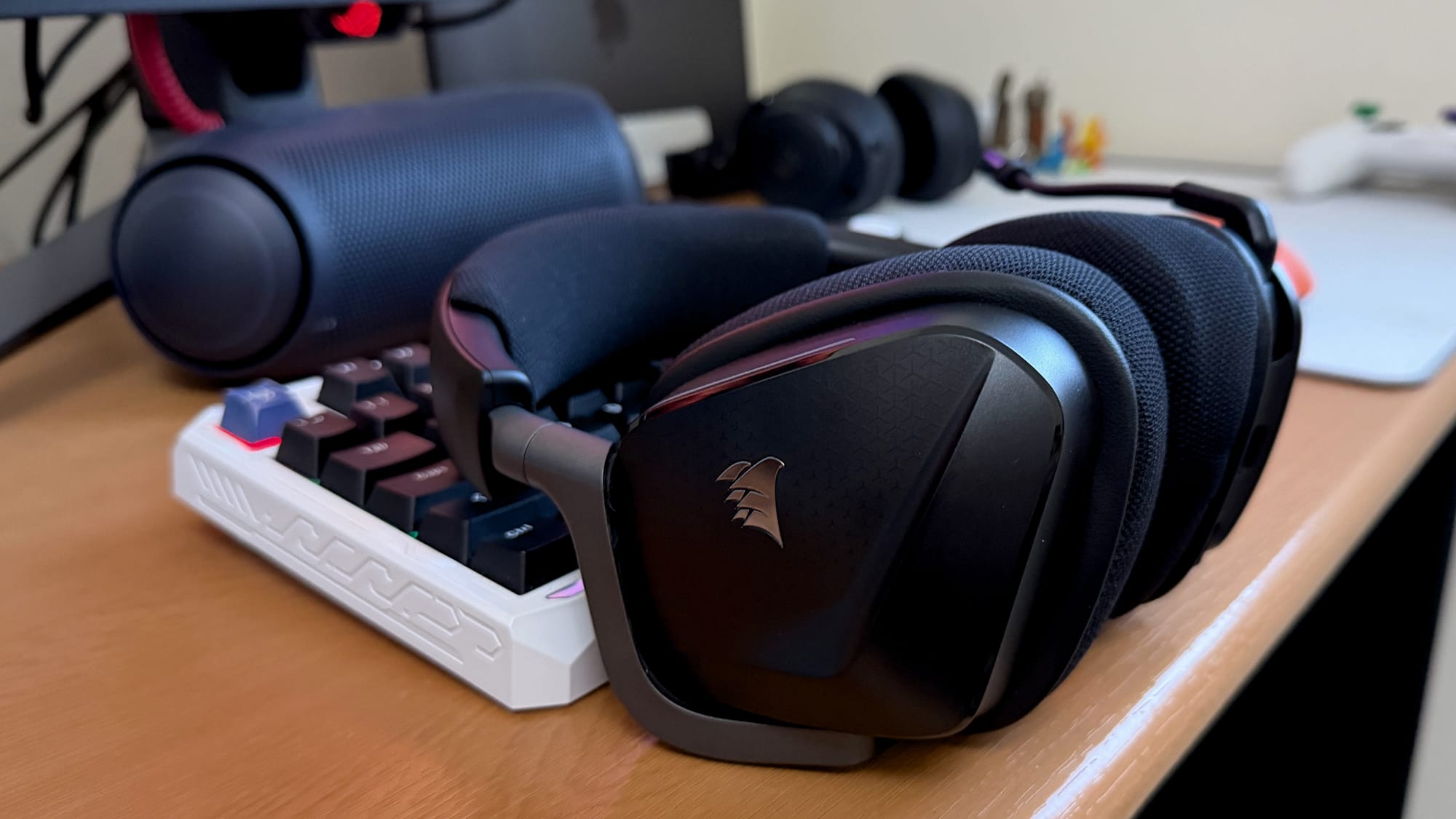
The Void v2 Max comes in a Carbon (black) colourway, and it’s a good-looking piece of kit. The earcups have an angular, geometric cut that sets them apart from the sea of round and oval gaming headsets, and the speckled texture on the exterior of the cups is a nice, subtle detail. It doesn’t try to be flashy- that duty is relegated to the RGB strips.

There are two slim RGB light strips on the earcups that run along the edge. They look fine, and the RGB doubles as a visual indicator of which wireless mode the headset is in. Beyond that, there isn’t much of a case for them being there. They don’t meaningfully transform the headset’s look, and they inevitably chip away at battery life to some degree. You can switch them off through iCUE if you would rather not bother.

Picking up the headset, the plastic construction is immediately apparent and might even feel a bit cheap. But spend a bit more time with it, and that impression softens. The frame doesn’t creak when flexed, doesn’t feel like it would crack easily under normal use, and holds together with more confidence than its weight suggests. It’s not a premium-feeling build, but it’s a solid one.

On the head, it tells a different story. The Void v2 Max is comfortable to wear, as lightweight, well-padded headsets tend to be. The clamp force is well-judged – present enough to keep the headset in place, relaxed enough that it doesn’t squeeze your head after an hour. At 303 grams, it barely registers. Both the headband and the earcups are generously padded, thick and quite soft, and the headband in particular gives you no reason to complain about.

The earcup padding material is where things get more complicated. The cups use a breathable mesh-like fabric over memory foam, and while the foam itself is soft and well-cushioned, the mesh surface has a slightly scratchy texture that makes direct contact with your ears uncomfortable.
The earcups are also on the smaller side, which means they won’t fully encompass the ear for everyone – they partly sit on the ear rather than around it, which puts the mesh material in direct contact with your ears. After about 15 to 20 minutes, the combination of the texture and limited airflow causes the ears to heat up and itch. It’s worth saying that this will vary depending on the size and shape of your ears, and some people may have no issue with it at all. But for those with larger ears or more sensitivity to material contact, it’s something to be aware of before buying.
The controls are well thought out. The power button and the multifunction button sit on the left earcup and have different textures, making them easy to tell apart without looking. Once you have used them a couple of times, the muscle memory kicks in fast. The volume control is a spring-loaded rocker rather than a scroll wheel, which works cleanly and responds well. The flip-to-mute mic arm has a satisfying, firm action to it – it hasn’t loosened with use – and it stays out of the way comfortably when flipped up.
The standout feature of the Max version over the standard Void v2 is simultaneous dual connectivity. The headset can run its low-latency 2.4Ghz wireless connection and a Bluetooth connection at the same time, meaning you can have your game audio coming through the dongle while keeping your phone connected over Bluetooth for calls or a Discord chat on a separate device.
iCUE & Software: Functional, but SoundID Doesn’t Deliver
iCUE is where you will spend your setup time with the Void v2 Max, and it covers the bases you would expect. Lighting effects, button remapping, an equalizer with four presets – Pure Direct, Movie Theater, FPS Competition, and Bass Boost – plus a full parametric EQ if you want to dial things in yourself. You also get mic volume and sidetone controls sitting right there in the EQ tab. It’s a clean enough interface and not difficult to navigate.


The headset also supports Sonarworks SoundID, which is one of the features that separates the Max from the standard Void V2. The process is straightforward: it plays a series of tones and asks you to reduce the volume until you can no longer hear them, using that to map your hearing sensitivity and build a personalised EQ profile around it. My results showed my left ear sitting within normal hearing range, while my right ear dipped into mild hearing loss territory at higher frequencies (old age catching up, I see).
The profile it generated looked meaningfully different from the flat Pure Direct curve on paper. In practice, I could not tell them apart. The sound was nearly identical with SoundID enabled versus without – no improvement in audio quality, no change in soundstage or imaging worth noting. It’s a nice idea that, at least in my experience, doesn’t deliver on what it promises. But again, you might spot a difference, so YMMV.
There is also an NVIDIA Broadcast tab in iCUE that links to an AI-powered noise and room-echo removal feature for the microphone. It requires a separate 2.71GB installation to use, so it’s not something you get out of the box.
On the subject of iCUE itself, it functions fine, but Corsair has been rolling out its Web Hub solution for some of its newer peripherals, and it would have been good to see the Void v2 Max benefit from the same treatment. Having to run a dedicated software suite for a headset is a minor annoyance that adds up over time, and the less background software you run, the better.
| Spec | Detail |
|---|---|
| Price | AED 489 |
| Driver Size | 50mm custom-tuned neodymium |
| Frequency Response | 20Hz – 20kHz |
| Sensitivity | 116dB (+/-3dB) |
| Impedance | 32k Ohms @ 1kHz |
| Connectivity | Simultaneous 2.4GHz wireless + Bluetooth |
| Wireless Range | Up to 50ft (15m) |
| Battery Life | Up to 70 hours (2.4GHz) / Up to 130 hours (Bluetooth) |
| Fast Charging | 15 minutes = up to 6 hours of use |
| Charging | USB-C |
| Microphone Type | Omni-directional, flip-to-mute |
| Microphone Frequency Response | 100Hz – 8kHz |
| Microphone Sensitivity | -40dB (+/-3dB) |
| Microphone Impedance | 2.2k Ohms |
| Detachable Microphone | No |
| Spatial Audio | Dolby Atmos (PC), Tempest 3D Audio (PS5) |
| Software | Corsair iCUE, Sonarworks SoundID, NVIDIA Broadcast |
| Platform Compatibility | PC, Mac, PS4/PS5, Nintendo Switch, Mobile |
| Weight | 303g |
| Colors | Carbon (Black), White |
Audio Quality: Muddy Bass, Recessed Mids, and Hard to Ignore
The Void v2 Max Wireless is built around custom-tuned 50mm neodymium drivers, with a frequency response of 20Hz to 20kHz, 116dB sensitivity, and Dolby Atmos for Headphones support on PC. On paper, that’s a reasonable foundation for a mid-range gaming headset. In practice, the tuning choices Corsair has made here are difficult to overlook.
The overall sound signature leans muddy. The bass is present – it’s not thin or absent – but it’s poorly controlled, carrying a kind of underwater quality that bleeds into everything around it. Switching between the Void v2 Max and the Corsair HS80 Max while playing Saros quickly makes the difference apparent. Gunfire that sounds punchy and sharp on the HS80 Max comes across as diluted and dull on the Void v2 Max. The same holds in Mouse P.I., where weapons that should have impact and bite feel softened and weak.

The mids are noticeably recessed, which compounds the bass problem. Voices, environmental detail, and in-game audio cues are all buried deeper in the mix than they should be, fighting against low-end muddiness rather than cutting through it. The highs, meanwhile, are smoothed out to the point where they offer very little detail or energy. Music suffers for it – tracks that should feel alive and textured come across as flat. The FPS Competition EQ preset, which should, in theory, bring out more high-frequency detail, has next to nothing to work with here. Bass Boost, predictably, just makes the muddiness worse.
Soundstage is decent for a closed-back headset at this price – intimate but not claustrophobic. Sound imaging is technically competent, and you can generally tell where sounds are coming from. The problem is that the recessed mids and blunted highs make those sounds so quiet and indistinct that you often have to actively concentrate to act on the positional information the headset provides. In a fast-paced game, that’s a meaningful limitation.
Volume is another sticking point. On PC, it’s on the lower side, manageable, but not where you want it. On PS5, the situation is noticeably worse – the headset sounds hollow and quiet compared to what you would expect, and the underlying tuning issues make the perceived volume feel even lower than the number on screen suggests. Dolby Atmos adds a small amount of width to the soundstage, but it doesn’t address any of the core problems.

Passive noise isolation is also worth flagging. The mesh earcup material that causes the comfort issues discussed earlier does very little to block external sound. If your PC fans are running hard, or there’s a TV on in the background, it will seep in.
While writing that, a thought occurred to me: maybe I should say it out loud: I think Corsair’s drivers are tuned for pleather cushions, which would have improved the headset’s sound tuning and dynamics, but the mesh material dramatically alters the sound signature and hampers the headset’s performance. It could be the reason, but I am not entirely sure.
The headset fares better with movies and shows, particularly over Bluetooth. Less demanding audio content – dialogue-heavy scenes, ambient scores – masks the tuning issues reasonably well, and most media players let you push volume past 100% to compensate for the lower output. It’s not a strong endorsement, but it’s worth knowing that casual media consumption is a more forgiving use case for this headset than competitive gaming.
Mic Quality: Decent for Calls, Nothing More
The Void v2 Max uses an omnidirectional boom microphone with a frequency response of 100Hz to 8kHz, -40dB sensitivity, and NVIDIA Broadcast integration through iCUE for AI-powered noise and echo removal.

The microphone quality is decent. Like most wireless headset mics, it’s prone to compression, but it does add a bit of body to the vocals, which keeps it sounding reasonably close to your natural voice. The compression and a slightly muffled presentation hold it back from being anything more than functional, though. For online chats and calls, it gets the job done – nobody on the other end raised any complaints. One thing worth noting is that the noise gate seems fairly aggressive. When you stop speaking, it cuts in quickly, and sometimes it takes a beat to pick your voice back up, or it clips into the silence if you pause mid-sentence. It’s not a dealbreaker for casual use, but if you tend to speak with natural pauses, it can be noticeable.
A microphone recording sample capture on a Windows 11 system without any post production is embedded below for your reference.
Verdict: Good Headset, Disappointing Audio
The Corsair Void v2 Max Wireless gets a number of things right. The design is distinctive and holds up well enough for the price. The dual connectivity works as advertised, the battery life is impressive, the controls are well-placed, and the microphone is serviceable for online calls and party chat.
The problem is that a gaming headset’s most important job is to sound good, and the Void v2 Max struggles there in ways that are hard to set aside. The muddy bass, recessed mids, and heavily blunted treble combine into a sound signature that feels dull and fatiguing over time. The poor passive noise isolation means external sound bleeds in freely despite this being a closed-back design, and the output volume, particularly on PS5, sits lower than you would reasonably expect at AED 489. SoundID, one of the two features that justify the Max upgrade over the standard Void v2, made no meaningful difference in our testing. Dolby Atmos adds a touch of width but doesn’t address the underlying tuning issues.
☑ Buy it if you want a comfortable wireless headset for casual media consumption over Bluetooth, and simultaneous 2.4GHz + Bluetooth connectivity is something you’ll use daily across PC, PS4/5, or mobile.
✗ Don’t buy it if gaming audio is your priority. At AED 489, the Void v2 Max’s muddy sound signature and poor passive isolation put it well behind the competition. Razer and SteelSeries meaningfully offer better audio at the same price point.
For casual media consumption over Bluetooth, it’s a more forgiving experience. But that’s a narrow use case to hang a gaming headset on. At this price, there are better options available from the likes of Razer and Steelseries that will serve you considerably better.
Frequently Asked Questions
Is the Corsair Void v2 Max Wireless worth buying in the UAE?
At AED 489, it’s a tough sell. The dual connectivity and battery life are genuine strengths, but the muddy audio and poor passive isolation make it hard to recommend for gaming over equally priced options from Razer and SteelSeries.
What is the price of the Corsair Void v2 Max Wireless in the UAE?
The Corsair Void v2 Max Wireless is priced at AED 489 in the UAE.
How long does the battery last on the Corsair Void v2 Max Wireless?
Corsair rates it at up to 70 hours over 2.4GHz wireless and up to 130 hours over Bluetooth. Fast charging delivers up to 6 hours of use from a 15-minute charge.
Does the Corsair Void v2 Max Wireless work with PS5?
Yes, via the 2.4GHz USB dongle with Tempest 3D Audio support. Volume output on PS5 is noticeably lower than on PC, however, and the underlying tuning issues are more apparent on the platform.
What is the difference between the Corsair Void v2 and Void v2 Max Wireless?
The Max adds two things over the standard Void v2: simultaneous 2.4GHz and Bluetooth dual connectivity, and Sonarworks SoundID support through iCUE. The core headset — drivers, earcups, microphone, and design — is otherwise identical.
Is the Corsair Void v2 Max Wireless good for competitive gaming?
Not particularly. The muddy bass and recessed mids make positional cues harder to act on than they should be at this price, and the poor passive isolation lets in ambient noise freely — a real drawback in any serious gaming setup.