
Microsoft's bringing Xbox mode to all Windows 11 PCs in April
Windows 11 gets a console-style Xbox interface next month that lets you navigate your entire game library with a controller. The full-screen mode works with Steam and Game Pass, perfect for couch gaming sessions.

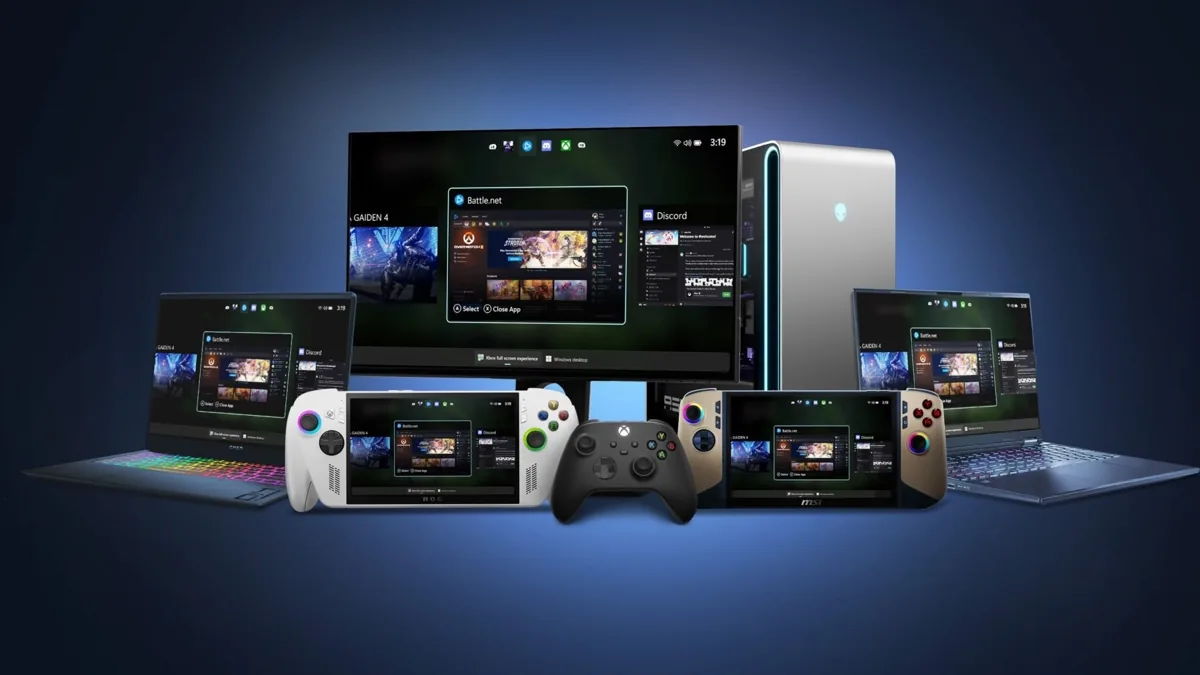
Microsoft is bringing its Xbox full screen experience to all Windows 11 PCs and tablets starting next month, according to PCMag's report. The controller-friendly mode, which transforms your desktop into an Xbox-style gaming interface, was previously exclusive to Windows 11 gaming handhelds. The rollout begins in April 2026 in select markets including the US.
What is Xbox mode for Windows 11?
The Xbox full screen experience turns your Windows 11 desktop into a streamlined gaming hub that resembles the Xbox home screen. According to Microsoft's Ian LeGrow, Corporate VP for Windows and Devices, "Xbox mode makes it easier for players to jump into a streamlined, full‑screen, dedicated gaming experience whenever they want to lean back and play."
The interface integrates Xbox Game Pass alongside games from other storefronts like Steam, creating a unified library accessible through controller navigation. You can launch multiple games and switch between them without leaving the Xbox-style interface, making it particularly useful for couch gaming sessions.
Unlike traditional desktop gaming, this mode prioritises controller input over mouse and keyboard, offering console-like navigation through your entire game collection. It's designed for situations where you want to game from your sofa rather than at a desk.
How to activate Xbox mode on your PC
Once the update arrives, accessing Xbox mode requires just a few keystrokes. Press Windows key + G to open the Game Bar overlay, navigate to Settings, and activate "Enter full screen experience." Alternatively, you can use the Windows key + F11 shortcut to toggle the mode directly.
Switching back to your regular desktop is equally simple. Choose the Windows desktop option from Task View, exit through Game Bar settings, or simply press the Windows key. Microsoft emphasises that no restart is required for either transition.
The feature was first offered to Windows Insiders beta testers in November 2025, allowing Microsoft to refine the experience before the wider rollout. Early feedback has focused on controller responsiveness and game library integration.
Expanding beyond gaming handhelds
Microsoft originally designed the Xbox full screen experience for Windows 11 gaming handhelds like the Asus ROG Ally X, where controller-first interfaces make obvious sense. The expansion to traditional PCs and tablets represents a broader push to make Windows more gaming-friendly across all device types.
This move aligns with Microsoft's strategy to blur the lines between PC and console gaming. The Xbox app for Arm-based Windows 11 devices has already improved gaming compatibility on alternative hardware, and Xbox mode continues this trend.
For many PC gamers who prefer using controllers for certain game types or living room setups, this represents a significant usability improvement. Rather than navigating desktop interfaces with a controller, users get a purpose-built gaming environment.
What this means for PC gaming
Xbox mode signals Microsoft's commitment to making Windows a more console-like platform when needed. This addresses a longstanding challenge for PC gamers who want the flexibility of console-style navigation without abandoning their game libraries or hardware.
The integration of multiple storefronts means users won't need to choose between Xbox Game Pass and Steam libraries. Both appear in the same interface, potentially reducing the friction of managing games across different platforms.
However, the initial rollout to "select markets" suggests Microsoft is taking a cautious approach. The company hasn't confirmed when other regions, including the UAE and broader Middle East, will receive the feature.
Frequently Asked Questions
What is Xbox mode on Windows 11?
Xbox mode, officially called "Xbox full screen experience," transforms your Windows 11 desktop into an Xbox-style interface optimised for controller navigation. It integrates Xbox Game Pass, Steam, and other PC game libraries into a streamlined gaming hub.
When is Xbox mode coming to Windows 11 PCs?
Microsoft plans to roll out Xbox mode to all Windows 11 PCs and tablets starting in April 2026. The initial launch covers select markets including the US, with no confirmed timeline for global availability.
How do I activate Xbox mode on Windows 11?
Press Windows key + G to open Game Bar, go to Settings, and activate "Enter full screen experience." Alternatively, use Windows key + F11 to toggle the mode directly. No restart is required to switch between modes.
Do I need a controller to use Xbox mode?
While Xbox mode is designed primarily for controller navigation, it's not strictly required. However, the interface is optimised for gamepad input and provides the best experience with a controller rather than mouse and keyboard.
Will Xbox mode work with Steam games?
Yes, Xbox mode integrates games from multiple storefronts including Steam, Epic Games Store, and other PC gaming platforms alongside Xbox Game Pass titles. All your games appear in the same unified interface.
Written by

Subscribe to our newsletter
Subscribe to our newsletter to get the latest updates and news










Member discussion