


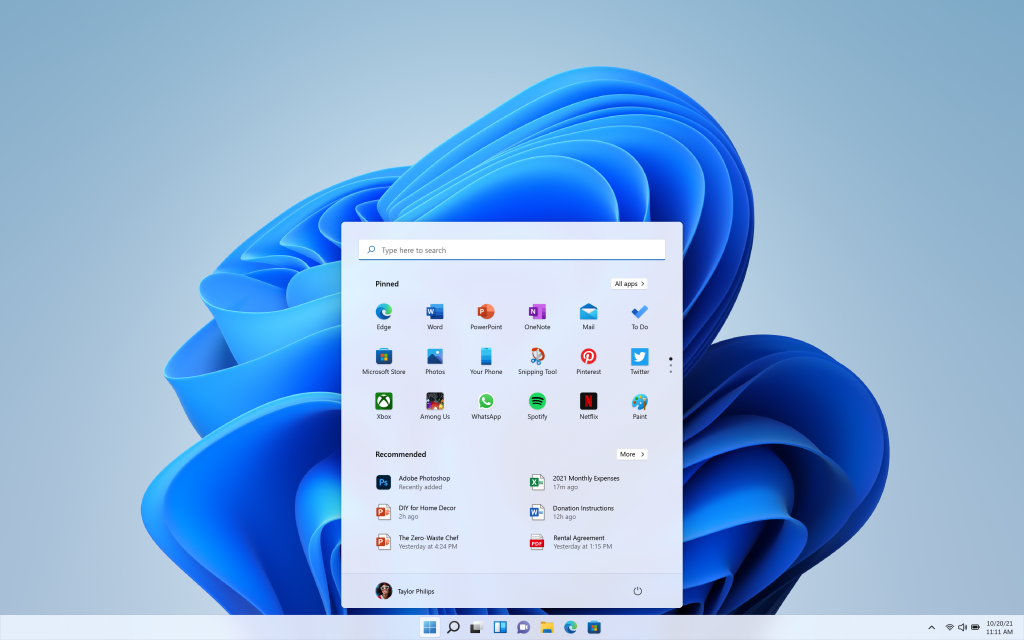
If you’ve got a PC that needs a fresh Windows license (new build, wiped drive, or that “I somehow lost my key” situation), StackSocial has Windows 11 Pro for $9.97 / AED 36 (down from $199, listed as 94% off).
KEY TAKEAWAYS
- $9.97 for Windows 11 Pro (digital code, not a physical box).
- Lifetime access for 1 device and the licence is non-transferable.
- You must redeem within 30 days of purchase.
- Your PC must meet Windows 11 requirements (TPM 2.0, Secure Boot-capable UEFI, etc.).
More Deals
What you’re actually buying
This is a Windows 11 Pro license key delivered via email with redemption instructions (“instant redemption code”).
StackSocial also notes it’s intended for PCs that need a new Windows license and that you should check compatibility before buying.
Important license details (read before you click “buy”)
- 1 PC only (non-transferable).
- Redeem within 30 days of purchase.
- Digital purchase (nothing gets shipped).
- If you redeem the licence, sales are final (StackSocial’s terms say unredeemed licenses can be returned for store credit within 30 days, but redeemed licences are final).
Why Windows 11 Pro (not Home) is worth it for some people
Windows 11 Home is fine for a lot of users. Windows 11 Pro is for anyone who wants more control, stronger security options, or business-friendly tools.
Here are the Pro features that matter most:
- BitLocker device encryption (helpful if you carry work files or travel with your laptop). Microsoft positions BitLocker as full-volume encryption to reduce risk if a device is lost or stolen.
- Group Policy controls (useful if you manage multiple PCs or want deeper system control).
- Domain / Azure AD join options for work setups.
- Windows Sandbox for safely testing unknown apps in an isolated environment.
- Hyper-V support for virtual machines (dev/test labs, running alternate OS setups, etc.).
StackSocial also highlights Pro-specific tools like BitLocker, Hyper-V, Windows Sandbox, and Azure AD in its listing.
Before you buy: check your PC can actually run Windows 11
Windows 11 has stricter requirements than older Windows versions. Microsoft’s official requirements include:
- TPM 2.0
- UEFI firmware + Secure Boot capable
- 4GB RAM minimum
- 64GB storage minimum
- DirectX 12 compatible graphics + WDDM 2.0 driver
If your PC doesn’t qualify (common with older CPUs), don’t assume you’ll “figure it out later”. The cleanest path is always: supported hardware, official install, activated licence.
How redemption works (simple version)
StackSocial says you’ll receive a code and instructions by email after purchase, and you must redeem within 30 days.
Also: it’s a Windows 11 Pro license, not Microsoft Office, and Office would still need its own license if you want it.
Who should buy this deal
Buy it if:
- You’re building a PC or reinstalling Windows and need a legit Windows 11 Pro key.
- You want BitLocker, Group Policy, Sandbox, Hyper-V, or business join features.
- You found a great UAE laptop/desktop deal but it’s missing a Windows licence.
Skip it if:
- Your PC doesn’t meet Windows 11 requirements (TPM 2.0 is usually the dealbreaker).
- You need a licence you can move between machines later (this one is non-transferable).
- You only need Windows for basic use and Home is already activated.
FAQs
Is this a physical Windows box or USB?
No. StackSocial labels it as a digital purchase with redemption instructions.
Can I use it on more than one PC?
No. The listing says max 1 device and non-transferable.
Do I need internet?
Microsoft’s Windows 11 requirements include an internet connection during initial device setup (for many setups).
What if I’m on Windows 10?
StackSocial notes: if you’re on Windows 10 and you can’t use Windows Update to do the free upgrade, you may not be able to install this version. In practice, treat this deal as best for new licences / clean installs on compatible hardware.
Worth it?
For $9.97 / AED 36, this is the kind of pricing that makes Windows licences look like they were invented by a different species of human. As long as:
- Your hardware is compatible, and
- You’re fine with 1 PC, non-transferable,it’s a very low-cost way to get Windows 11 Pro properly activated.
Written by

Subscribe to our newsletter
Subscribe to our newsletter to get the latest updates and news




Member discussion