
Apple Studio Display XDR for Video Editors: Is It Worth Dhs 13,499 for HDR Monitoring?
The Studio Display XDR delivers 2000-nit HDR, 120Hz, and Adobe RGB for Dhs 13,499. We break down what it means for DaVinci Resolve, Premiere, and Final Cut Pro workflows in the UAE.

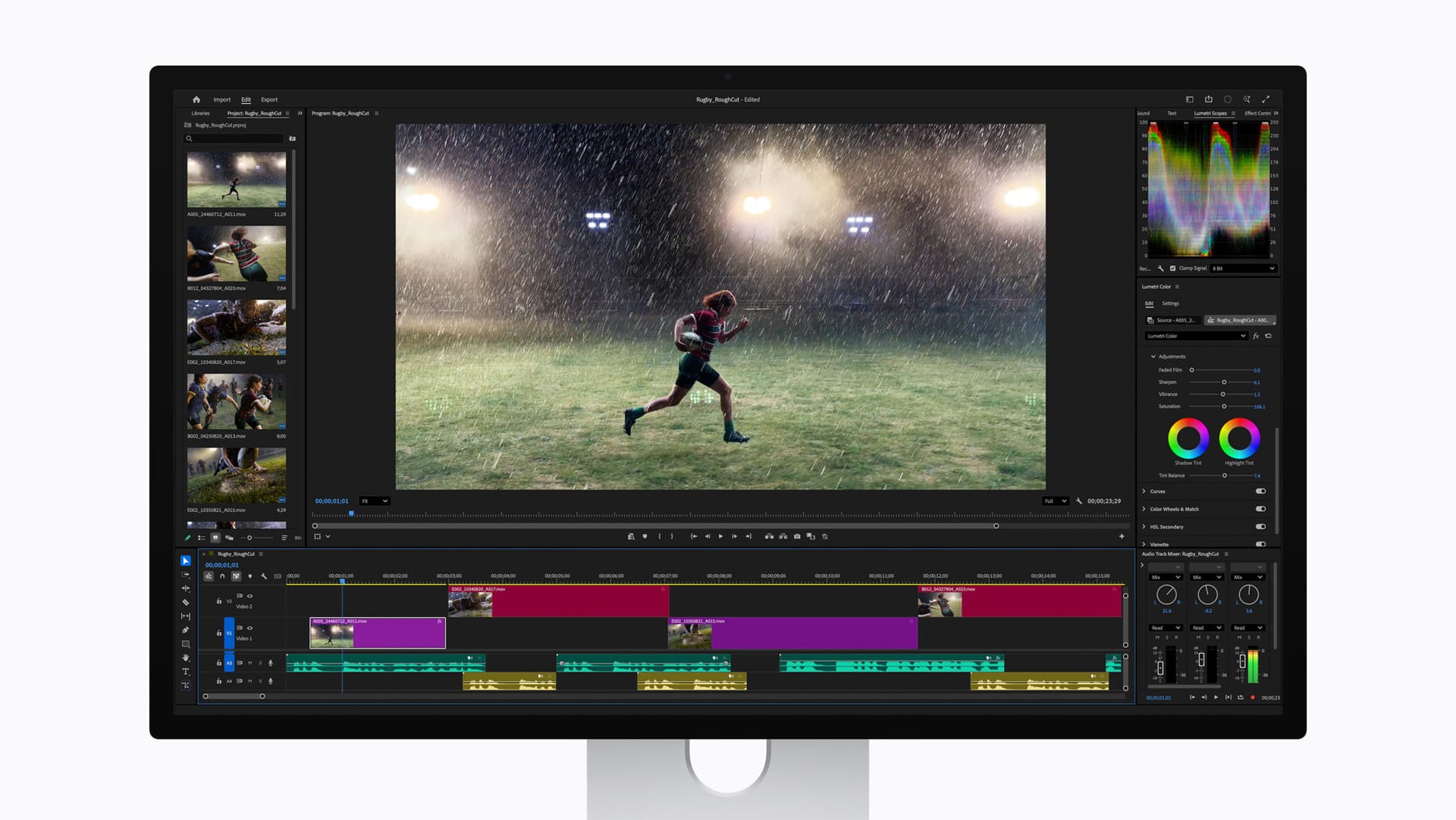
If you edit video professionally in the UAE, the question is not whether the Studio Display XDR is a good monitor. It is. The question is whether it fits your specific workflow and whether it replaces the need for a dedicated reference display.
Pre-orders for all March 2026 Apple products open March 4 — see every product, price, and release date in our full UAE launch guide. Availability starts March 11 at Apple Store, iSTYLE, and authorised resellers across the UAE.
The HDR specs that matter
The Studio Display XDR delivers 2000 nits of peak HDR brightness, exceeding the outgoing Pro Display XDR at 1600 nits. For practical HDR grading, this means you can see specular highlights and bright sky detail that would clip on lesser displays. The 1000-nit sustained SDR brightness matches the Pro Display XDR and exceeds most third-party options.
The 2,304 mini-LED local dimming zones on a 27-inch panel give you roughly 85 zones per inch of screen width. That density minimises the haloing that makes cheaper mini-LED displays unreliable for critical evaluation. The Pro Display XDR packed 576 full-array LED zones into its larger 32-inch panel — significantly fewer zones per unit area.
The 1,000,000:1 contrast ratio means deep blacks adjacent to bright highlights render cleanly. This matters when grading night scenes, low-key interviews, or any content with extreme dynamic range.
Colour gamut: P3, Adobe RGB, and Rec. 2020
P3 wide colour is the standard for HDR video delivery. The Studio Display XDR covers it fully. Adobe RGB support matters less for video but significantly for anyone crossing between video and print — commercial photographers who also shoot video, or agencies producing both digital and print campaigns. Having both gamuts accessible from the same default preset eliminates workflow friction.
Apple claims more than 80% Rec. 2020 coverage. Full Rec. 2020 would be ideal for future-proofing, but 80% is enough to reliably preview how wide-gamut HDR content will render on consumer displays. No desktop monitor covers the full Rec. 2020 gamut today.
120Hz: why it matters for editing
The 120Hz refresh rate with Adaptive Sync (47Hz to 120Hz) has genuine implications for video editing beyond gaming.
Timeline scrubbing in DaVinci Resolve, Premiere, and Final Cut Pro is noticeably smoother. When dragging through footage to find an edit point, the higher refresh rate reduces motion blur between frames, making it easier to land on the exact frame you need.
3D viewport navigation in After Effects, Cinema 4D, Houdini, or Blender benefits from smoother camera movement. At 60Hz, quick orbit and pan movements feel choppy with heavy scenes. 120Hz eliminates that friction.
Adaptive Sync for playback dynamically matches the refresh rate to your content frame rate. Playing back 24fps, 25fps, or 48fps content without judder is a subtle but valuable improvement for editors evaluating motion cadence.
General macOS interaction feels more responsive, too. Over a 10-hour editing session, reduced visual strain adds up.
Thunderbolt 5: the single-cable studio
The primary Thunderbolt 5 connection carries video, data, and up to 140W of charging — enough to fast-charge a 16-inch MacBook Pro. The second TB5 port connects a downstream device or daisy-chains another display. Two additional USB-C ports handle peripherals.
Connect your MacBook Pro with one cable, then attach RAID storage, a control surface, or an audio interface to the downstream ports. Clean desk, no dongle mess.
How it fits specific NLEs
DaVinci Resolve: Well-suited for HDR grading with reference modes mapping to standard deliverables. The 120Hz improves the Color page experience. Adobe RGB support is useful for delivering stills from Resolve for print.
Adobe Premiere Pro: The 2000-nit peak brightness means HDR preview accurately reflects your content dynamic range. Adaptive Sync smooths playback of mixed-framerate timelines.
Final Cut Pro: Tightest integration with Apple displays. Colour management, HDR monitoring, and ProRes playback work seamlessly. Built-in speakers handle quick audio checks.
What it does not replace
The Studio Display XDR is not a broadcast reference monitor. It lacks certifications and pixel-level calibration accuracy of a Sony BVM or Flanders Scientific. If your facility requires certified reference monitoring, you still need a dedicated display.
At 27 inches, it may not provide enough real estate for complex Resolve layouts with multiple scopes, timeline, and viewer all visible. If you work on 32 inches now, you will need to adjust or add a second monitor for scopes.
The verdict for UAE-based editors
At Dhs 13,499, the Studio Display XDR is significantly cheaper than dedicated reference monitors while overlapping with reference-grade capabilities for many workflows.
For freelance editors, small production houses, and content creators across Dubai, Abu Dhabi, and Sharjah, this is likely the best single display you can buy. For larger facilities, it makes an excellent primary editing display alongside existing reference monitoring.
💡
This is part of Apple's biggest early-year launch ever. See everything Apple announced for the UAE in March 2026, including iPhone 17e, iPad Air M4, and MacBook pricing.
FAQ
Can the Studio Display XDR replace a reference monitor? For most independent editors and small studios, yes. For broadcast facilities requiring certified reference monitoring, it complements rather than replaces dedicated displays.
Does it support hardware calibration? Apple uses factory calibration and software reference modes. It does not support third-party calibration probes like ASUS ProArt or BenQ SW displays do.
What Mac do I need to drive it at 120Hz? Any Mac with an M-series chip and Thunderbolt 4 or 5. MacBook Pro M4 or later, Mac Studio, and Mac Pro are all suitable.
Written by

Subscribe to our newsletter
Subscribe to our newsletter to get the latest updates and news






Member discussion