
One UI 8.5 Beta Just Dropped – 7 Hidden Upgrades for Your Galaxy S25
Samsung has launched the One UI 8.5 beta for Galaxy S25 phones, adding smarter content creation, easier sharing and stronger security. Here’s what’s new and how to join.

Samsung has kicked off the One UI 8.5 beta programme for the Galaxy S25 series, focusing on three things: making content creation less of a chore, getting your devices to play nicer together, and tightening security.
The beta starts in a handful of markets first, with more regions expected later. For UAE users on the Galaxy S25 line, this is the next big software step after One UI 8, which we’ve already seen on devices like the Galaxy S25 FE and Tab S11 series.
KEY TAKEAWAYS
- One UI 8.5 beta is live first for Galaxy S25 series users in select countries, not yet in the UAE.
- Photo Assist now lets you keep editing and generating images without saving every version.
- Quick Share, Storage Share and Audio Broadcast make Galaxy devices talk to each other more smoothly.
- New Theft Protection, Failed Authentication Lock and expanded identity checks boost security.
- You join the beta through the Samsung Members app once it’s available in your market.
Create more with the new Photo Assist
Samsung is going after the “edit, regret, re-edit” cycle with a smarter Photo Assist.
- Continuous image generation without stopping to save each edit
- Edit history that keeps every version so you can pick favourites later
- Tighter flow from creating to sharing your images
Instead of forcing you to save every tiny tweak, Photo Assist in One UI 8.5 lets you keep generating and editing images in one session. When you’re done, you can scroll through an edit history, compare your variations, and keep only the ones you actually like. That’s handy if you’re used to posting shots of your Galaxy S25 Ultra from recent UAE deals and want to experiment a bit before hitting share.
Sharing and storage across your Galaxy devices
One UI 8.5 also tries to fix that feeling of “the file is always on the wrong device”.
- Quick Share now recognises people in photos and suggests sending them the image directly
- Storage Share shows files from other Galaxy devices (including tablets and PCs) in the My Files app
- You can also access your phone’s files from other Samsung devices, including your TV
In practice, this means you can snap a photo on your Galaxy S25, see your other Galaxy devices’ files right inside My Files, and shoot things over without digging through separate storage apps. Storage Share basically turns your Galaxy gear into a small network: your phone, Tab S11 Ultra and even your Samsung TV can see and access each other’s files more naturally, which fits nicely with how Samsung is positioning One UI 8 across phones and tablets.
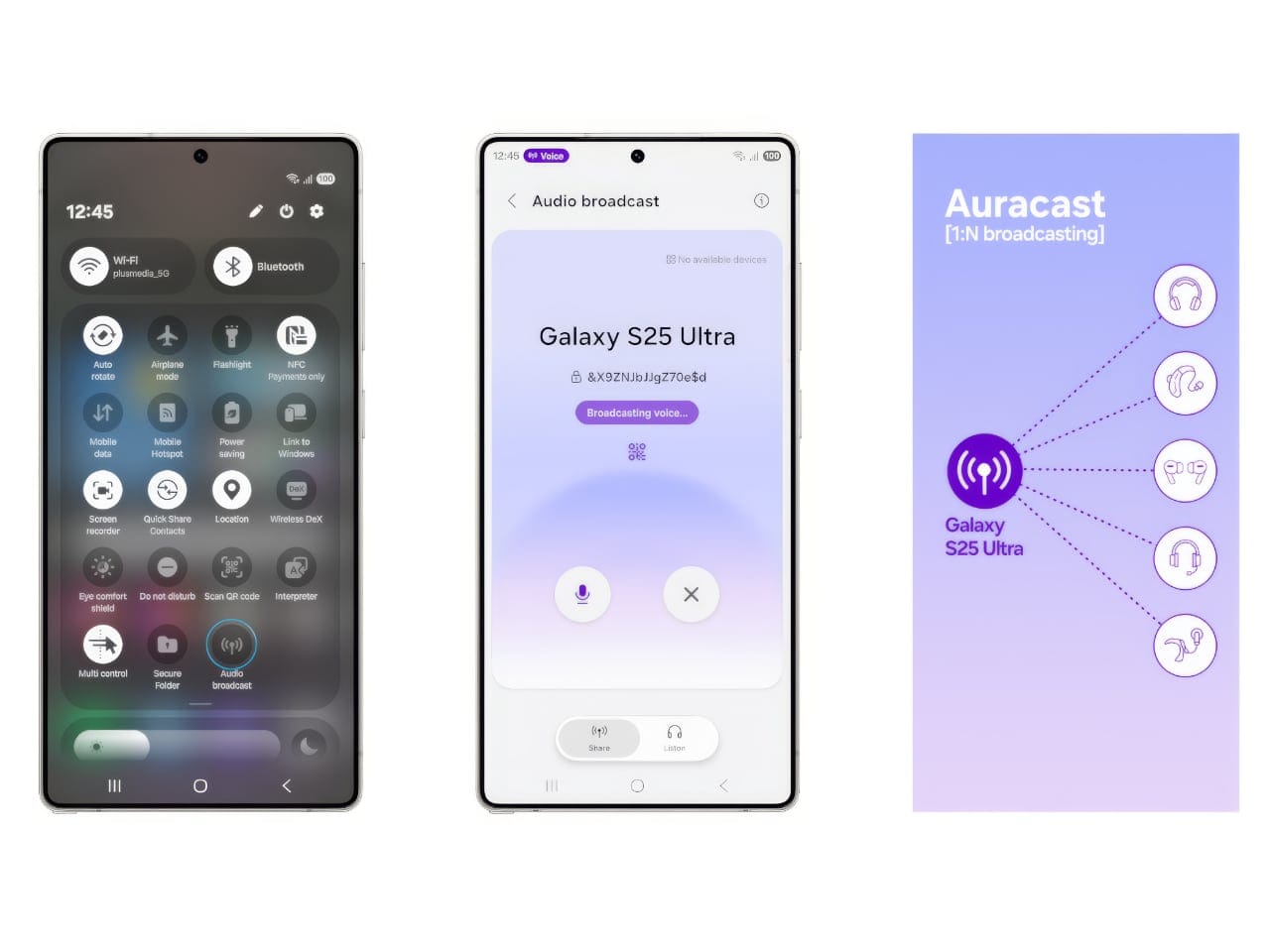
Audio Broadcast: your phone as a mini PA system
If you’ve ever tried shouting over a group, this one’s for you.
- Uses Audio Broadcast with LE Audio and Auracast to talk to nearby supported devices
- Can broadcast regular media audio or your voice via the phone’s microphone
- Aimed at group contexts like tours, events or small sessions
Audio Broadcast takes advantage of LE Audio and Auracast so your Galaxy phone can beam out sound to nearby supported devices. That could be visitors’ Galaxy Buds or other compatible earphones in a tour group, or multiple speakers in a small event space. The key change here is that One UI 8.5 lets you broadcast not just media like music, but also your voice using the phone’s mic, so your Galaxy basically doubles as a lightweight announcement system.
Tougher security: theft protection and smarter locks
Samsung is tightening the screws on how easy it is to mess with your phone if it’s lost or stolen.
- Theft Protection keeps the phone and its data safer if the device goes missing
- Failed Authentication Lock triggers a lock after too many failed PIN, password or fingerprint attempts
- Identity check now covers more settings, adding an extra verification layer
The new security features are there to make your Galaxy less attractive to thieves and nosy people. Theft Protection is designed to keep your data safe even if someone has the physical phone. Failed Authentication Lock stops repeated guessing of your credentials, and the broader identity checks mean you’ll have to confirm it’s really you before changing more sensitive settings. This lines up with Samsung’s wider push for long-term device support and security we’ve seen on recent Galaxy flagships.
Where One UI 8.5 beta is available and how to join
Here’s the important bit: who actually gets it now.
- First wave covers Galaxy S25 series users
- Initial markets: Germany, India, Korea, Poland, the UK and the US
- Beta enrolment is via the Samsung Members app
If you’re in one of the supported regions with a Galaxy S25, S25+, or S25 Ultra, you can apply for the beta from the Samsung Members app on your phone. Look for a banner about the One UI 8.5 beta in the app once it goes live for your account. For UAE users, the beta isn’t in the first announced batch, so it may land later or you might see it only once the stable update rolls out. You can keep an eye on the Samsung Members Gulf page for local updates.
If you’re still deciding on which Galaxy to grab, we’ve already broken down Galaxy S25 FE pricing and specs in the UAE, plus how One UI 8 is used across Samsung’s newer tablets and foldables.
FAQs: One UI 8.5 beta, answered
What is One UI 8.5?
One UI 8.5 is Samsung’s latest software skin on top of Android for Galaxy devices. This beta focuses on easing everyday tasks with smarter content creation tools, better cross-device sharing, and stronger security features like Theft Protection and improved lock behaviour.
Which devices get the One UI 8.5 beta first?
Samsung is launching the One UI 8.5 beta first for the Galaxy S25 series in select markets. The initial rollout covers Germany, India, Korea, Poland, the UK and the US. Other devices and regions, including the UAE, haven’t been confirmed yet in the official announcement.
How do I join the One UI 8.5 beta?
You need a compatible Galaxy S25 series device in a supported country. From there, open the Samsung Members app and look for the One UI 8.5 beta banner to apply. Once accepted, you’ll get the beta as a regular software update.
Is One UI 8.5 beta available in the UAE?
The UAE is not listed in the first wave of beta markets. That doesn’t rule out a later expansion, but for now UAE users will likely have to wait for either a later beta phase or the stable release. It’s worth checking Samsung Members occasionally for any local beta notices.
Does One UI 8.5 improve security on my Galaxy?
Yes. One UI 8.5 adds Theft Protection, Failed Authentication Lock and wider identity checks for sensitive settings. Together, these tools are meant to make it harder for someone to access or resell your phone and data if it’s lost or stolen, and to stop repeated unlock attempts.
Written by

Subscribe to our newsletter
Subscribe to our newsletter to get the latest updates and news








Member discussion