Samsung has never been subtle about who the Galaxy Buds are for. These are earbuds built for Android users who watched iPhone owners smugly pop open AirPods Pro and thought, right, where’s our version of that?
At AED 949 / $249, the Galaxy Buds4 Pro goes straight for the premium crowd. It sits right next to the AirPods Pro 3 on price and, at least on paper, matches or beats Apple’s pair in a few key areas. Better codec support on Samsung devices, more EQ control, a dual-driver setup, and a feature list so long it starts to feel mildly threatening.
This was my first time using a pair of Galaxy Buds, so I came in with no baggage and no brand loyalty, which is probably the healthiest way to review consumer tech before the ecosystem nonsense starts. Since I’m primarily an iPhone user, I borrowed a Galaxy Flip6 to get the full experience, because several of the Buds4 Pro’s headline features are locked to Samsung devices. That includes spatial audio with head tracking, the SSC UHQ hi-res codec, and Live Translation. If you plan to use these on a Windows PC or Mac, there is a workaround I’ll get to later.
Compared to the Buds3 Pro, Samsung has redesigned the case, improved noise cancellation with a new ANC 2.0 system, added an extra hour of battery life, upgraded connectivity to Bluetooth 6.1, and moved to a dual-driver setup consisting of an 11mm woofer and a dedicated tweeter.
Against the AirPods Pro 3, the Buds4 Pro matches on price, ANC, spatial audio with head tracking, and IP57 water resistance. Samsung pulls ahead with more audio control, better codec support on its own devices, a nine-band EQ, and a dual-driver design. Apple still has the cleaner ecosystem experience and a slight edge on battery life, but this is the closest Samsung has come to making a true AirPods Pro rival.
Design, Comfort and Features
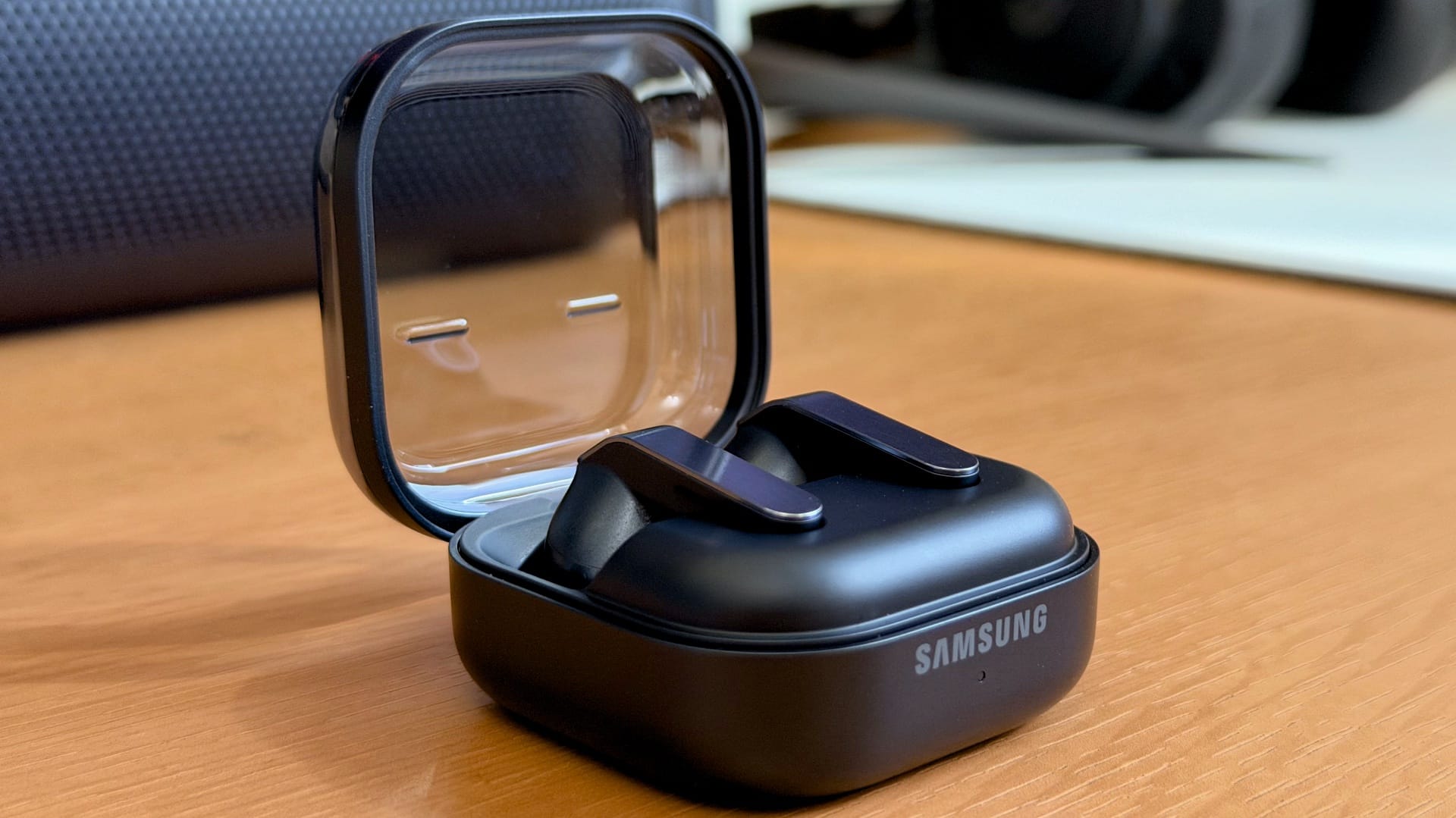
Samsung has reworked the case design, and for the better, I would say. Gone is the classic, and admittedly old, rectangular form factor of the Buds3 Pro, replaced by a compact clamshell design with a transparent lid that lets you see the earbuds sitting inside. We received the Black colourway, and it carries a polished, understated finish that feels classy and every bit of the price it commands.

My initial concern with the clear plastic lid was durability. Transparent plastic tends to age badly – scratches show up fast, and the “new product” shine disappears quickly. After a week of dropping it into bags, pockets alongside keys, and placing it on various surfaces (as carelessly as my heart allowed), it hasn’t picked up a single scratch. Fingerprints and smudges, yes – that’s unavoidable with glossy plastic – but the surface itself has held up better than I expected. No idea how it will fair longterm, however. The case is also pocketable without any fuss, and both wired USB-C and wireless charging are supported. No charging cable in the box, though, which well…what can ya say about that these days?

The earbuds haven’t strayed too far from what the Buds3 Pro established – the stem-and-bud shape is carried over, though Samsung has cleaned up the look considerably. The blade lights that ran along the stem of the previous model are gone, replaced by a brushed metal strip that sits flush against the outer face. It’s a small change that makes a noticeable difference; the Buds4 Pro looks more refined and premium than their predecessor. Yes, the stem design will inevitably draw AirPods Pro comparisons, but that’s true of pretty much any earbud with a stem at this point. I actually like the design of the Buds4 Pro over the AirPods Pro, if you ask me. Each bud weighs 5.1 grams, and that lightness is apparent the moment you put them on.

Controls work on a pinch-and-swipe system. A single pinch plays or pauses, two pinches skip forward, three go back, and a pinch-and-hold cycles between noise modes. Swiping up or down on the stem controls volume. It’s largely intuitive once you have spent a day with it, though the pinch gestures require a firmer squeeze than you would expect – a feature-light touch won’t register, and it needs to be pressed in its exact place. I do prefer a good old button, at the end of the day though. Volume control via the swipe was the most consistent of the two, though the jumps between levels can be a bit coarse for sensitive listeners who prefer finer adjustments.
Comfort is where things get more personal. The Buds4 Pro are among the most secure-fitting earbuds I have tested – they stayed firmly in place through gym sessions, running on a treadmill, and general head-shaking, with no sign of shifting. In that respect, they are excellent. But “secure” doesn’t always mean “comfortable”.

I am kind of split on how I feel about the Buds4 Pro here. The ear tips – I tried both the medium (default) and large sizes – sit deep enough in the canal that they create a pressure and fullness sensation after a while. It doesn’t happen every time; I have watched two-hour films with them on without issue, and then had sessions where I need to take them out after ten or fifteen minutes because of the numbness. The small tips avoid this entirely, but compromise the seal to the point where ANC becomes nearly ineffective, which defeats the purpose.
It’s a fit issue more than a design flaw, and your mileage will vary depending on your ear shape. But it’s worth knowing going in, especially if you are sensitive to in-ear pressure.
The Galaxy Buds App
When you first connect the Buds4 Pro to a compatible Samsung device, a dedicated shortcut appears at the top of the Settings app for quick access. Worth noting: on my unit, tapping that shortcut did nothing on the first try. The fix turned out to be a manual update of the Galaxy Buds app through the Samsung Store – it hadn’t updated automatically, and there was no prompt to do so. Once that was sorted, everything worked as it should. If you run into the same wall, that’s where to look first.
Galaxy Buds app experience
The app itself is clean and well-organised. The main screen gives you a noise mode switch – cycling between off, Ambient Sound, Adaptive, and ANC – along with a slider to adjust the ANC intensity level. You can also set it to auto-switch to Ambient Sound when it detects voices or sirens, which is a handy toggle for commuting or walking in busy areas. This works really well, although I do wish it would trigger sooner, as you tend to miss the first few seconds of the conversation when someone approaches you, and you have to ask them to repeat it because of the strong ANC.


Earbud controls are customizable to a reasonable degree. The pinch features for media and call controls are fixed, but the pinch-and-hold action can be set independently for each bud. By default, the right handles noise mode switching and the left triggers your voice assistant, but you can reassign them. I swapped the left to Interpreter, which launches a live translation mode directly from the earbuds – it captures speech, translates it on the fly, plays the translation back in your ear, and displays it on screen simultaneously. Language support covers most major languages, including Arabic and Hindi, and in basic testing, it held up reasonably well.
Under Sound Quality and Effects, you get EQ presets like Balanced, Treble Boost, Dynamic, Clear, and Bass Boost, plus a Custom option to manually tune all nine bands. There’s also an Adjust Sound to Fit that automatically tweaks the audio output based on your ear shape and how the buds sit, and an Earbud Fit Test that confirms whether you have a proper seal. Buried in the Accessibility settings is Adapt Sound, which runs a hearing test of sorts – a series of beeps and boops into each ear – and builds a personalised sound profile from the results. More on how that affects things in the next section.


Laptop support with Galaxy Buds Manager
If you want to use the Buds 4 Pro with a laptop, there is an unofficial Galaxy Buds Manager available for Windows, macOS, and Linux that’s worth knowing about. It covers essentially everything the Samsung app does on a Galaxy phone – noise control, equaliser, touchpad remapping, find my earbuds via SmartThings, and a fairly detailed Advanced Settings menu with options like Conversation Detection timeout, Sharpen Call Sound for noisy environments, in-ear detection, seamless device switching, and even keyboard hotkeys to control the buds directly from your laptop.
It’s a surprisingly thorough companion for a third-party app, and it fills a gap that Samsung hasn’t officially addressed (and likely never will). On mobile, if you are not on a Samsung device, you are largely on your own. For example, when connected to an iPhone, you do get pinch controls, ANC, Ambient mode, and the default audio profile, but nothing more.
What’s missing across all of this is Bluetooth Multipoint. Auto-switching only works between Samsung devices, so if you are juggling a phone and a laptop from different brands, you will need to disconnect and reconnect each time manually.
Audio Quality and ANC
The Buds4 Pro run a dual-driver setup per earbud – an 11mm woofer handling the low end paired with a dedicated tweeter for the highs. It’s an upgrade over the Buds3 Pro’s single-driver configuration, and the separation between the two drivers gives Samsung more control over the frequency range. The AirPods Pro 3, by comparison, still uses a single driver per side, so on paper at least, Samsung has a structural advantage. Audio transmission on a compatible Samsung device runs through the SSC UHQ codec at up to 24-bit/96kHz, which puts it firmly in hi-res territory – something the AirPods Pro 3 doesn’t offer over Bluetooth.
Out of the box, Samsung has tuned the Buds4 Pro to be aggressively bass-heavy, and bass lovers will find a lot to like here. I appreciate bass too, but only when it’s well-controlled and punchy; this is just a bit over the top. The low end is boomy to the point where it starts to feel bloated – it doesn’t sit underneath the music so much as it sits on top of it, looming over the mid-range and casting a dark shadow over the whole presentation.

The fix, fortunately, is straightforward. Switching to the Clear equaliser preset does exactly what the name suggests – it reins in the bass, brings the mid-range forward, and eases off the treble just enough to let the music breathe. It’s also worth noting that the Adapt Sound profile generated by the personalised hearing test lands in almost the same place as Clear, so if you run through that process, you will likely end up with your preferred profile.
With Clear enabled, the Buds4 Pro are a genuinely impressive listen. Detail retrieval is excellent – small textures in recordings that you might gloss over on lesser earbuds come through with clarity and definition. The mid-range is punchy and present, and the soundstage is surprisingly wide for earbuds this size. It doesn’t feel closed-in or intimate the way a lot of in-ears do; there’s actual space between instruments and a sense of air around the sound that makes longer listening sessions more engaging.
That said, Clear isn’t the right choice for everyone. Something like “Chop Suey” by System of a Down hits harder and carries more energy on the Dynamic present, even if the bass encroaches on the mids a little. The point is that the EQ is versatile enough that you can dial the Buds4 Pro into something that suits your taste, and whatever that preference is, they can sound excellent.
The 360 Audio mode – Samsung’s spatial audio implementation – is worth mentioning separately. For music, I left it off, although it’s not too bad with it on. For movies, though, it’s a different story. It wraps the sound around you in a way that’s genuinely immersive without smearing the dialogue, and the effect on film audio in particular is impressive enough that I did not miss my regular headphones at all.

The ANC is top-notch. With music or a film playing, the outside world largely disappears – ambient noise, background hum, the general buzz of an environment all get pushed well into the background. A more telling test I like to do is to wear earbuds with a podcast on during a walk, when the content is quieter, and any bleed-through is more noticeable. The Buds4 Pro handled that well – wind noise was mostly suppressed, the environmental buzz was eliminated, and the only thing that made it through was the occasional passing car engine, and even that came through quietly enough not to interfere. For daily use, the ANC is as good as anything at this price.
Ambient mode is equally strong. Voice clarity through the microphones is natural, and the Conversation Detection feature – which automatically switches to Ambient Sound when it picks up your voice – works well enough that I stopped removing the earbuds when someone spoke to me. It just handles it. If you listen carefully, there is a slight background hiss when Ambient Sound is active, but in normal use, it’s easy to ignore.
Call Quality and Battery Life
The Buds4 Pro uses a combination of three mics and a voice pickup unit per earbud to handle calls, and the results are solid. Everyone I called or held meetings with could hear me clearly without complaint. Background noise pickup is well controlled – the mics do a good job of isolating your voice from whatever is going on around you, and the Super Wide Band Speech feature, which extends call audio bandwidth to 16kHz on compatible Samsung devices, should add some clarity and naturalness to how voices sound on both ends.
Battery life is adequate but not exceptional. Each earbud carries a 61mAh cell, good for seven hours of continuous playback with ANC off and six hours with it on. The case holds enough charge for roughly three additional top-ups, bringing the total to around 30 hours without ANC and 26 hours with it. Those numbers are competitive with the Bose QuietComfort Ultra Earbuds, though the AirPods Pro 3 and Sony WF-1000XM6 both edge ahead with eight hours on in-bud playback. It’s not a dealbreaker – and six hours should ideally cover a work day and some – but it is the one area where the Buds4 Pro trail their closest rivals.

Charging is handled via USB-C or wirelessly. No charging cable is included in the box, which is a minor annoyance given the price. One thing to note here is that enabling the Advanced Quality Options – UHQ audio and Super Wide Band Speech – does draw on the battery faster than standard playback, so if you are pushing the hi-res codec all day, you may fall a little short of the rated figures.
Should You Buy the Samsung Galaxy Buds4 Pro?
If you are a Samsung phone user looking for a pair of flagship earbuds that slot neatly into your ecosystem the way AirPods Pro do for iPhone/Mac users, the Buds4 Pro makes a compelling case. The sound quality – once you move past the default tuning – is genuinely excellent, the ANC holds its own against the best at this price, the feature set is extensive, and the build quality is polished.
There are some caveats, though. The ecosystem dependency is significant – a good chunk of what makes the Buds4 Pro worth AED 949 / $249 simply isn’t accessible without a compatible Samsung device, which is fine if you are a Samsung phone user, but there is a good chance you have a Windows/Apple laptop, over a Samsung one, and you won’t get the full set of features, or multipoint connection. Battery life trails the AirPods 3 and Sony WF-1000XM6 by a small margin, as well. The default sound tuning requires some EQ work – unless you enjoy unfiltered bass, and the comfort, while good for most, may not suit everyone, depending on the ear canal sensitivity.
For non-Samsung Android users, the Galaxy Wearable app on the Play Store gives you access to most of the core settings – EQ, noise controls, touch customisation -though features like the SSC UHQ hi-res codec and spatial audio remain locked to Samsung devices. For iPhone users, there’s little reason to consider the Buds4 Pro over the AirPods Pro 3 unless you are fond of the sound quality of the Buds4 Pro.
Taken on their own terms – as Samsung’s best earbuds yet, aimed squarely at people already in the galaxy ecosystem – the Buds4 Pro delivers. They are not perfect, but they are the closest Samsung has come to getting it right.
FAQs
Are the Samsung Galaxy Buds4 Pro worth buying?
Yes, especially if you use a Samsung phone. They offer excellent ANC, strong sound quality once tuned, and a deep feature set. They are less compelling for iPhone users.
Do the Samsung Galaxy Buds4 Pro work with an iPhone?
Yes, but in a limited way. You still get basic playback controls, ANC, and Ambient mode, but many advanced features are locked to Samsung devices.
Do the Galaxy Buds4 Pro have multipoint Bluetooth?
No. They support auto-switching between Samsung devices, but they do not offer traditional Bluetooth multipoint for use across different brands.
How is the sound quality on the Galaxy Buds4 Pro?
Very good, but the default tuning is too bass-heavy. Switching to the Clear EQ preset improves balance and makes them sound much better.
How good is the ANC on the Galaxy Buds4 Pro?
ANC is excellent and among the best in the category. It does a strong job of cutting out background noise during music, films, podcasts, and daily commuting.