
DLSS 5 Explained: How Nvidia's Neural Renderer Actually Works
DLSS 5 isn't just smarter upscaling. Nvidia's new neural renderer understands what's in the scene — and re-lights it. Here's the full breakdown.

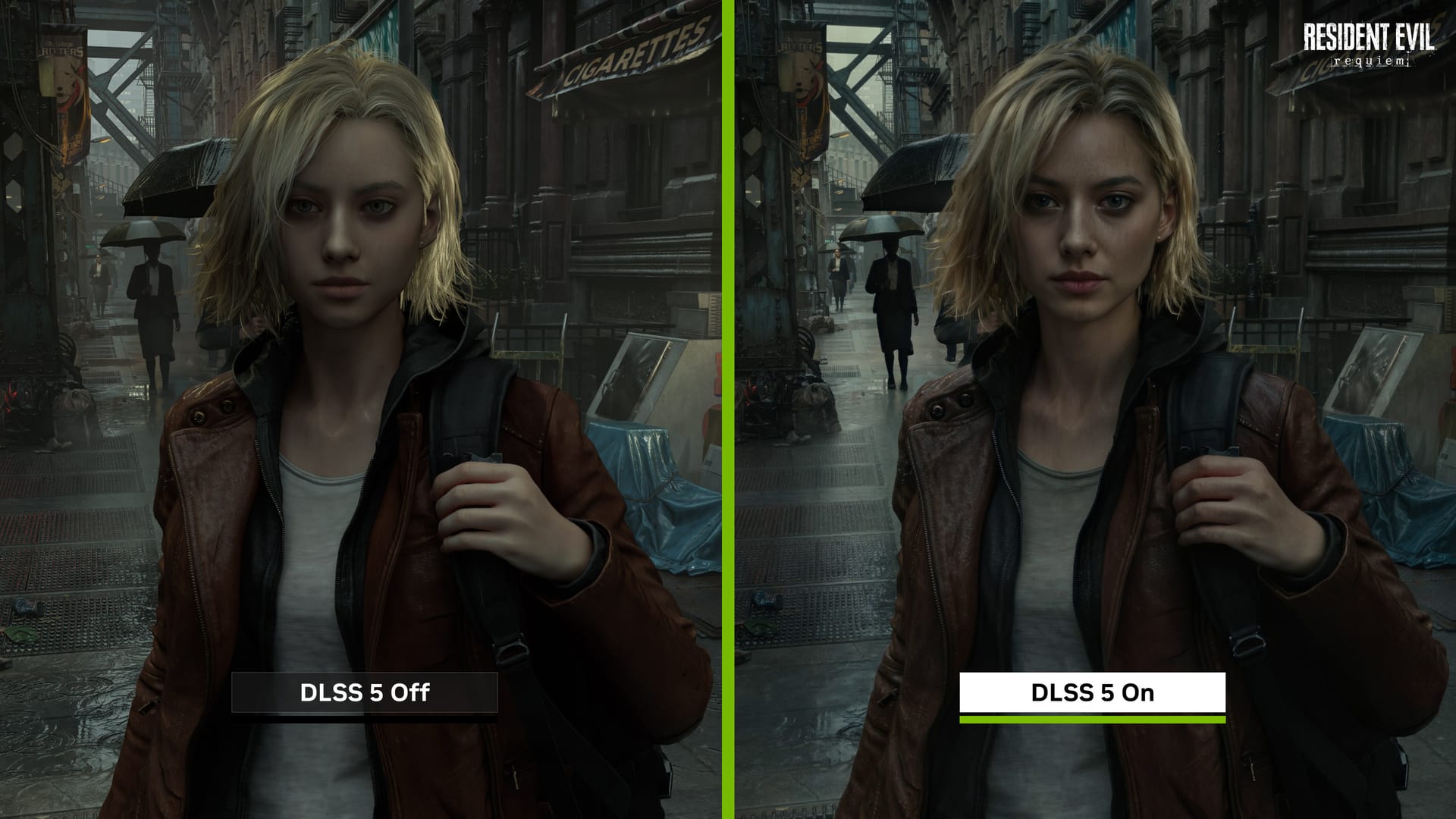
Quick Answer: DLSS 5 is Nvidia's first neural rendering system for games. Unlike previous DLSS versions that just upscaled or generated frames, DLSS 5 uses a large AI model to analyse faces, materials, and lighting in real time — then re-shades each frame accordingly. It runs on RTX tensor cores and is optimised for RTX 50-series GPUs.
Nvidia has been using the word "breakthrough" to describe every DLSS release since 2018. This time, it might actually mean it.
DLSS 5 isn't a better upscaler or a smarter frame generator. It's a neural renderer — a system that looks at what's in a scene, understands the materials and lighting, and then re-shades the image using AI-inferred light transport.
Here's exactly how it works, why RTX 50-series cards matter, and what it actually looks like on real hardware.
What Is DLSS 5? The Short Version
Nvidia describes DLSS 5 as an "AI-powered breakthrough in visual fidelity for games" that sits on top of the existing DLSS stack — Super Resolution, Multi-Frame Generation, and Ray Reconstruction — and adds a fourth stage: neural shading.
Previous DLSS versions were, at their core, image reconstruction tools. They took a low-resolution frame and used AI to guess what a high-resolution version should look like. DLSS 5 does something different: it uses AI to understand what's in the frame — characters, hair, fabrics, skin, reflective surfaces — and applies physically-informed shading behaviours to each material type accordingly.
On Nvidia's official DLSS developer page, DLSS is now framed as a suite of neural rendering technologies rather than a single upscaler. DLSS 5 is the layer that earns that framing.
Which GPUs Support DLSS 5?
| GPU Generation | DLSS 5 Support | Notes |
|---|---|---|
| RTX 50 Series (Blackwell) | ✅ Full | Best performance; optimised for FP8 tensor cores |
| RTX 40 Series (Ada) | ⚠️ Partial | May run at reduced quality or affect frame times |
| RTX 30 Series and older | ❌ Not supported | Insufficient tensor throughput |
DLSS 5 is compute-heavy. It adds a large neural model on top of an already demanding stack. On RTX 50-series, there's enough tensor throughput to run Super Resolution, Multi-Frame Generation, and DLSS 5's neural shading simultaneously. On older cards, Nvidia hasn't committed to full support — and based on how previous DLSS versions scaled, don't hold your breath.
How DLSS Evolved: From DLSS 1 to DLSS 5
Understanding what DLSS 5 changes requires knowing what came before it. Here's the short version:
DLSS 1.x used per-game trained convolutional neural networks. Each title needed its own model, trained specifically on that game's render output. It worked, but it didn't scale.
DLSS 2.x moved to a generalised model trained across many games on Nvidia's Saturn V supercomputer. The model takes a low-resolution frame, motion vectors, depth, and exposure as inputs, then reconstructs a high-resolution image that approximates a 64x supersampled reference frame. This is where DLSS became a widely-supported feature rather than a boutique experiment.
DLSS 3 and 4 introduced Frame Generation on RTX 40-series — interpolating whole new frames between rendered ones using optical flow, massively boosting effective FPS. DLSS remained conceptually an image reconstruction tool, just with bonus frames.
DLSS 4.5 introduced a second-generation vision transformer for Super Resolution, trained across multiple resolutions and running on FP8 tensor cores in RTX 40- and 50-series GPUs. It also added Dynamic Multi-Frame Generation, capable of generating up to six frames per base frame — targeting 4K at 240Hz. Still reconstruction, just more sophisticated.
DLSS 5 is where reconstruction becomes interpretation.
How DLSS 5 Actually Works: The Full Pipeline
Step 1: The engine still does the heavy lifting
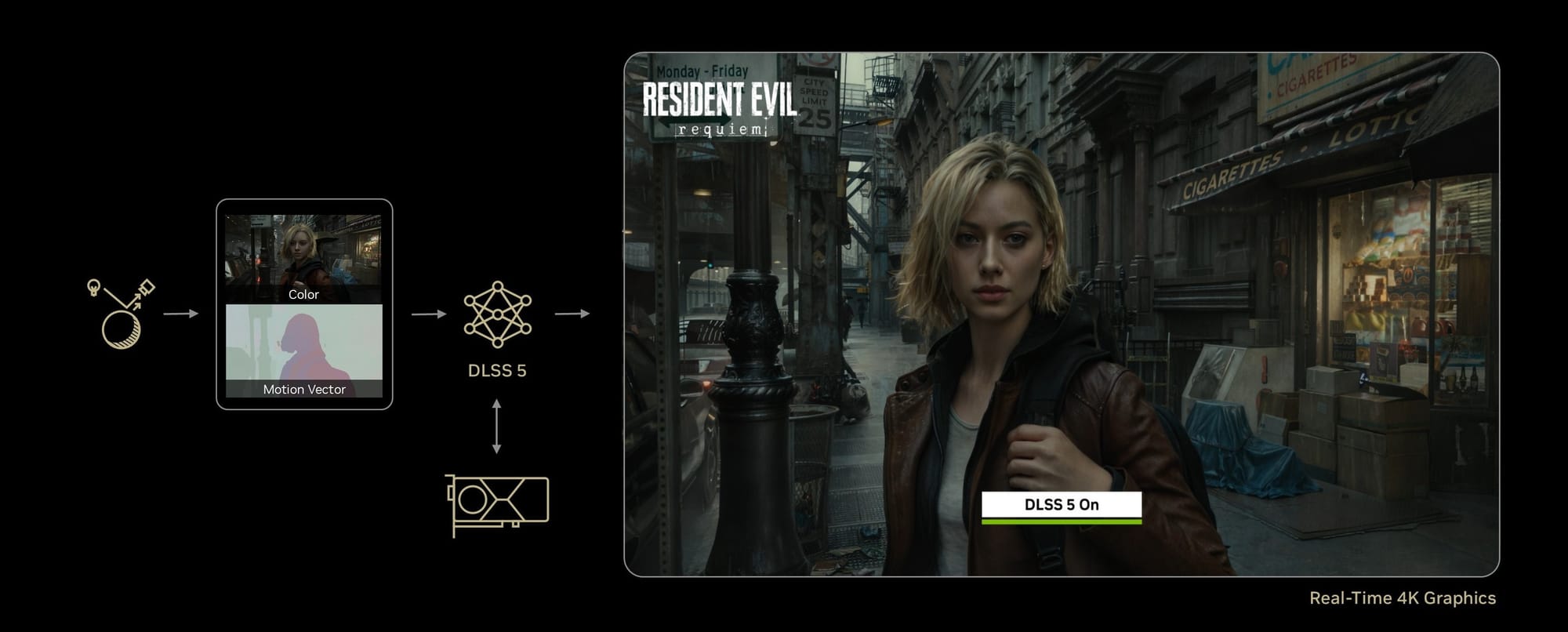
Nothing changes at the engine level. The game rasterises geometry at a lower internal resolution, applies its usual lighting model (including ray tracing if enabled), and produces the same set of buffers it always has:
- Low-resolution colour buffer
- Depth and surface normals
- Motion vectors
- Material IDs and G-buffer data (where exposed)
- Exposure and camera information
This is unchanged from DLSS 2 onwards and is detailed in Nvidia's Unity and Unreal DLSS plugin documentation.
Step 2: Super Resolution and Multi-Frame Generation (optional)
Depending on developer implementation and player settings:
- DLSS Super Resolution (the 4.x transformer model) upscales the low-res colour buffer to target resolution using temporal history and motion vectors.
- DLSS Multi-Frame Generation interpolates additional frames to boost FPS.
Either way, this stage produces a temporally stable, high-resolution base frame. This is the input that DLSS 5 then works on.
Step 3: DLSS 5 neural rendering
This is the new block. It takes as input:
- The current high-resolution base frame
- The original low-res colour, depth, normals, and motion buffers
- A history buffer encoding recent frame data
- Any material IDs or masks the engine exposes
Inside, three logical sub-systems run simultaneously:
Semantic/material classifier A branch of the network identifies specific regions and material types as first-class scene elements:
- Faces and exposed skin
- Hair and fur
- Fabrics and clothing
- Metals, glass, and reflective surfaces
- Foliage, fog, smoke, and volumetric effects
Lighting estimator A second branch infers the lighting context of the scene — not just where the light is coming from, but its quality:
- Overall scene type (indoor vs outdoor, sunny vs overcast)
- Local lighting direction (front-lit, back-lit, side-lit)
- Intensity ratios between key, fill, and rim lighting
Neural shading compositor The main decoder combines semantic, material, and lighting information with the base frame and history to produce a re-shaded image. This is where the physics-informed behaviour applies:
- Subsurface scattering for skin — faces stop looking like wax under flashlights
- Anisotropic highlights on hair — fewer temporal sparkle artifacts in motion
- Cloth-like diffusion on fabrics — replaces the plasticky sheen from aggressive post-processing
- Cleaner GI and reflections — the model differentiates between frosted glass and glossy paint and treats them accordingly
Step 4: Developer controls and masking
One of the more important practical details is that developers aren't forced to accept whatever the neural renderer decides. Nvidia's DLSS 5 announcement confirms that the system includes intensity controls, colour grading overrides, and per-element masking — so artists can:
- Adjust intensity separately for characters vs environments
- Exclude UI, stylised elements, or cutscene layers entirely
- Apply colour-grading curves on top of DLSS 5's output
Step 5: Final frame output
After DLSS 5 completes:
- Remaining post-processing (bloom, lens effects, tone mapping) runs as normal
- UI and HUD elements are composited back in
- The frame hits your monitor
The practical differences you'll notice most:
- Faces in dramatic lighting stop looking compositied in from a different engine
- Hair and thin geometry hold up better during motion
- Noisy ray-traced reflections clean up without losing their character
- Flat midday scenes look similar to DLSS 4 — which is exactly how a good default should behave
How Nvidia Trains DLSS 5
The training pipeline for DLSS 5 builds on the same teacher-student architecture Nvidia has used since DLSS 2, as described in official Nvidia DLSS presentations.
Generating ground truth frames Training starts with the game engine itself. Nvidia runs engines across many scenes, times of day, and settings — capturing a low-resolution render alongside a 64x supersampled "perfect frame" for each sample. Those 64-sample-per-pixel renders are far too expensive for real-time gameplay, but they're ideal reference material for a neural network to learn from.
Dataset augmentation The raw dataset is augmented with rotations, noise, and colour/brightness shifts to prevent memorisation and improve robustness on edge cases.
Teacher vs student The teacher path sees the perfect 64x supersampled frame. The student network sees only the low-res colour buffer, motion vectors, depth, normals, and exposure — and learns to reconstruct a result that matches the teacher. Loss functions penalise pixel-level differences as well as temporal artifacts like ghosting, flicker, and blur.
What makes DLSS 5's training distinct is the additional material and lighting supervision — the dataset is tilted toward scenes with complex skin, hair, fabrics, and varied lighting conditions, which is what shapes the semantic understanding at inference time.
Runtime deployment Once the student's weights converge, the model is compressed and quantised to FP16/FP8/INT8 precision and shipped in the DLSS runtime DLL. At runtime it executes on RTX tensor cores — taking low-res frames in, high-res re-shaded frames out, at playable frame rates.
Why RTX 50 Series Specifically?
DLSS has always been a tensor-core play. An RTX GPU splits compute across three types of core:
- Shader cores — traditional programmable shading and rasterisation
- RT cores — ray traversal and BVH acceleration
- Tensor cores — low-precision matrix multiply/accumulate operations (neural network maths)
DLSS 4.5 already leans hard on FP8 tensor cores, as Nvidia notes in its DLSS 4.5 blog post. DLSS 5 adds another large model on top of that stack.
On RTX 50-series, tensor throughput is sufficient to run Super Resolution, Multi-Frame Generation, and DLSS 5's neural shading simultaneously — with shader and RT cores still handling geometry and ray tracing. At 4K in a path-traced game, this is where DLSS 5 makes its strongest argument.
On older RTX cards, DLSS 5 will either run at reduced quality or introduce frame time overhead. Nvidia hasn't published a formal compatibility matrix yet, but given that RTX 6000-generation GPUs have been pushed to 2028 due to AI memory demand at the data-centre level, DLSS 5 is clearly designed to keep RTX 5080- and 5090-class cards relevant — and premium-priced — for several years.
What It Actually Looks Like: Real-World Impressions
Here's are the general impressions based on real-world use from other users:
Where DLSS 5 earns it:
- In dark, ray-traced scenes — horror games, neon cityscapes — faces and skin finally feel like they belong in the environment. Subsurface scattering under flashlights and spotlights is noticeably more believable.
- Long hair shows fewer temporal artifacts and less sparkle in motion. Cloth materials lose the plasticky sheen associated with aggressive post-processing.
- Noisy RT reflections clean up more gracefully, with the model correctly differentiating frosted glass from glossy paint.
Where the concerns are legitimate:
- Push the intensity too high and faces can look off — over-glossy skin, exaggerated contrast, uncanny valley territory.
- Some users worry about an "AI filter" aesthetic — every game nudged toward the same photoreal look, sanding off intentional art direction.
- Publishers may use DLSS 5 to ship heavier, under-optimised scenes and let the neural renderer cover for it.
Nvidia's answer is the developer control layer — intensity sliders, masks, colour grading. Whether studios use those responsibly will vary. If you've ever had to explain to a relative why motion smoothing makes their TV look wrong, you already know why PC players get twitchy when a GPU feature offers to "fix" the image for them.
DLSS 5 vs DLSS 4: What Actually Changed
| Feature | DLSS 4.5 | DLSS 5 |
|---|---|---|
| Super Resolution | ✅ 2nd-gen transformer | ✅ Same |
| Multi-Frame Generation | ✅ Up to 6x | ✅ Same |
| Neural shading | ❌ | ✅ New |
| Material understanding | ❌ | ✅ New |
| Lighting estimation | ❌ | ✅ New |
| Developer masking/controls | ❌ | ✅ New |
| Optimised for | RTX 40 + 50 | RTX 50 primary |
Frequently Asked Questions
What is DLSS 5? DLSS 5 is Nvidia's neural rendering system for PC games. Unlike previous DLSS versions that upscaled or generated frames, DLSS 5 uses AI to understand the materials and lighting in a scene — faces, hair, fabrics, reflective surfaces — and re-shades the frame accordingly in real time.
How does DLSS 5 work? DLSS 5 takes the engine's render buffers (colour, depth, normals, motion vectors, material IDs) and passes them through a neural network with three sub-systems: a semantic/material classifier, a lighting estimator, and a neural shading compositor. These work together to apply physically-informed shading behaviours — subsurface scattering on skin, anisotropic highlights on hair, correct material response for glass and metal — without needing the engine to explicitly calculate them.
Which GPUs support DLSS 5? DLSS 5 is optimised for RTX 50-series (Blackwell) GPUs, which have sufficient FP8 tensor throughput to run the full stack. RTX 40-series cards may see partial support at reduced quality. RTX 30-series and older are not supported.
What's the difference between DLSS 4 and DLSS 5? DLSS 4 (and 4.5 focused on better upscaling via a second-generation transformer model, and added Dynamic Multi-Frame Generation for up to 6x frame output. DLSS 5 adds neural shading on top — it doesn't just reconstruct the image, it reinterprets materials and lighting using AI. The upscaling and frame generation from DLSS 4.5 remain underneath.
Does DLSS 5 work on RTX 40 series? Nvidia has indicated partial support for RTX 40-series, but DLSS 5 is primarily optimised for the tensor throughput of RTX 50-series. Performance on RTX 40-series cards may be reduced, and Nvidia has not confirmed full feature parity.
For more GPU coverage, check out our RTX 50 Series hub and Best Graphics Card UAE 2026 guide.
Written by


Subscribe to our newsletter
Subscribe to our newsletter to get the latest updates and news







Member discussion