Motorola’s Razr lineup has always been about the clamshell – the flip phone that folds vertically and slips into a pocket with ease. The company has spent the better part of the last five years refining that formula, and it has gotten very good at it. The Razr Fold is something different altogether. This is Motorola’s first book-style foldable, and it puts the company squarely up against the Samsung Galaxy Z Fold 7 and the Google Pixel 10 Pro Fold – two devices that have had the segment largely to themselves in the region.
For a first attempt at the format, Motorola has not held back. The Razr Fold arrives with a triple 50MP camera system, a 6,000mAh silicon-carbon battery that charges at 80W wired, two large OLED displays, and support for the Moto Pen Ultra stylus. It is priced at AED 6,999, which puts it above the Galaxy Z Fold 7’s official AED 6,679 (512GB version), though on local Amazon.ae, the Fold 7 has been going for well under AED 1,000 of that price, which makes the value comparison considerably less straightforward.
Motorola Razr Fold
Motorola’s first book-style foldable is a remarkably complete package – great displays, excellent cameras, outstanding battery life, and stylus support make it a strong alternative to the Galaxy Z Fold 7, even if the camera’s processing and some other issues need work.
- Excellent dual OLED displays
- Outstanding battery life for a foldable
- Triple 50MP camera system produces great images
- Moto Pen Ultra works really well
- Clean OS with strong multitasking features
- Solid build quality and hinge
- Seven years of OS updates
- Camera viewfinder and video recording stutter
- Kinda heavy
- Speakers are meh
- Pen has no way to attack or store in to the phone
Where to buy · Prices checked September 25, 2026
AmazonAED 5,949View JumboAED 5,949View Sharaf DGAED 5,999View NoonAED 6,687ViewTbreak Media UAE may earn a commission on purchases made through these links — it never affects our scores.
Now, I am not, by nature, a foldable phone person. I find them interesting as a concept, but I have never found one compelling enough to actually stick with. The Razr Fold has started to change that a little bit, and I am having a hard time explaining why. It runs smoothly, handles multitasking without drama, and the pen works better than I expected. There is something about the way it all comes together that keeps me reaching for it. That is probably the best thing Motorola could have hoped to hear.
Specifications
Specifications
Motorola Razr Fold
Body
Display
Camera
Hardware
Battery
A handsome, heavy slab with one slightly sharp edge
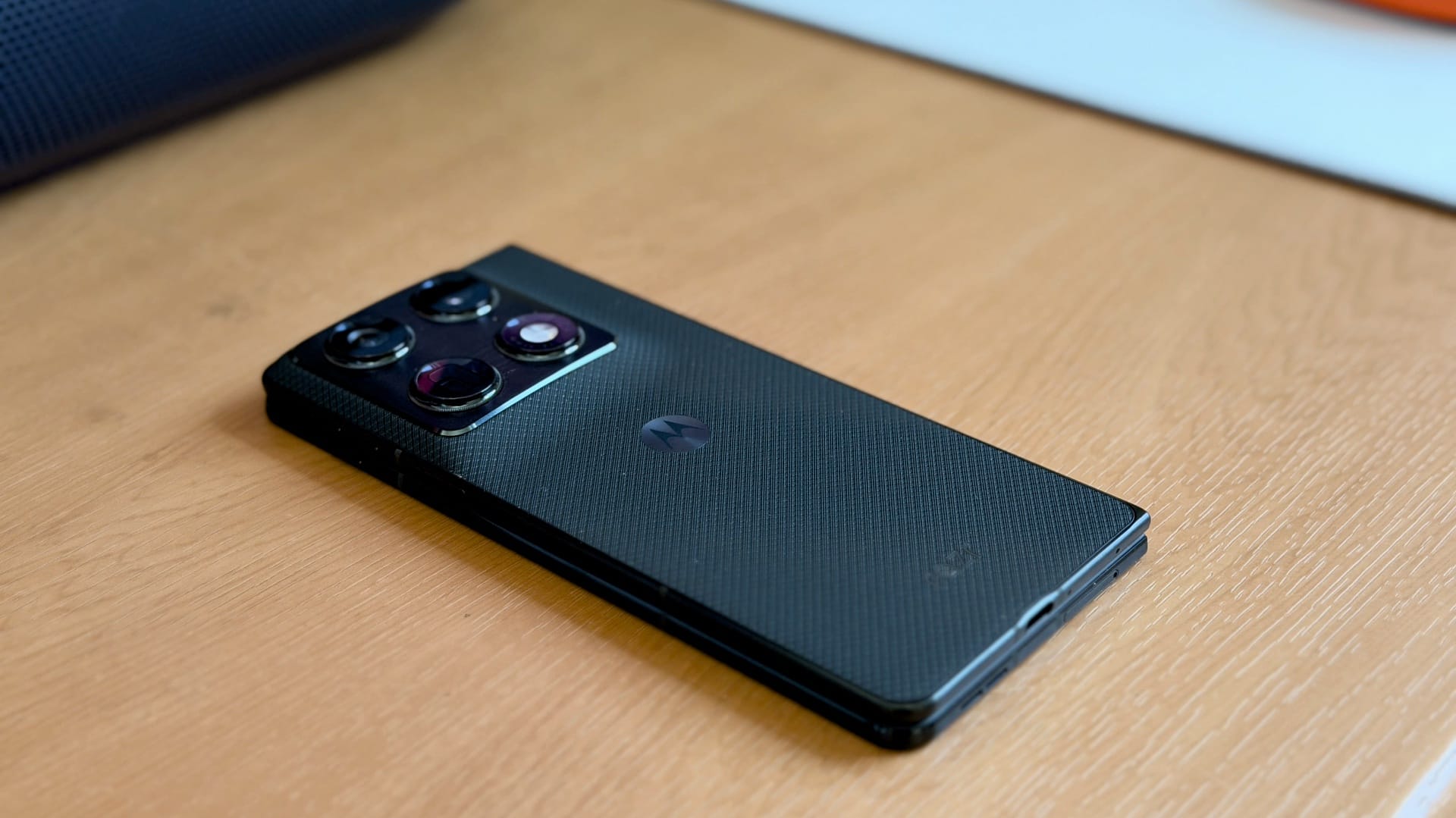
The Razr Fold comes in Pantone Lily White and Pantone Blackened Blue – I have the latter, and it is a good-looking phone. The back features a soft, slightly rubbery texture that sits somewhere between faux leather and polished plastic. It does not feel cheap, and the grip it provides is welcome on a phone that weighs 243g. The slightly elevated camera island is classic Motorola, and the overall design reads as clean and restrained rather than trying too hard to be different from what the company has developed over the years.

In the hand, the Razr Fold feels solid whether folded or fully open. The rounded corners and slim bezels make it comfortable to hold, and there is no flex or creak anywhere that would give you pause about the build quality. The weight, though, does eventually make itself known. When you are holding the phone in its folded state, 243g presses down on your pinkie finger, particularly because you are effectively gripping two screens’ worth of device. It’s not a dealbreaker, though.

One detail that caught my attention is the back coating itself. The material sits slightly proud of the frame, and where it meets the side of the phone, the edge becomes noticeably sharp. When gripping the device folded, that edge can dig into the side of your finger. It is not painful, and when the phone is open, your holding position changes enough that it stops being an issue- something to keep in mind, especially for the wear and tear after several months or years of use.

The hinge is where Motorola has clearly put a lot of thought. The Razr Fold uses what the company calls a teardrop hinge design, with a titanium plate positioned behind the inner display. The crease is still there, and you can clearly see it if you tilt the phone — though when you actually run your fingers over it, the bump is noticeably less prominent than other foldables I have tried.

On the protection front, the cover screen is covered with Corning Gorilla Glass Ceramic 3 – making the Razr Fold the first phone to feature it – while the inner display gets an ultra-thin glass treatment. The device carries IP48 and IP49 ratings, meaning it can handle submersion and high-pressure water jets, which is pretty solid for a foldable.

The cover screen is 6.6″ LTPO P-OLED with a 165Hz refresh rate, 2520×1080 resolution, and a peak brightness of 6,000 nits. It is large enough to handle most everyday tasks without needing to open the phone at all. The inner screen steps things up to 8.1″, 2,232×2,484 resolution, 120Hz, and a peak of 6,200 nits. Both panels support Dolby Vision and HDR10+, and both are plenty bright in direct sunlight.


I have used the Razr Fold primarily in the fully open position because that is where it makes the most sense. The hinge can hold at any angle, enabling a couple of different modes of use. Tent Mode – propping the phone at roughly 90 degrees – surfaces the time, date, battery status and a handful of quick controls on the upper half of the screen (like a mini music player), which is handy if you want to prop it up on a desk. Laptop Mode splits the display across both halves to mimic a more desktop-like experience, but app support for it is still quite limited right now – YouTube handles it well, most other apps do not bother, and you will likely end up going fully flat anyway.
The stereo speakers are Bose-tuned and perfectly adequate for YouTube, calls, and day-to-day use, but they haven’t impressed me beyond that. There is also a slightly odd quirk when using the phone fully open: because the speakers are on the cover screen half of the device, the audio ends up feeling like it is coming predominantly from one side.

Like every other recent Motorola release, the Razr Fold also has a (very sharp) Moto AI button on the right side of the cover screen. The AI Button triggers Moto AI – Motorola’s suite of on-device and cloud-connected features. I have used it briefly to record and transcribe conversations and for quick searches, both of which work well, but these on-device AI features just aren’t for me.
The Razr Fold also supports the Moto Pen Ultra, which comes in the box. It works across both the cover and inner displays, supports 4,096 pressure levels, and writes with impressively low latency. The Galaxy Z Fold 7 dropped stylus support entirely, so Motorola stepping in and doing it well is a meaningful differentiator for anyone who found that feature useful. For connectivity, you get USB-C with DP 1.2, WiFi 7, Bluetooth, and NFC.
Excellent photos, frustrating to actually shoot with
The Razr Fold carries a triple 50MP camera system on the back, the same hardware as the Motorola Signature.

The rear setup is a triple 50MP system across all three lenses – the main sensor is a Sony Lytia 828, 1/1.28” with an f/1.6 aperture, OIS and PDAF. The periscope telephoto is a Sony Lytia 600 at 1/1.95”, f/2.4, with 3x optical zoom, OIS and dual-pixel PDAF – covering everything from 0.5x up to 3x optically and 100x digitally. The ultrawide is a 1/2.76″ 50MP unit at 12mm f/2.0 with PDAF. For video, the Razr Fold can shoot 8K at 30 fps in Dolby Vision, 4K at up to 120 fps in Dolby Vision, and 1080p at up to 240 fps.
There are two front cameras – a 32MP on the cover and a 20MP on the inner display. You don’t really have to use them for selfies since you can use the cover screen and flip the phone around to use it as a viewfinder.
DXOMark scored the Razr Fold at 164 overall, placing it 8th in the global ranking and at the top for foldables.


With that kind of camera setup, and this being Motorola’s flagship, the camera performance is unsurprising. I feel like Motorola doesn’t get enough attention and recognition for its camera systems, but they have been consistently good, and the Razr Fold is, too. In daylight, the pictures are brimming with detail, colour and vibrance, with excellent control over dynamic range and highlights. I don’t really have many nitpicks here, except that the colours could be a little too punchy for some — but for me, they look excellent.


For nighttime photography, the cameras are not as stellar, but the presented pictures are still very good, all things considered. One of the things that was immediately apparent to me is that the sensors manage to take in an obscene amount of light, to the point that it might lose the ‘artistic vision’ you might want to go with.
Take the highway shot in the sample gallery above: it looks bright enough that you would assume it was a late-evening shot, simply because the sensors soak up so much light from the street lamps and the mall. Also, notice the buildings in the distance; they are crisp and well-lit, but they were barely visible to my ageing eyes in real life. This might be a good or bad thing, depending on what you are looking for – I like the pictures, but I would also have liked a bit more balance and natural scenery in the way it handles lighting and shadows.
You can also see some obvious signs of oversharpening in almost all of the images, which could lead to some graininess or artifacting – most obvious in the street lamps from the highway picture. The cameras also start losing detail and apply a Vaseline-like smoothing to anything beyond the 4x zoom. Meanwhile, the 100x digital zoom is mostly useless, but it can capture pictures of large, far-away objects with enough detail to be recognisable.
Fast, but throttles harder than you would like
The Motorola Razr Fold runs on the Qualcomm Snapdragon 8 Gen 5 – not the Elite variant, which is a bit of a bummer considering the price point. Regardless, the 8 Gen 5 is no slouch and for its purpose it does the job relatively well, especially when compared to the Galaxy Z Fold 7.
Benchmarks compared
Moto Razr Fold vs. Galaxy Z Fold 7
| Benchmark | Motorola Razr Fold | Samsung Galaxy Z Fold 7 |
|---|---|---|
| Geekbench | ||
| Geekbench 6 CPU – Single Core | 2599 | 1734 |
| Geekbench 6 CPU – Multi Core | 8827 | 8308 |
| Geekbench GPU | 18054 | 16915 |
| Geekbench AI | 3807 | 3946 |
| 3DMark | ||
| 3DMark Steel Nomad Light | 2084 | 1568 |
| 3DMark Solar Bay Extreme | 867 | 989 |
| 3DMark Wildlife Extreme | 5107 | 4745 |
In Geekbench 6, the Razr Fold scored 2,599 in single-core and 8,827 in multi-core. The Galaxy Z Fold 7 scored 1,734 and 8,308, respectively. The Razr Fold leads in CPU performance, and it is not particularly close in single-core. GPU compute tells a similar story — 18,054 for the Razr Fold against the Fold 7’s 16,915.
The Fold 7 does pull ahead in two areas: Solar Bay Extreme, which leans heavily on ray-tracing, goes to the Fold 7 at 989 versus 867, and its AI score edges ahead 3,946 to 3,807. Everything else goes the other way — Wild Life Extreme lands at 5,107 to 4,745, Steel Nomad Light at 2,084 to 1,568, and both phones max out Slingshot Extreme.

Sustained performance is where things get more complicated. In the Wild Life Extreme Stress Test, the Razr Fold posted a stability rating of 61.2%, with a best loop score of 19,332 and a lowest of 11,839. What the numbers do not fully capture is how abruptly the drop happens – the phone started at 19,332 on Loop 1, was down to 17,396 by Loop 2, fell to 15,424 on Loop 3, and then hit 1,406 on Loop 4 before finding its feet and stabilising in the 11,000-13,000 range for the rest of the run.
Temps climbed from 33C to 43C throughout the test, which is warm but manageable, and battery drain came in at just 4% over the full duration, which was impressive considering the stress test ran at full load for around 20 minutes. The frame rate comparison between Loop 1 and Loop 16 tells the practical story: what started at up to 140fps settled into a range closer to 60-75fps by the time throttling had done its work.
61.2% is an honest number, and it does mean that sustained, heavy gaming will feel the difference from a phone with better thermal headroom. That said, the Razr Fold is not really a device people buy to run Genshin Impact at maximum settings for two hours straight. For the things a book-style foldable actually gets used for – productivity, multitasking, content consumption, the occasional casual game – the thermal story is largely irrelevant.
In day-to-day use, the phone has been smooth. Streaming, switching between apps, transferring files, working across the inner display – none of it has produced any warmth or slowdown worth mentioning. There are minor animation stutters scattered throughout the UI, but they aren’t distracting and don’t happen often enough to matter.
The camera, though, is a different matter. The viewfinder stutters, zooming in and out stutters, video recording – the actual recording itself – has stutters. Post-processing after a shot takes a few seconds. This has been a problem with some Android phones for a while now, and it’s surprising that this hasn’t been fixed even with better thermal performance and newer chipsets. As such, while the cameras on the Razr Fold are great, actually using them can be a bit cumbersome. Let’s hope Motorola can fix that with a software update.
The best multitasking on Android right now
The Razr Fold ships with Android 16, and Motorola promises seven years of major OS updates, which is pretty much what Samsung also offers with the Fold 7. As usual, Motorola’s Android skin is pretty lean and clean for the most part, with nice, flowy animations and a simple, lightweight interface. It does come with some apps pre-installed that you probably won’t need.

Where the phone’s software experience gets more interesting is how it handles the inner display. When you are in an app, swiping up from the bottom brings out a dock that shows recent apps alongside your full app library (like a start menu), and from there you can drag any app onto the side of one already running to set up a split screen. Drag a third app in, and you have three running simultaneously — and on 8.1″, it is actually usable because each pane ends up with roughly the same dimensions as a single-screen bar phone.

Stretching the divider between those split apps to around 85% shifts the layout into something closer to macOS’s Stage Manager: one app expands to take up most of the screen while the other two sit in a rotation you can cycle through one at a time. The screenshot above shows it: Chrome in the main view, WhatsApp and Instagram apps queued up on either side, and you can switch between them by tapping the sides. I ended up gravitating to this mode more than a straight split screen because you get a proper look at whatever you are working on without losing the other two apps, without loading them separately again and again.
Swiping up also temporarily stores the entire arrangement, so you can return to it immediately rather than rebuilding the workflow from scratch. The phone will also occasionally suggest a relevant app to pair with whatever you have just opened (usually based on past behaviour), which comes in handy.

Switching between the cover and inner screen is smooth throughout – apps adapt to the new layout without reloading or refreshing them. But of course, not all apps have been customised for the large screen experience on Android. Instagram, WhatsApp, and Gmail make proper use of the inner display, but apps like X do not, and there is a good chance you will find a fair number of others that still render as stretched phone layouts rather than anything designed for the extra space. How much this affects you depends entirely on which apps you actually use, but it is worth knowing going in – and it is an Android ecosystem issue rather than anything specific to the Razr Fold.
The stylus that should never have been optional
Taking the Moto Pen Ultra out of its case — or pressing the button on the pen itself — brings up a radial menu on screen with four default options: Notes, Screen Record, Annotate and Magnify. All four can be swapped out for other apps of your choice from Settings, so the menu can be tailored to however you actually work.
Notes is where the pen does most of its heavy lifting. There are two Notes apps on the phone – why, exactly, is not clear – but the one that appears to be Motorola’s own was my choice from the two. It converts handwriting to typed text and does so well enough to decipher my absolutely horrendous handwriting without issue. There is also a Sketch to Image feature that takes whatever you have drawn and converts it into a proper image using AI (you can only use this 5 times a day), with Watercolor, Realistic, Sketch Cleanup and Abstract Ink as the style options.


The pen itself writes well. There is no noticeable latency, and pressure sensitivity translates into stroke weight in a way that feels natural to using an actual pen. For how useful the pen has been for the Razr Fold, I do not quite understand why Samsung dropped stylus support from the Fold 7 — on a display this size, having a pen changes how you interact with the device, particularly for anyone using it for productivity.
The frustration with the pen, however, is portability. The pen does not attach to the phone in any way – no clip, no magnetic connection to the frame, nothing. It comes with a cloth case that also charges it, which looks somewhere between a cigar and a vape, and that case is effectively what you are carrying around separately if you want the pen with you. It works out fine at a desk, but it becomes an extra thing to manage the moment you leave the house.
Two days, easily
The Razr Fold has a 6,000mAh silicon-carbon battery with 80W wired charging, 50W wireless charging, and 5W reverse wireless charging. A 90W charger comes in the box, which is nice. The Galaxy Z Fold 7, in comparison, has a 4,400mAh cell that charges at 25W wired, so that’s a pretty wide gap there.
In practice, the battery has been excellent. Using the inner display almost constantly throughout the day – YouTube, emails, photos, doomscrolling, sharing content, chatting – I found it quite difficult to kill it in a single day. With more moderate use, two days is achievable without much thought. Heavy tasks or gaming will eat into that, but a full day under any reasonable workload should not be a concern.

The most complete Android foldable, with one big asterisk
I said at the start that I am not a foldable phone person, and that the Razr Fold had started to change something about that without me being able to fully explain why. Having spent more time with it, I think I have an answer. Maybe.
The package it offers is as complete as any Android foldable right now. The displays are excellent, the battery will outlast most of what you throw at it, the cameras produce great images, the pen is genuinely useful, and the software is clean and stays out of your way. The multitasking setup on that 8.1″ inner screen is something I have actually used rather than tried once and forgotten.
The camera stuttering is the one thing I keep coming back to. For anyone shooting a lot of stills or recording video for content, it is a real negative. The viewfinder stutters, zooming stutters, recording stutters, and post-processing takes a beat longer than it should. The images themselves are great — that part Motorola has sorted — but the act of taking them is cumbersome and dated for AED 6,999.
Speaking of which: AED 6,999 against a Galaxy Z Fold 7 you can find under AED 5,000 (256GB) on local Amazon is a real gap to reckon with. My honest answer is that the Razr Fold is the more complete device, regardless. The Fold 7 does not have the battery, the pen, or the cameras. For a first attempt at the format, this is a remarkably assured phone — and if Motorola sorts out the niggles, there is very little left to argue with.
Buy it if
- You want the most complete Android foldable on the market right now.
- You will actually use the stylus — Samsung dropping it from the Fold 7 leaves Motorola alone here.
- You want two days of battery life on a book-style foldable.
- You have been waiting for someone other than Samsung to take the book format seriously.
Don’t buy it if
- You shoot a lot of mobile photo or video and need a snappy camera experience.
- You want maximum value — the Z Fold 7 at sub-AED 5,000 on Amazon is hard to ignore.
- You do not really need the inner screen — a clamshell will serve you better and cost less.
Frequently asked questions
How much does the Motorola Razr Fold cost in the UAE?
The Motorola Razr Fold is priced at AED 6,999 in the UAE. For context, the Samsung Galaxy Z Fold 7 launched at AED 6,259 but has been available on local Amazon for under AED 5,000, which makes the real-world value comparison closer than the official pricing suggests.
Is the Motorola Razr Fold better than the Samsung Galaxy Z Fold 7?
For most book-style foldable use cases, yes. The Razr Fold has a larger 6,000mAh battery (vs 4,400mAh), faster 80W wired charging (vs 25W), a triple 50MP camera system, and stylus support — all areas where the Fold 7 either trails or has been dropped entirely. The Fold 7’s main advantage is its current street price.
Does the Motorola Razr Fold support a stylus?
Yes. The Razr Fold supports the Moto Pen Ultra, which comes in the box. It works on both the cover and inner displays, supports 4,096 pressure levels, and writes with low latency. With Samsung dropping stylus support from the Galaxy Z Fold 7, the Razr Fold is currently the only flagship book-style foldable that takes a pen.
What chipset does the Motorola Razr Fold use?
The Razr Fold runs the Qualcomm Snapdragon 8 Gen 5 — the non-Elite variant. It beats the Galaxy Z Fold 7 on CPU and most GPU benchmarks in our testing, but throttles to around 61% of peak performance under sustained heavy load.
How long does the Motorola Razr Fold battery last?
A full day of heavy use on the 8.1″ inner display is comfortable, and two days is achievable on moderate use. The 6,000mAh silicon-carbon cell supports 80W wired charging, 50W wireless, and 5W reverse wireless, with a 90W charger included in the box.
Is the Motorola Razr Fold waterproof?
The Razr Fold carries IP48 and IP49 ratings, meaning it can handle submersion in fresh water and high-pressure water jets. That is unusually robust for a foldable, though still short of the IP68 rating you would find on most non-folding flagships.