
MacBook Neo vs Chromebook in the UAE: Is Apple's Dhs 2,599 Laptop Worth the Premium?
Apple finally has a laptop that competes on price with Chromebooks. But does it compete on value? We break down everything.

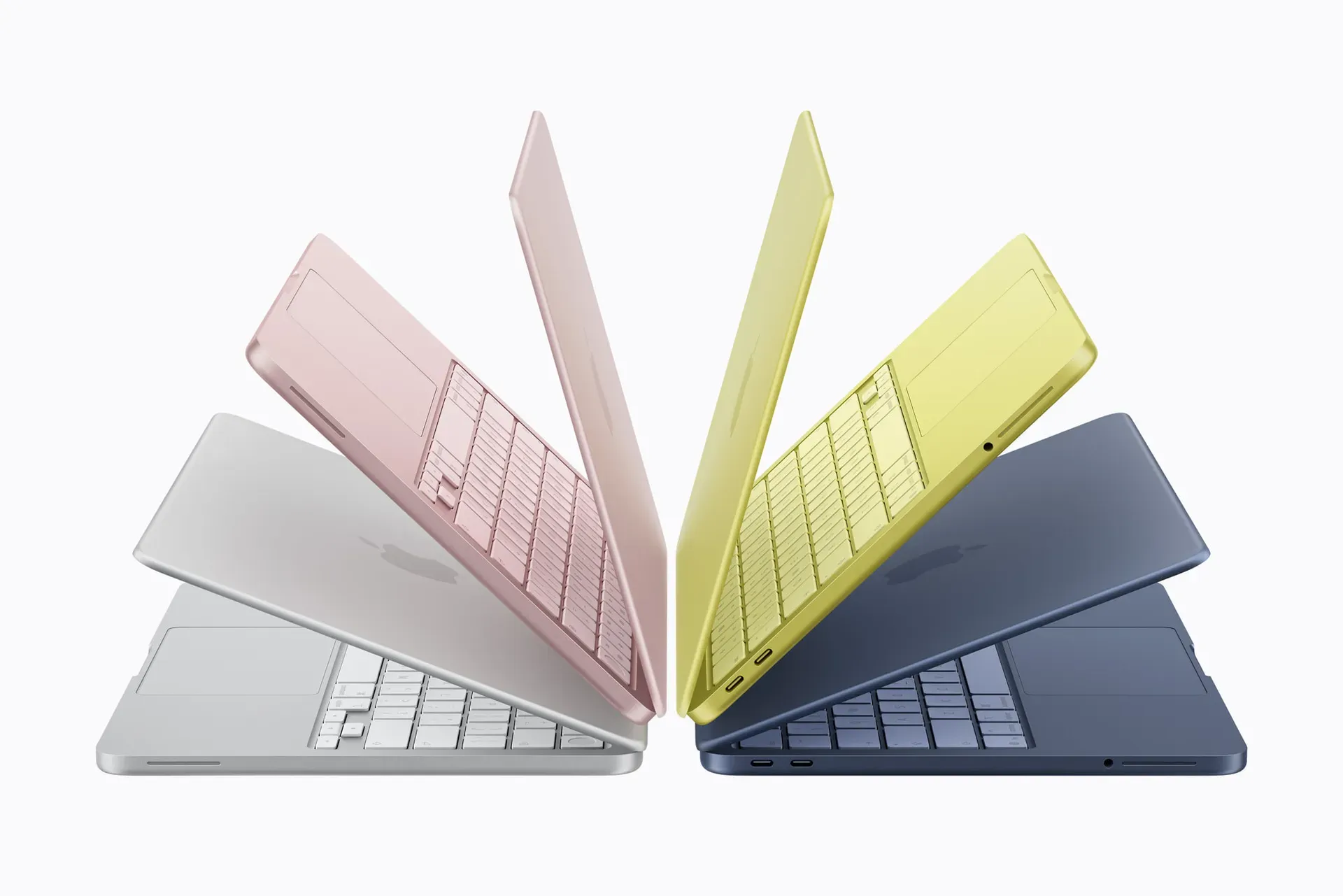
Apple built the MacBook Neo to steal Chromebook buyers. Here's whether it should steal you.
Apple has never had a laptop this cheap. The MacBook Neo starts at Dhs 2,599 in the UAE — and Apple isn't shy about who it's targeting. TechCrunch called it "Apple's colourful answer to the Chromebook." Reuters framed it as a direct competitor to budget Windows PCs and Chromebooks. Apple's marketing positions it for students, families, and first-time buyers — the exact audience that has historically gravitated toward Chromebooks because MacBooks were too expensive.
But "cheaper than before" doesn't mean "cheap." A decent Chromebook in the UAE starts at around Dhs 1,400, and you can find basic models for under Dhs 800. The MacBook Neo costs nearly twice as much as the mid-range Chromebook. The question isn't whether the Neo is a good MacBook — it clearly is. The question is whether the premium over a Chromebook is worth paying.
For the full picture on everything Apple launched this week, see our Apple March 2026 UAE launch guide.
The specs, head-to-head
| Feature | MacBook Neo | Mid-range Chromebook (Acer Chromebook Plus 514) |
|---|---|---|
| UAE price | Dhs 2,599 | ~Dhs 1,800–2,100 |
| Processor | Apple A18 Pro (6-core) | Intel Core 3 N355 (8-core) |
| RAM | 8GB unified | 8GB LPDDR5x |
| Storage | 256GB SSD | 128GB eMMC |
| Display | 13" Liquid Retina, 2408×1506, 500 nits | 14" FHD, 1920×1080, ~300 nits |
| Battery | Up to 16 hours | Up to 10 hours |
| Weight | 1.22 kg | ~1.4 kg |
| Build | Aluminium unibody | Plastic chassis |
| OS | macOS Tahoe | ChromeOS |
| Keyboard | Magic Keyboard (no backlight) | Standard (backlit on some models) |
| Ports | 2x USB-C, 3.5mm | 2x USB-C, USB-A, 3.5mm (varies) |
| Webcam | 1080p FaceTime HD | 720p–1080p (varies) |
| Colours | Blush, indigo, silver, citrus | Grey/silver |
| Software support | 7+ years of macOS updates | Auto Update Expiry (~8–10 years) |
The raw numbers tell only part of the story. Let's break down what actually matters.
Performance: not even close
On paper, the Intel Core 3 N355 inside a mid-range Chromebook has more CPU cores (8 vs 6). In practice, Apple's A18 Pro is in a completely different performance class. Apple claims the Neo is up to 50% faster for everyday tasks and 3x faster at on-device AI workloads compared to the bestselling Intel Core Ultra 5 laptops — let alone the budget Intel chips inside Chromebooks.
The A18 Pro is the same chip that powers the iPhone 16 Pro. Its single-core performance trades blows with Apple's own M1 chip, which powered MacBook Airs that professionals used happily for years. In real-world terms, the MacBook Neo will feel faster at everything: opening apps, rendering web pages, scrolling through documents, editing photos, and switching between tasks.
ChromeOS is lightweight enough that Chromebooks don't feel slow at basic browsing, but the moment you push them — multiple Google Docs tabs, a Zoom call, Spotify in the background — budget Chromebook chips start to struggle in ways the A18 Pro simply won't.
The Neo also has 256GB of fast SSD storage, compared with the 128GB of slower eMMC flash found in most Chromebooks at this price. That's double the local storage at roughly double the speed.
Build quality: aluminium vs plastic
This is one of the MacBook Neo's biggest advantages, and it's impossible to appreciate from a spec sheet. The Neo inherits Apple's aluminium unibody construction — the same manufacturing process used on MacBooks that cost three times as much. It feels solid, premium, and built to last through four years of university.
Chromebooks in the Dhs 1,400–2,100 range are almost universally plastic. Some have textured finishes or reinforced corners (Acer's military-spec models, for instance), but the flex in the chassis, the wobble in the hinge, and the overall tactile impression are a tier below. This matters more than it might seem — a laptop you carry every day needs to feel like it can survive the journey.
The MacBook Neo also comes in four colours (blush, indigo, silver, citrus) with colour-matched keyboards. Chromebooks mostly come in grey or silver.
Battery life: the all-day gap
Apple rates the MacBook Neo at 16 hours of video playback. Most mid-range Chromebooks advertise 10–12 hours of battery life, and real-world results typically fall short of those claims.
For students in the UAE who commute between lectures, study in libraries, and work at coffee shops, battery life is a practical differentiator. The MacBook Neo should comfortably last a full university day without needing a charger. Many Chromebooks will need a top-up by mid-afternoon, especially under sustained workloads.
Display: sharper and brighter
The MacBook Neo's 13-inch Liquid Retina display has a 2408×1506 resolution, 500 nits of brightness, and support for 1 billion colours. That translates to noticeably sharper text, more vivid images, and better visibility in bright environments — which matters in the UAE's sunlit interiors and outdoor cafés.
Most Chromebooks in this price range ship with 1920×1080 Full HD panels at 250–300 nits. The difference is visible side by side: text looks crisper on the Neo, colours are more accurate, and the screen is easier to read in well-lit rooms. Some premium Chromebooks offer better displays, but those tend to cost Dhs 2,500+ and close the price gap with the Neo.
Software: macOS vs ChromeOS
This is the most important section of this comparison, because it's where the two devices diverge fundamentally.
ChromeOS is designed around the Chrome browser. Everything you do — email, documents, spreadsheets, streaming, social media — happens in the browser or through Android apps from the Google Play Store. This makes Chromebooks extremely simple to use and nearly immune to viruses, but it also means you can't install traditional desktop applications. No Photoshop. No Final Cut Pro. No full Microsoft Office (only the web versions). No Xcode. No local development environments.
For users who live entirely in Google Workspace (Docs, Sheets, Slides, Gmail, Drive), ChromeOS is perfectly sufficient. Everything works, syncs seamlessly, and requires zero configuration.
macOS Tahoe on the MacBook Neo is a full desktop operating system. You get the complete Safari or Chrome browser (with extension support), the full suite of Apple's built-in apps (Pages, Numbers, Keynote, GarageBand, iMovie), access to the Mac App Store, and the ability to install any macOS application. You can also run terminal commands, manage files freely, and use professional-grade applications if and when you need them.
The practical difference: if you outgrow basic web-based productivity — maybe you pick up photography, want to edit a video, start learning to code, or need a specific application for a course — macOS accommodates that growth. ChromeOS doesn't.
The Apple ecosystem advantage
If you already own an iPhone — and in the UAE, iPhone market share is exceptionally high — the MacBook Neo integrates with it in ways no Chromebook can match.
AirDrop lets you instantly share files, photos, and links between your iPhone and MacBook. iPhone Mirroring (new in macOS Tahoe) lets you control your iPhone from your MacBook screen. iMessage and FaceTime work natively on the Mac. Your Safari tabs, passwords, clipboard content, and Wi-Fi hotspot sync automatically. If you receive a call on your iPhone, it rings on your MacBook. If you copy a link on your phone, you can paste it on your laptop.
Chromebooks integrate well with Android phones through Google's ecosystem, but the experience isn't as seamless.
Long-term value: the four-year lens
A laptop for university needs to last at least four years. Here's how the two devices compare over that timeframe.
Software updates: Apple typically supports Macs with macOS updates for 6–8 years. The MacBook Neo, launching in 2026, should receive updates through at least 2032. Chromebooks have an Auto Update Expiry (AUE) date — after which they stop receiving ChromeOS updates and security patches. Current models typically get 8–10 years of support, which is comparable.
Performance over time: macOS tends to remain stable across years of updates. ChromeOS is lightweight by design, so it also ages well — but the weaker hardware inside budget Chromebooks means they're more likely to feel sluggish as web apps grow more demanding. The A18 Pro has significantly more performance headroom.
Resale value: This is where Apple pulls away dramatically. Apple products hold their value better than almost any consumer electronics product. A four-year-old MacBook in the UAE resale market (dubizzle, Facebook Marketplace) typically fetches 30–40% of its original price. A four-year-old Chromebook is nearly worthless.
Build longevity: The aluminium MacBook Neo will physically age better than a plastic Chromebook. No chassis flex, no cracked bezels, no keyboard lettering worn away. The premium feel on day one is the same premium feel in year four.
Where Chromebooks still win
It wouldn't be honest to compare these without acknowledging what Chromebooks do better.
Price. Full stop. A functional Chromebook starts at Dhs 800 in the UAE. The Acer Chromebook 311 at Dhs 1,384 is a perfectly usable device for basic browsing and Google Workspace. If your budget genuinely cannot stretch to Dhs 2,599, a Chromebook is the right choice — and there's no shame in that.
Simplicity. ChromeOS is harder to break than macOS. There's virtually no malware, no system maintenance, no software conflicts. For users who want a laptop that turns on, opens Chrome, and does nothing else, Chromebooks are purpose-built for that simplicity.
Touchscreen models. Many Chromebooks in the Dhs 1,500–2,500 range offer touchscreens and 2-in-1 convertible designs. The MacBook Neo does not have a touchscreen. If you want a hybrid laptop-tablet without buying a separate iPad, some Chromebooks offer that flexibility.
USB-A ports. Some Chromebooks still include USB-A, SD card readers, and HDMI — legacy ports that the MacBook Neo lacks. If you regularly connect older peripherals, Chromebooks may be more convenient without dongles.
The verdict
The MacBook Neo isn't really competing with Dhs 800 Chromebooks. It's competing with Dhs 1,800–2,500 premium Chromebooks — the Acer Chromebook Plus 514, the Lenovo Chromebook Plus, the ASUS Chromebook CX34 Flip. At that price range, the gap narrows to Dhs 400–800, and the MacBook Neo's advantages become overwhelming: a dramatically faster processor, an aluminium build, a sharper display, 60% more battery life, a full desktop operating system, and deep iPhone integration.
If you're in the UAE and deciding between a premium Chromebook and the MacBook Neo, the Neo is the better long-term investment by a significant margin. The Dhs 400–800 premium pays for itself in build quality, resale value, and software versatility.
If your budget is firmly below Dhs 1,500, a Chromebook remains the practical choice — and a perfectly valid one for basic academic needs.
Choosing between Apple devices? If you're comparing the MacBook Neo against Apple's own iPad Air M4 (both Dhs 2,599), see our MacBook Neo vs iPad Air M4 comparison. For a complete tier-by-tier MacBook guide, read our best MacBook in the UAE.
FAQ
Is the MacBook Neo really a Chromebook competitor? Apple positions it that way, and the Dhs 2,599 price puts it in the premium Chromebook range. It's not competing with Dhs 800 budget Chromebooks — it's targeting students and families who would have stretched to a Dhs 2,000+ Chromebook or Windows laptop because MacBooks started at Dhs 4,599.
Can a Chromebook run Microsoft Office? Only the web-based versions (Office Online) and the Android apps. These work for basic document editing but lack the full feature set of desktop Office. The MacBook Neo can run the full desktop version of Microsoft 365 for Mac.
Do Chromebooks work with iPhones? Partially. You can use Google services (Gmail, Google Photos, Drive) on both, but there's no iMessage, AirDrop, iPhone Mirroring, Handoff, or Universal Clipboard. If your phone is an iPhone, the MacBook Neo's integration is vastly superior.
Is ChromeOS better for security? ChromeOS has an excellent security model — sandboxed apps, verified boot, automatic updates, and near-zero malware risk. macOS is also very secure, but has a larger attack surface since it runs full desktop applications. For practical purposes, both are safe for everyday use. Neither requires antivirus software.
Can I game on a MacBook Neo? Light gaming, yes. Apple Arcade games, many indie titles, and older games run well on the A18 Pro. AAA gaming is not the Neo's strength — but it's not a Chromebook's strength either. For serious gaming, neither device is the right choice.
How long will the MacBook Neo get software updates? Based on Apple's track record, expect 6–8 years of macOS updates from the launch date. A MacBook Neo bought in 2026 should receive updates through at least 2032, likely longer.
Should I switch from my current Chromebook to a MacBook Neo? If your Chromebook handles everything you need and you're happy with it, there's no urgent reason to switch. Consider the Neo when your current Chromebook reaches its Auto Update Expiry date or when you need capabilities ChromeOS can't provide — desktop applications, deeper file management, or Apple ecosystem integration.
Written by

Subscribe to our newsletter
Subscribe to our newsletter to get the latest updates and news





Member discussion