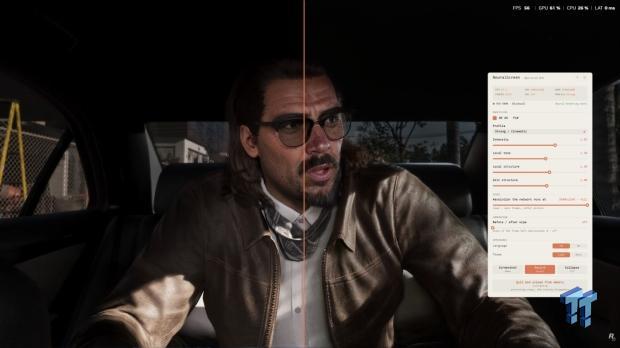
NeuralScreen, an unofficial Windows app from GitHub user perseval_BLR, applies DLSS 5 Neural Rendering across the Windows 11 desktop. It can process YouTube videos, images and windowed games rather than waiting for each title to add support.
Read the original report from TweakTown, which tested NeuralScreen on a GTA 6 gameplay video. The app captures what is on screen, applies the neural-rendering effect and offers controls for changing the model, intensity and processing resolution. Tbreak has also covered [DLSS 5 Swapper](https://tbreak.com/dlss-5-swapper-unsupported-games/) and NVIDIA’s [DLSS 5 launch in NBA 2K27](https://tbreak.com/nvidia-dlss-5-nba-2k27/).

DLSS 5 NeuralScreen turns the desktop into the test case
NVIDIA currently officially supports DLSS 5 in NBA 2K27 for GeForce RTX 50-series graphics cards and GeForce NOW, according to NVIDIA’s announcement. The DLSS 5 NeuralScreen project is separate from that supported integration. It is an unofficial overlay that applies the effect to the captured desktop output, so results and compatibility will depend on the hardware, software and content being processed.
The app’s v1.2.1 release was published on 8 September and includes a 222MB full package with the application, portable Python and two DLLs. The release notes say it adds a single processing-resolution slider, improves hotkeys in games that take exclusive keyboard input, restores shared-memory recording and rebuilds the capture chain when the monitor resolution changes.
The repository says RTX 50-series cards are supported natively, while RTX 20, 30 and 40-series cards use a built-in architecture hook. That is a claim from the project, not NVIDIA support. The repository also says NVIDIA’s nvngx_dlssnr.dll is not included in the source project and remains subject to NVIDIA’s own terms.
What NeuralScreen can and cannot do
NeuralScreen includes sliders for the effect and a before-and-after view. It can be used on video playback, still images and games running in a window. TweakTown’s screenshots show the overlay producing a stronger visual change in game footage than on ordinary Windows text or wallpaper.
That broad reach comes with the usual caveat for an unofficial graphics tool: applying an effect to a desktop capture is not the same as integrating it into a game’s rendering pipeline. It may change the appearance of footage without giving a game the depth or motion data available to a native implementation. Installation instructions are available in the NeuralScreen GitHub repository, and users should check the files and licensing terms before running it.
The practical appeal is obvious enough. DLSS 5 has moved from one official game to a desktop experiment that can process almost anything on screen. Whether that is useful depends on the footage, the GPU and how much sharpening a user can tolerate before the picture starts making editorial decisions of its own.
Some links in this article are affiliate links; tbreak may earn a commission from qualifying purchases.
What is NeuralScreen?
NeuralScreen is an unofficial Windows app by GitHub user perseval_BLR that applies DLSS 5 Neural Rendering to the captured Windows desktop output.
Which GPUs does NeuralScreen support?
The project says RTX 50-series GPUs are supported natively, while RTX 20, 30 and 40-series cards use a built-in architecture hook. This is project-level support, not an official NVIDIA integration.
Is NeuralScreen an official NVIDIA DLSS 5 feature?
No. NVIDIA officially introduced DLSS 5 in NBA 2K27 for GeForce RTX 50-series GPUs and GeForce NOW. NeuralScreen is an independent overlay project.