
Chrome users can finally ditch horizontal tab chaos
Chrome finally launches vertical tabs in 2026 after years of user requests. The sidebar feature replaces horizontal tabs, freeing screen space for Dubai professionals juggling 20+ tabs daily. Available now via feature flags.

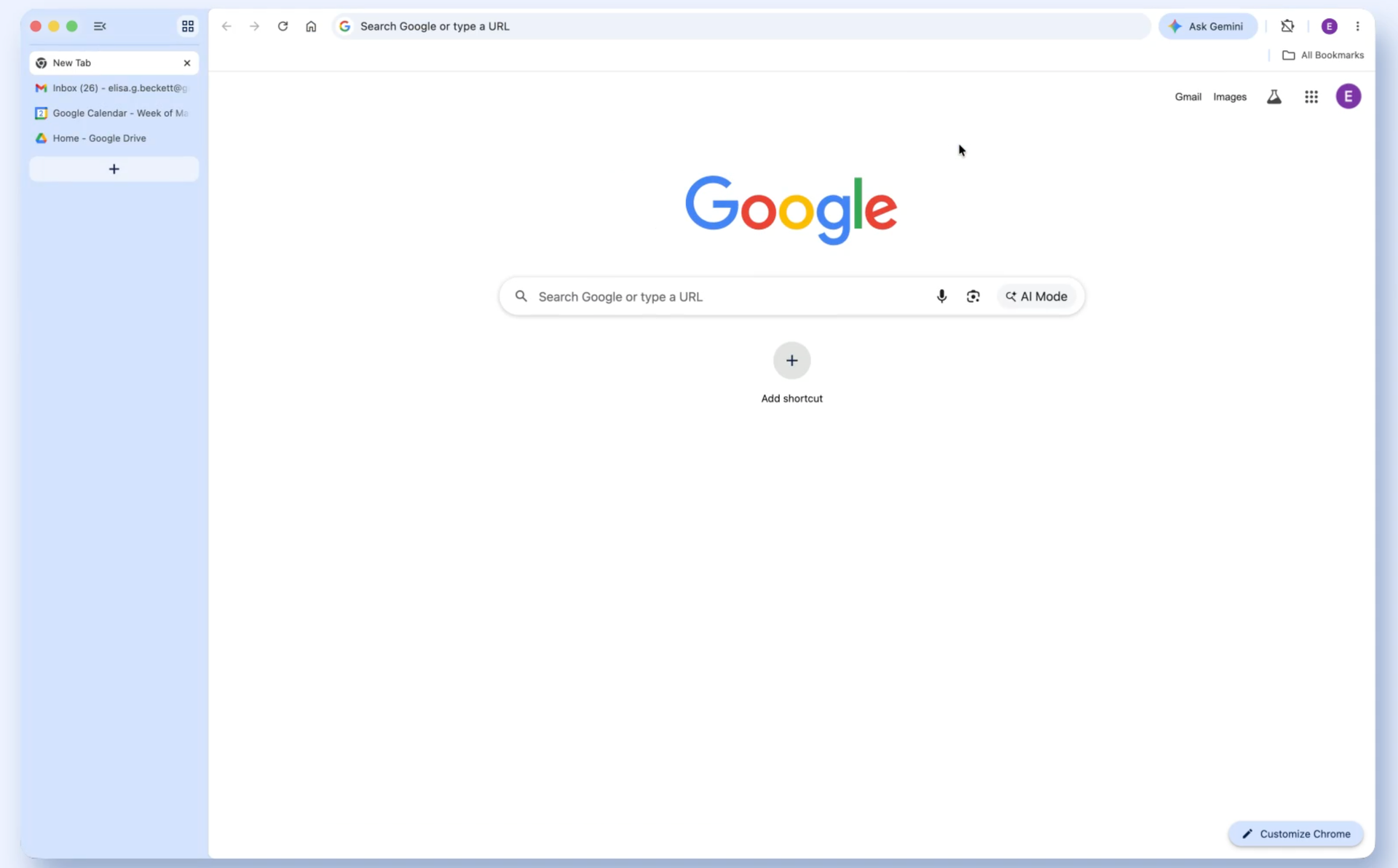
Google Chrome is rolling out native vertical tabs in early 2026, allowing users to stack tabs in a collapsible left sidebar instead of the traditional horizontal strip. The feature is available in Chrome 145 Beta (January 2026) and stable version 146 (March 2026), though it requires manual activation through feature flags. For UAE professionals in Dubai's business districts managing dozens of tabs daily, this represents a significant productivity upgrade that finally matches what Edge and Arc users have enjoyed for years.
Key Takeaways
- Chrome's native vertical tabs are rolling out in versions 145 and 146 during early 2026.
- Enable via chrome://flags/#vertical-tabs, then Settings > Appearance > Tab strip position.
- The feature creates a collapsible left sidebar showing full page titles without hovering.
- Available on Windows, macOS, Linux, and ChromeOS but not enabled by default.
- Chrome finally matches competitors like Edge, Arc, and Vivaldi after years of user requests.
How to enable Chrome vertical tabs
Activating vertical tabs requires two steps through Chrome's experimental features. First, navigate to chrome://flags/#vertical-tabs in your address bar and set the dropdown to 'Enabled', then restart Chrome completely. After relaunching, open Settings > Appearance and change 'Tab strip position' from 'Top' to 'Side'.
The process works identically across Windows, macOS, Linux, and ChromeOS. If Chrome appears stuck after enabling the flag, force-quit the browser process entirely before relaunching. The feature integrates directly into Chromium's core, unlike third-party extensions that overlay the existing tab system.
Note that stable Chrome users may experience occasional glitches during this experimental rollout phase. The UI varies slightly between versions — Beta shows 'Show tabs vertically' while stable displays 'Move tabs to side' in settings.
Too many @GoogleChrome tabs open? Try vertical tabs, rolling out now.
— Google (@Google) April 7, 2026
Just right-click any Chrome window and select “Show Tabs Vertically” to move your tabs to the side of the browser window, making it easier to read page titles and manage tab groups. pic.twitter.com/DO7ShWl89f
What vertical tabs actually do
Chrome's implementation creates a resizable left sidebar that displays full page titles without requiring hover actions. Users can collapse tabs to icon-only mode or expand them to show complete titles, with tab search and grouping functionality preserved from the horizontal layout.
The sidebar completely replaces the horizontal tab strip, freeing vertical screen space — crucial for laptop users working on multiple projects. Tab groups remain functional within the vertical layout, and the familiar right-click context menu persists for managing individual tabs.
Unlike browser extensions that overlay vertical tabs whilst keeping the original horizontal strip, Chrome's native implementation removes the top tab bar entirely when activated. This provides more usable screen real estate compared to add-on solutions.
Chrome's catch-up game with competitors
Microsoft Edge introduced vertical tabs in 2021, whilst Arc and Vivaldi have offered sidebar tab management for years. Chrome's delay reflects the challenge of implementing native features without disrupting the browser's established interface paradigms.
The development involved extensive Chromium commits throughout 2025 and early 2026, building UI frameworks, flag systems, and settings integration from scratch. This comprehensive approach suggests Google prioritised stability over speed-to-market.
For context, Safari offers a basic tab overview but lacks true vertical stacking, making Chrome's implementation more competitive with dedicated productivity browsers. The feature addresses years of user requests on Chrome support forums and social media.
Availability and rollout timeline
Chrome 145 Beta became available globally on 19 January 2026, marking the first public access to vertical tabs through feature flags. The stable Chrome 146 release followed in March 2026, though Google hasn't specified the exact rollout completion date.
The feature works immediately after flag activation across all supported desktop platforms. Mobile versions of Chrome don't include vertical tabs due to screen size constraints. No pricing applies as this is a free browser update for existing Chrome users worldwide, including the UAE market.
Frequently Asked Questions
How do you enable vertical tabs in Chrome?
Navigate to chrome://flags/#vertical-tabs and set it to 'Enabled', restart Chrome, then go to Settings > Appearance and change 'Tab strip position' to 'Side'.
Do Chrome vertical tabs work on mobile?
No, vertical tabs are only available on desktop versions of Chrome for Windows, macOS, Linux, and ChromeOS due to mobile screen size limitations.
Are Chrome vertical tabs better than extensions?
Yes, Chrome's native implementation removes the horizontal tab strip entirely, providing more screen space compared to extensions that overlay vertical tabs on existing layouts.
When will Chrome vertical tabs be enabled by default?
Google hasn't announced when vertical tabs will become default. Currently, they require manual activation through experimental flags in Chrome 146 and later versions.
Written by

Subscribe to our newsletter
Subscribe to our newsletter to get the latest updates and news











Member discussion