
You can finally use ChatGPT while driving
iPhone users can now chat with ChatGPT through their car's speakers via Apple CarPlay. The voice-only feature works during commutes but can't control car functions or navigation - it's purely for conversation and productivity tasks.

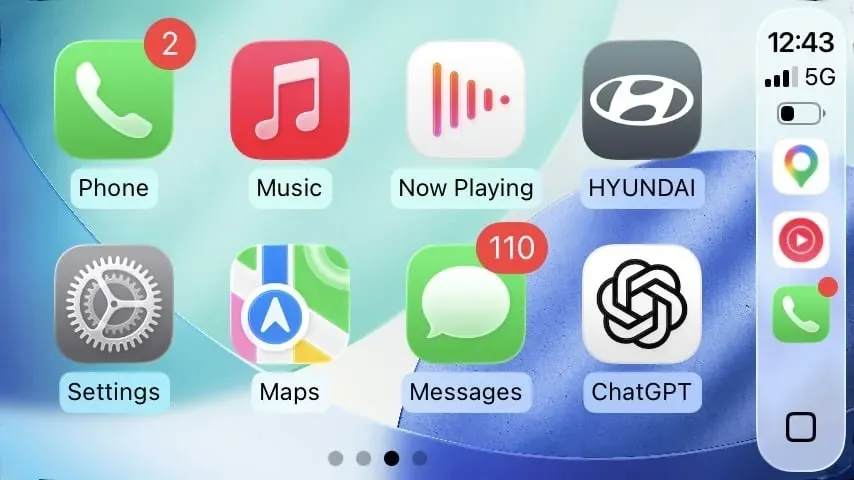
OpenAI launched ChatGPT Voice for Apple CarPlay on April 2, 2026, letting iPhone users access conversational AI while driving. According to the rollout announcement, the feature requires iOS 26.4 or later and works through the ChatGPT app on your dashboard. This marks Apple's first decision to allow third-party AI voice assistants into CarPlay — though with significant restrictions.
Key Takeaways
- ChatGPT Voice launched for Apple CarPlay on April 2, 2026, requiring iPhone with iOS 26.4 or later.
- The feature is voice-only and cannot control car functions, music, or access navigation systems.
- Users must tap the ChatGPT app icon on CarPlay to start conversations - no wake word activation.
- This marks Apple's first allowance of third-party AI voice assistants in CarPlay systems.
What ChatGPT Voice does in your car
ChatGPT Voice in CarPlay functions like a hands-free phone call with an AI assistant. You can ask questions, brainstorm ideas, draft messages, or have casual conversations through your car's speakers and microphone. The system handles everything from traffic-related queries to creative writing prompts while you keep your eyes on Sheikh Zayed Road.
The feature works particularly well for productivity tasks during traffic jams. Commuters spending 45-60 minutes daily in gridlock can now use that time for email planning, meeting preparation, or language practice. The voice-only format ensures minimal distraction — you're essentially talking to an invisible passenger.
However, this isn't a replacement for your car's built-in systems. ChatGPT cannot adjust your air conditioning, skip songs, or provide turn-by-turn directions. Apple restricted the integration to pure conversation, treating it more like a podcast than a smart assistant.
How to set up ChatGPT in CarPlay
Setting up ChatGPT Voice requires three components: an iPhone running iOS 26.4 or later, the latest ChatGPT app (both free and Plus accounts work), and a CarPlay-compatible vehicle. Most cars sold in the UAE since 2018 support CarPlay via a USB cable or wirelessly.
The setup process is straightforward. First, update your iPhone to iOS 26.4 or later and download the latest ChatGPT app from the App Store. Connect your iPhone to your car's CarPlay system as usual — the ChatGPT icon will appear on your dashboard alongside other supported apps.
To start a conversation, tap the ChatGPT icon and select 'New voice chat.' The system immediately activates your car's microphone and speakers, ready for your first question. There's no wake word like 'Hey ChatGPT' — you must manually tap to begin each session.
What can ChatGPT Voice not do in cars?
Apple imposed strict limitations on ChatGPT's CarPlay integration to maintain driving safety. The AI cannot control any car functions — no adjusting climate control, changing radio stations, or managing phone calls. It also cannot access your car's navigation system or provide real-time directions.
The interface is purely voice-based, with no visual elements beyond the four action buttons allowed in Apple's voice control template. You cannot view ChatGPT's text responses, see images, or interact with any visual interface elements while the car is in motion. This differs significantly from using ChatGPT on your phone or computer.
Internet connectivity is required for all functions, which can be problematic in areas with weak mobile coverage. The system also cannot learn from your car's data or integrate with other vehicle systems — it's essentially a contained voice chat experience.
Why Apple finally opened CarPlay to AI
This integration represents a significant policy shift for Apple, which previously restricted CarPlay to its own Siri voice assistant. The company's decision to allow ChatGPT suggests recognition that cars are becoming important computing platforms, especially as electric vehicles with larger screens dominate UAE showrooms.
Apple maintained strict control by limiting ChatGPT to voice-only interactions and by preventing access to the car system. This approach reduces the risk of distraction while allowing users to experience advanced AI capabilities during commutes. For context, Apple has historically been cautious about third-party integrations that could compromise safety or user experience.
ChatGPT Voice availability in the UAE
ChatGPT Voice for CarPlay is rolling out globally to iPhone users throughout April 2026, including the UAE markets. The feature works with both free ChatGPT accounts and ChatGPT Plus subscriptions (Dhs 73 monthly), though Plus users may experience faster response times during peak usage.
We don't have concrete reports of vehicles in the UAE that can access the feature. Wireless CarPlay connections work identically to wired USB connections for ChatGPT Voice functionality.
The rollout requires no additional fees beyond your existing mobile data plan. However, extended conversations during long commutes could consume significant data, particularly relevant for UAE users with limited mobile packages or when travelling between emirates.
Frequently Asked Questions
Does ChatGPT Voice work with all CarPlay cars?
Yes, ChatGPT Voice works with any CarPlay-compatible vehicle, including most cars sold in the UAE since 2018. Both wired USB and wireless CarPlay connections support the feature equally.
Can I use ChatGPT Voice for navigation while driving?
No, ChatGPT Voice cannot access your car's navigation system or provide turn-by-turn directions. Apple restricted the integration to voice conversations only, without car system control.
Do I need ChatGPT Plus to use Voice in CarPlay?
No, free ChatGPT accounts can use Voice in CarPlay. However, ChatGPT Plus subscribers (Dhs 73 monthly) may experience faster response times during busy periods.
How much mobile data does ChatGPT Voice use while driving?
Voice conversations consume moderate data similar to voice calls, but extended chats during long UAE commutes could impact limited mobile data plans. Monitor usage during first few trips.
Can ChatGPT Voice control my car's music or air conditioning?
No, Apple prevented ChatGPT from controlling any car functions, including music, climate control, or phone calls. The integration is limited to voice conversations through your car's speakers.
Written by

Subscribe to our newsletter
Subscribe to our newsletter to get the latest updates and news










Member discussion