Instagram now lets you edit a Story after posting it without losing its views, likes, or replies.
A typo or a forgotten song used to mean deleting the Story and posting it again. Now creators and brands can correct a caption without losing the audience responses the original has already received.
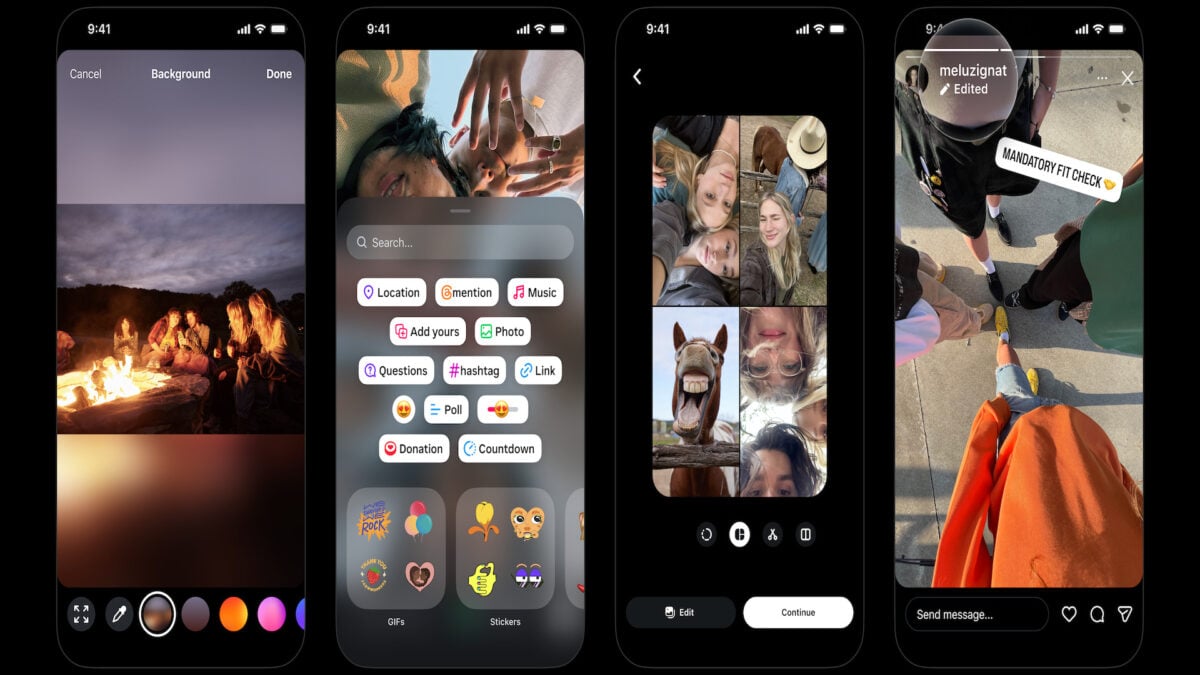
The Verge reports that Instagram head Adam Mosseri announced the change. You can change text, music, stickers, and drawings, so there’s no need to start over if you’ve added the wrong sticker or left out the music.
How to edit an Instagram Story
Open the Story you’ve posted, tap the three-dot menu in the bottom-right corner, and select Edit Story. Once you save your changes, viewers will see an “Edited” label in the upper-right corner.
A lot of people have been asking for this, so I’m excited to get this one out there
Adam Mosseri, head of Instagram
The editing option closes 15 minutes after you share the Story, 9to5Mac reports. After that, a typo means deleting and reposting, as it did before. The feature is rolling out.
What else is changing in Stories?
Instagram is adding new fonts, colours, and shapes for stickers and grouping them into sticker sheets designed to be easier to browse. It’s also adding blurred, solid-colour, and gradient backgrounds and making it easier to select multiple photos for a layout.
In March, Instagram started letting users reorder photos in a carousel after posting. 9to5Mac reports that Instagram added comment editing in April, with the same 15-minute limit, and began letting users manually rearrange posts on their profile grid in June.
The Verge reports that reverse engineer Alessandro Paluzzi spotted Instagram working on Story editing in April. An earlier prototype reportedly deleted the original Story and reset its likes, reactions, and replies.