The Corsair HS80 MAX has been one of my favourite wireless gaming headsets for the past few years. I reviewed it in 2023, kept using it long after, and only moved away when I started dabbling in more enthusiast-grade headphones.
Three years of heavy use has also exposed some of its weaknesses. The faux leather on the floating headband has torn, Bluetooth and 2.4GHz audio can’t play simultaneously, and the battery life is starting to look ordinary by today’s standards. The new HS80 V2 MAX fixes most of those issues without messing too much with what already worked.
Corsair HS80 V2 MAX
The Corsair HS80 V2 MAX improves an already excellent wireless headset with outstanding comfort, much better battery life and useful connectivity upgrades. Overly boomy bass, average positional imaging and a reliance on iCUE hold back the sound quality.
- Exceptional comfort
- Premium, sturdy design
- Excellent battery life
- Good mic quality
- Simultaneous Bluetooth and 2.4Ghz audio
- Rock-solid wireless connection
- Bass can become very boomy
- Detail and separation suffer in busy mixes
- Average positional imaging
- Odd iCUE behaviour and ineffective EQ presets
At USD 199.99, this is very much an iterative upgrade. The design is largely unchanged, but Corsair has refined the materials, improved the battery life, added simultaneous wireless connectivity and fitted a new set of 50mm drivers. Most importantly for me, it somehow feels even more comfortable than its predecessor. The sound quality, however, turned out to be a little more complicated than I expected.
Is the HS80 V2 MAX as Comfortable as the Original?
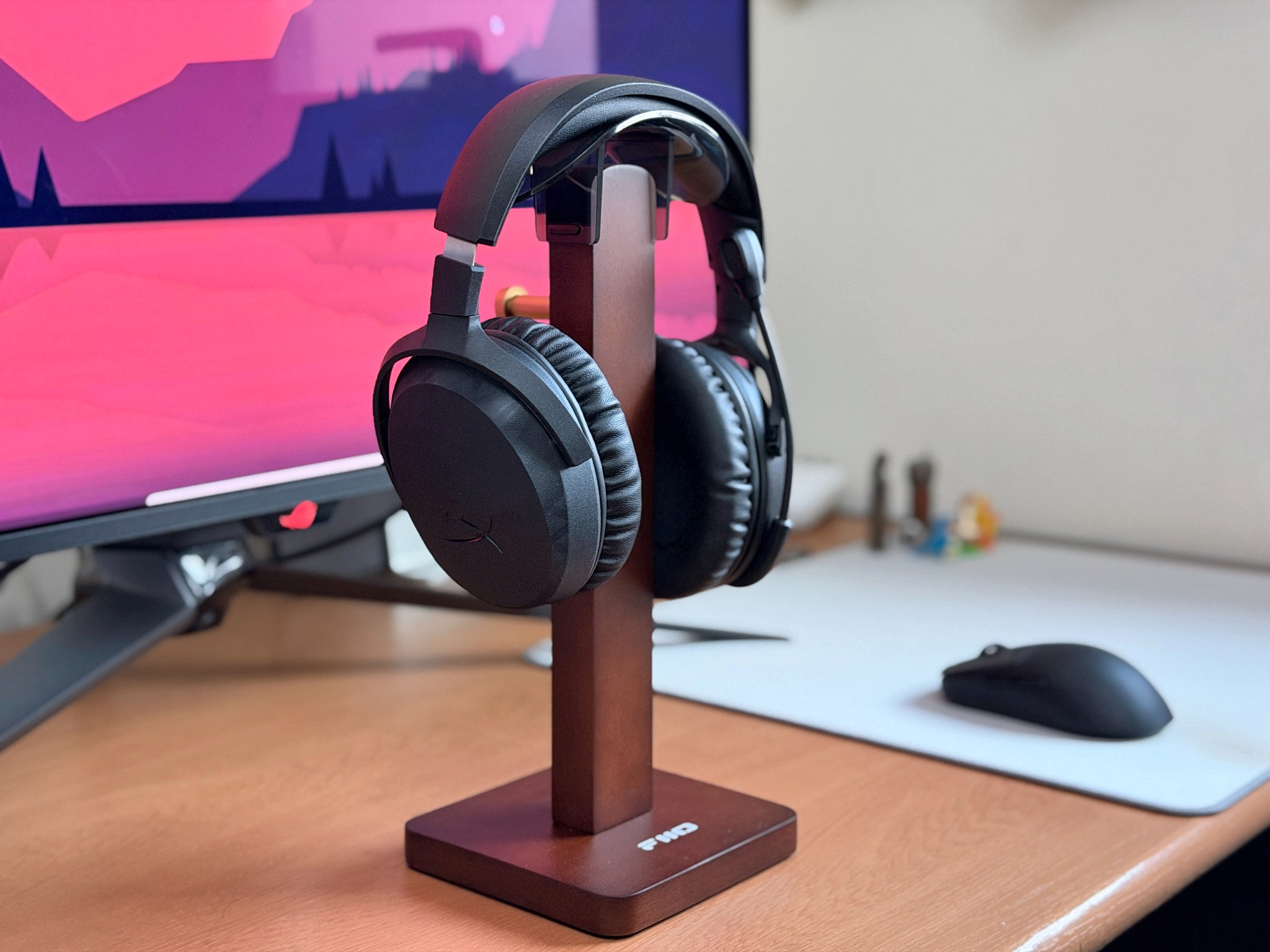
Put the HS80 V2 MAX next to the older model, and you would struggle to tell them apart. Corsair has kept the same general shape, floating headband, and sturdy construction, with only new markings around the earcups and slightly different finishes that give the V2 away.

That is perfectly fine by me because I have always been very fond of the HS80’s design. It looks sleek and polished without going overboard, and the construction still feels suitably premium and sturdy. There is some RGB on the Corsair logo on either earcup, which looks nice enough but is mostly pointless since you obviously cannot see it while wearing the headset. Streamers might get some mileage out of it, I suppose.

The more important changes are in the materials. The ear cushions now use a noticeably smoother and softer fabric than the slightly rougher, suede-like material on my older HS80 MAX. Corsair has also swapped the faux leather covering on the floating headband for a similar fabric. After nearly three years of heavy use, the leather on my old headset has completely torn apart, so this seemingly small change should hopefully age considerably better.

Comfort is pitch perfect. I have worn the HS80 V2 MAX for hours at a time and never once felt the need to take it off because of itching, pressure or fatigue. The earcups sit partly on my ears, which is normally a recipe for disaster for me, but the clamp force is just right, and the cushions are so soft the headset almost melts onto your head.

It’s slightly heavier than the previous model at around 370g, but you would never know it. The floating headband, weight distribution, clamp force and soft cushions all work together exceptionally well. This is easily one of the most comfortable gaming headsets I have worn, and somehow even better than the already excellent original.

The controls remain familiar. The left earcup houses the power button, volume wheel, and USB-C charging port, while the right has the Bluetooth button for pairing and media controls. Everything is easy to find without looking and works exactly as expected.

The non-detachable microphone still flips up to mute, which I like, although the arm itself is oddly floppy and cannot really be shaped into position. Tap it, and it wobbles violently, and because it bends when flipped up, it has tangled in my hair a few times. Not a major issue, but still slightly annoying.
One genuinely useful upgrade is simultaneous 2.4GHz and Bluetooth playback, something the previous HS80 MAX frustratingly lacked. I could keep the headset connected to my PC over wireless while also playing audio from my phone over Bluetooth without any trouble. The volume wheel controls only the 2.4GHz source when both are active, which makes sense, and the connection has been rock solid throughout testing, with excellent range and no dropouts or random disconnects.
Do You Need iCUE to Get the Most Out of the HS80 V2 MAX?
The HS80 V2 MAX uses Corsair’s iCUE software for customisation, though there isn’t much to play around with. You can change the RGB lighting, remap a few controls, adjust microphone volume and sidetone, and use a 10-band equaliser with presets such as Pure Direct, Movie Theatre, FPS Competition, Clear Chat and Bass Boost.


Strangely, I couldn’t hear any difference between the EQ presets. Even switching from Pure Direct to something as dramatically different as Bass Boost or FPS Competition produced no noticeable change, which makes me suspect a software or firmware bug in my review unit. I eventually just left it on Pure Direct.
There is also NVIDIA Broadcast support for noise and room echo removal, although I tested the microphone completely stock (and quite liked it). What is unusual is that simply running iCUE noticeably changes how the headset behaves: the volume increases, and the audio generally sounds better than when the software is completely closed. There is no obvious indication that iCUE is applying any additional processing, either. We will get into that oddity properly in the sound quality section, but it does make iCUE feel more necessary than it probably should be for a wireless headset.
Is the HS80 V2 MAX’s Bass Too Boomy?
The HS80 V2 MAX uses a new set of 50mm non-Newtonian laminate drivers, and my first impressions were actually quite positive. The sound has a lot of warmth and punch, vocals come through full-bodied, and music can sound enjoyable when the mix gives everything enough room to breathe.
However, the more I used the headset across different games and music, the more the bass started getting in the way. It can become very boomy, bleeding heavily into the mids and upper mids whenever the mix gets busy. Tool’s Chocolate Chip Trip has plenty of impact, but the individual drum beats lose their definition under all that blobby bass. The same happens in Gears of War: E-Day and Marvel Rivals, where heavy combat can turn into a mess of low-end energy, burying the finer details underneath.

The mids themselves are actually quite good. Vocals sound clear, warm and solid when they have room to breathe, with enough detail to make music enjoyable. Treble is similarly smooth and never fatiguing, but it isn’t particularly resolving. There is detail up top, but very little separation between individual sounds, especially in denser tracks.
The soundstage is fairly intimate for a closed-back headset. Left/Right separation is easy enough to make out, but positional accuracy is average at best. Depending on the game and how busy its soundscape is, pinpointing an enemy’s exact vertical or horizontal position can be difficult.

There is also some strange behaviour with iCUE. Running the software noticeably increases the overall volume, even with Pure Direct selected, although after more testing this seems mostly like a gain difference rather than a hidden change to the tuning. The higher volume also makes the already prominent bass feel even more aggressive. I noticed something similar over Bluetooth on my MacBook, where going from one notch below max volume to 100% produces an unusually large jump in loudness.
Overall, the HS80 V2 MAX can sound very good with simpler music and less chaotic game mixes, but the bass tuning is simply too heavy for my taste. When things get busy, it starts swallowing the very detail and separation these new drivers are supposed to bring out.
Is the HS80 V2 MAX Microphone Good Enough for Chat and Calls?
The microphone is one of the HS80 V2 MAX’s stronger features. Corsair uses a 10mm broadcast-grade capsule with a built-in pop filter, delivering clean, clear vocals with enough body to sound natural rather than thin and tinny.
There is still some compression, but that is expected from a wireless gaming headset. More importantly, the stock processing seems quite aggressive at cutting out background noise without interfering with vocals. Keyboard clacks and mouse clicks are heavily suppressed, and while you can still faintly hear them in the background, they never become distracting during my testing.
For game chat, Discord or even the occasional work call, the microphone is more than good enough.
How Long Does the HS80 V2 MAX Battery Last?
Battery life has received a substantial upgrade over the previous model. Corsair claims up to 110 hours over 2.4GHz wireless with the RGB turned off, dropping to 65 hours with the lighting enabled. Bluetooth stretches that further to 130 hours without RGB and 80 hours with it. A 15-minute quick charge is also rated to provide around six hours of use.
I couldn’t fully deplete the battery during testing, but after several days of regular use, there was still plenty of charge left. What I can say is that I used the HS80 V2 MAX extensively across several days and never once had to worry about charging it. Even leaving the RGB enabled for a while didn’t make a meaningful dent during normal use.
Should You Buy the Corsair HS80 V2 MAX?
The Corsair HS80 V2 MAX is a sensible refresh of a headset I already liked a lot. Corsair kept the excellent design and sturdy build, improved materials where they mattered, added simultaneous Bluetooth and 2.4GHz playback, and pushed battery life well beyond what the older model offered.
There is still a lot to like here, especially if comfort, battery life and microphone quality matter more to you than highly detailed or competitive audio. I just wish Corsair had exercised a little more restraint with the bass.
- You value comfort above all else. The soft cushions, floating headband and near-perfect clamp force stayed comfortable across hours of use.
- You want long battery life and a stable connection. Corsair rates it at up to 110 hours over 2.4GHz, and I had no dropouts in testing.
- You want a strong microphone for chat and calls. Vocals sounded clean and natural, and keyboard and mouse noise were well suppressed.
- You prefer tight, detailed bass. The low end turns boomy in busy mixes and buries finer detail.
- You play competitive games that rely on positioning. Positional accuracy was only average, which can make pinpointing enemies difficult.
- You'd rather not depend on companion software. Having iCUE running raised the volume, and the EQ presets made no audible difference on my review unit.
Corsair HS80 V2 MAX FAQs
Is the Corsair HS80 V2 MAX better than the HS80 MAX?
In most ways, yes. Comfort, materials, battery life, and wireless connectivity have all improved, and the headset now supports 2.4GHz and Bluetooth audio at the same time. Sound is where it gets complicated, because the new drivers add bass that can get boomy in busy mixes.
How long does the HS80 V2 MAX battery last?
Corsair rates it at up to 110 hours over 2.4GHz and 130 hours over Bluetooth with RGB off, dropping to 65 and 80 hours with RGB on. A 15-minute charge is rated for around six hours of use. In testing, it lasted several days of regular use without needing a charge.
Can the HS80 V2 MAX connect over 2.4GHz and Bluetooth at the same time?
Yes. You can keep it connected to a PC over 2.4GHz while playing audio from a phone over Bluetooth. When both are active, the volume wheel only controls the 2.4GHz source.
Do you need iCUE to use the HS80 V2 MAX?
The headset works without it, but iCUE is where you change the RGB lighting, remap controls, adjust microphone volume and sidetone, and use the 10-band equaliser. Having iCUE running also raised the overall volume in testing, and the EQ presets made no audible difference on our review unit.
Is the HS80 V2 MAX microphone any good?
Yes, it is one of the headset’s strongest points. The 10mm capsule delivers clean, natural-sounding vocals, and the stock processing suppresses keyboard and mouse noise well. The boom arm is floppy, though, and it flips up to mute.
Is the HS80 V2 MAX good for competitive gaming?
It is a mixed bag. The comfort, battery life and microphone all suit long sessions, but the bass can swamp detail in busy game mixes and positional accuracy is only average, which can make pinpointing enemies difficult.