Anthropic has shipped a Claude Code design command that drafts editable UI artboards inside the coding session. /design, now in research preview for the CLI and Desktop, is built on the same artboard system as Claude Design, which the company launched in April.
The command answers a familiar complaint: designing a screen meant leaving the terminal for claude.ai/design, exporting the result, and pasting it back into the repo. /design keeps the whole loop in one session. Run /design a few options for {feature} and Claude produces several editable artboards; pick one, tweak it on the canvas, then have it implemented in your stack — no export step.

Anthropic’s developer account announced the feature on X:
Claude Code can design now. The new /design skill (research preview) brings Claude Design’s artboard workflow into the CLI and Desktop, built on artifacts. Run /design to get editable artboards for your UI — pick one, tweak it, then have Claude implement it.
@ClaudeDevs
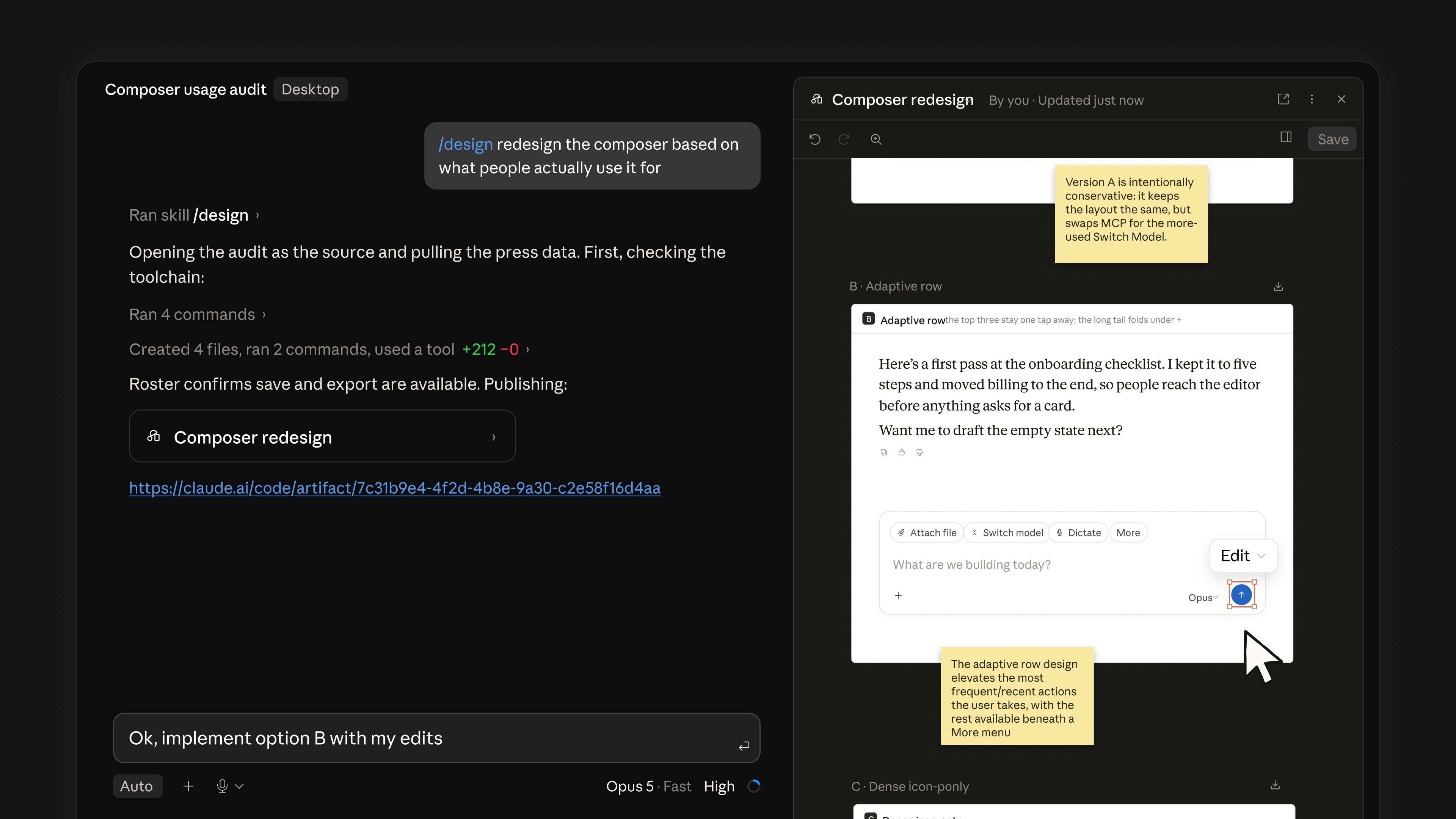
Nate Parrott of Anthropic’s design team demoed the workflow with a real example — /design redesign the composer based on what people actually use it for, then “implement option B with my edits” against the chosen artboard. The demo artboards carry notes on the trade-offs between versions; the design decision happens before the code is written, not after.
What the Claude Code design command changes
The artboard step now lives where the code is written. Developers who previously bounced between claude.ai/design and their editor get the same workflow without the context switch, and the selected artboard becomes the target for implementation in the repo’s own stack.
It is a research preview, so there are rough edges. Early users report the feature is token-hungry — generating several artboards on top of a coding session’s existing context adds up — and the first artboard is worth reviewing against the project’s actual design tokens before it ships. None of this changes what Claude Code costs: /design is available to subscribers on Pro, Max, Team and Enterprise plans, and the command appears after updating Claude Code.
Claude Code is subscription software, and the update reaches UAE developers on the same plans as everywhere else — there is no separate regional rollout or price list. Anyone on a paid plan can update and try /design once the preview reaches their account.
What is the Claude Code design command?
/design is a research-preview command in Claude Code that generates editable UI artboards inside the CLI or Desktop app. It brings Claude Design’s artboard workflow into the coding session, built on the Artifacts runtime, so a developer can sketch a screen and have Claude implement it without leaving the terminal.
How do I use /design in Claude Code?
Update Claude Code, then run /design a few options for {feature} or similar. Claude produces several editable artboards, you pick one and edit it on the canvas, then tell Claude to implement it in your project’s stack.
Who can use /design?
The command is in research preview for subscribers on Pro, Max, Team and Enterprise plans. It is not available on the free tier.